
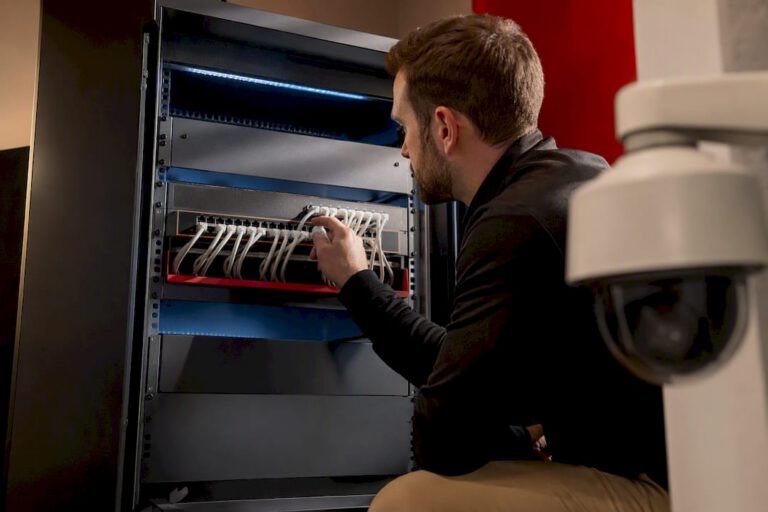
For most permanent home and small-business installs, PoE security cameras are the better long-term choice over Wi-Fi. They’re more reliable, easier to power at scale, and better suited to 4K footage. The exception is renters or anyone adding a single camera without running new cable, where a battery or Wi-Fi model still makes more sense. Everything below covers the specs, wiring, and costs that determine whether PoE fits your property.
TL;DR:
- PoE cameras are more reliable and easier to power at scale than Wi-Fi options, especially for long-term, permanent installations.
- Power over Ethernet supports different standards, with higher wattage models needed for PTZ cameras or those with heaters, and require careful budget planning.
- System reliability depends on proper infrastructure, including appropriate switches, cable categories, and power or surge protections, not just camera specs.
- Professional installation ensures accurate cabling, power budgeting, and system sizing, reducing long-term troubleshooting and upgrade costs.
- Legal considerations include avoiding private indoor spaces, understanding audio recording laws, and addressing property boundaries to prevent liability.
Table of Contents
- What Is a PoE Security Camera and How Does It Work?
- Are PoE Cameras Better Than Wi-Fi Cameras?
- Which Camera Specs Actually Matter When Comparing Systems?
- What Infrastructure Do You Need Behind the Cameras?
- How Do You Choose the Right PoE System for Your Property?
- What Does PoE Camera Installation Cost and How Long Does It Take?
- How Do You Maintain and Secure a PoE Camera System?
- Why Hire a Professional Installer for a PoE Camera System
- Can PoE Cameras Work With Your Existing Security System?
- Do Different PoE Camera Brands Work Together?
- What Are the Legal Rules for Using Security Cameras?
- An Installer’s Honest Take on PoE Systems
- How We Can Help: Central Jersey Security Cameras Services
- Sources
What Is a PoE Security Camera and How Does It Work?
PoE stands for Power over Ethernet, and it’s exactly what it sounds like: one Ethernet cable carries both electrical power and video data to the camera. No separate power cord, no outlet near the mounting point, no battery to charge. PoE cameras combine the ease of setup people expect from wireless models with the reliability of a hardwired system, which is why installers lean on them for anything meant to stay up for years, not months.
The standard governing this is IEEE 802.3, and it comes in a few flavors that matter when you’re shopping:
- 802.3af (PoE): delivers up to 15.4 watts, enough for basic fixed cameras.
- 802.3at (PoE+): pushes up to 30 watts, needed for cameras with heaters, IR arrays, or motorized zoom.
- 802.3bt (PoE++): delivers up to 60 or 100 watts depending on type, built for PTZ cameras and multi-sensor units.
Most residential fixed cameras run fine on PoE or PoE+. Pan-tilt-zoom cameras and units with built-in heaters for cold climates often need PoE++.
Two other pieces matter just as much as the power standard. ONVIF is an open protocol that lets cameras from different manufacturers talk to the same recorder, which matters more than most buyers realize (more on that later). And your recording setup is either a local NVR (network video recorder) that stores footage on-site, or a cloud service that streams it offsite for a monthly fee. Cable matters too: Cat5e handles PoE and 1080p to 4K just fine over short-to-medium runs, while Cat6 gives you more bandwidth headroom and better performance on longer cable runs or higher-resolution multi-camera setups.
Are PoE Cameras Better Than Wi-Fi Cameras?
The honest answer: for permanent installs, yes, PoE usually wins. For quick, temporary, or single-camera setups, Wi-Fi still has its place. The choice comes down to what you’re actually protecting and for how long.
Wired systems tend to win on the metric that matters most for security footage: uptime. A wired PoE setup with multiple cameras typically runs for years without any battery maintenance, which eliminates the single biggest failure point in wireless systems: a dead battery on the exact night something happens. Wi-Fi cameras also compete with every other device on your router for bandwidth, and a 4K stream chokes a home network fast. PoE cameras run on their own dedicated cabling, so they don’t fight your laptop, your smart TV, and your kid’s game console for throughput.
- Reliability: no battery to recharge or replace, no dropped Wi-Fi signal during a storm.
- Single-cable simplicity: one Ethernet run handles power and data, versus running a power cord and hoping the Wi-Fi signal reaches the mounting spot.
- Bandwidth headroom: dedicated cabling supports 4K streams without slowing your home network.
- Install effort: PoE requires cable runs, which means more upfront labor than pairing a battery camera with an app.
- Power outages: without a UPS backup, a PoE system tied to a rack goes dark during an outage, same as most Wi-Fi setups tied to a router.
Pro Tip: If you’re comparing quotes and one installer proposes battery cameras for a permanent 6+ camera commercial job, ask why. That’s usually a sign they’re cutting corners on cabling labor, not solving your actual problem.
Which Camera Specs Actually Matter When Comparing Systems?
Every spec sheet throws numbers at you. Here’s which ones change your day-to-day experience and which ones are marketing filler.
- Resolution. 1080p is fine for a doorway you just want documented. 2K (4MP) is the sweet spot for most driveways and yards. 4K earns its keep when you need to zoom into a license plate or a face after the fact, but it eats storage fast.
- Lens and field of view. A fixed wide-angle lens covers more ground with less detail per pixel; a motorized varifocal lens lets you dial in zoom for a specific chokepoint like a gate or loading dock.
- Night vision. Standard IR gives you grainy black-and-white footage out to roughly 30 to 50 feet. Color night vision (sometimes marketed as “starlight” tech) uses a larger sensor and low-light processing to hold color after dark, at a real premium in price.
- Compression codec. This is the spec nobody asks about and everybody should. H.265 compression cuts storage needs substantially compared with H.264 on the same 4K footage, which is the difference between your NVR holding two weeks of footage or five.
- IP and IK ratings. IP66 or higher means the camera survives rain and dust outdoors. An IK rating (like IK08) tells you how much physical impact the housing resists, worth checking for cameras mounted low enough to reach.
On analytics: homeowners mostly want motion zones and person detection to cut down on false alerts from passing cars. Businesses lean harder on line-crossing alerts, loitering detection, and in some cases license plate recognition for parking lots and gated access points.
What Infrastructure Do You Need Behind the Cameras?
The camera is the part people shop for. The switch, the recorder, and the cable are what actually determine whether the system works reliably for the next five years, and this is where most DIY installs run into trouble.
You have three ways to deliver power to a PoE camera: a dedicated PoE switch, a PoE injector for a single camera, or an NVR with built-in PoE ports (common on 4 to 8 camera home kits). For anything beyond four cameras, a standalone managed switch gives you more control and easier troubleshooting than relying on injectors scattered around a property.
Power budget is the concept most buyers skip past. Every switch has a total wattage budget shared across its ports, and if you add cameras without checking that math, ports start browning out. Installers typically build in 20 to 30% headroom above calculated peak draw so cameras don’t fail when IR arrays or heaters kick on overnight and push power draw higher.
| Component | Standard range | Notes |
|---|---|---|
| Cable distance (standard PoE) | Up to 100 meters | IEEE 802.3 spec limit for full-bandwidth PoE |
| Long-range PoE mode | Up to roughly 250 meters | Reduced bandwidth trade-off, good for low-framerate monitoring |
| Cat5e cabling | Fine for most home/small business runs | Lower cost, adequate for 1080p to 4K at standard distances |
| Cat6 cabling | Better for longer runs, multi-camera bandwidth | Worth the upgrade on commercial jobs |
Standard PoE tops out around 100 meters, which covers most homes without issue. Larger properties, like a warehouse with a distant loading dock or a farm with a long driveway, sometimes need long-range PoE modes that stretch to roughly 250 meters at reduced bandwidth, or a fiber run to a remote switch if you need full 4K throughput that far out. Passive extenders are a shortcut to avoid for anything beyond a low-resolution, low-priority camera.
Surveillance-focused managed switches justify their higher price with features generic switches skip entirely: PD-alive auto-recovery that reboots a stalled camera port automatically, and surveillance-mode dashboards that flag failing ports before a homeowner notices a blank feed. For Cat5e versus Cat6 specifics and which one fits your cable run, a dedicated buying guide walks through the tradeoffs in more depth.
How Do You Choose the Right PoE System for Your Property?
Start with camera count, because it drives everything else. A typical home covers entrances, a driveway, and a backyard with four to six cameras. A small retail storefront or office often needs eight to sixteen to cover entries, registers, stockrooms, and parking.
- Map your use case first. Count the entry points, blind corners, and high-value areas you actually need to see, not the number a sales flyer suggests.
- Match resolution to purpose. Save 4K budget for chokepoints where you need to identify faces or plates; use 2K everywhere else to control storage costs.
- Ask about warranty and firmware policy. A camera manufacturer that stops pushing security patches after two years is a liability, not a bargain.
- Ask about UPS backup and surge protection. A power blip shouldn’t take down your recorder or fry your switch.
- Ask about footage retention. Thirty days of 4K storage on an undersized NVR is a common gap between what’s promised and what’s delivered.
Red flags in a quote: no mention of PoE power budget calculations, no discussion of cable category, and a price that seems too low for the camera count listed. That combination usually means corners get cut on cabling labor, the part of the job that actually determines reliability.
Pro Tip: Ask any installer to walk you through their power budget math for your specific camera list before you sign anything. If they can’t explain it in plain terms, that’s your answer.
What Does PoE Camera Installation Cost and How Long Does It Take?
Cost swings mainly on camera count, cable run length, and whether you’re fishing wire through finished walls or running it through open framing, an attic, or exterior conduit. Residential jobs with four to six cameras typically land in a lower-to-mid price band; commercial jobs with eight or more cameras, PTZ units, or license plate recognition cameras scale up from there based on labor and equipment complexity.
Installation typically runs through four phases:
- Site survey: walking the property to mark camera positions, cable routes, and switch or NVR placement.
- Cabling: running Cat5e or Cat6 from each camera position back to the switch location, the most labor-intensive phase.
- Camera and hardware install: mounting cameras, terminating cable ends, connecting switches and the NVR.
- Commissioning: configuring recording schedules, motion zones, remote access, and walking the owner through the system.
Extras that push cost up: fishing cable through finished drywall versus open framing, conduit required for exterior runs on commercial buildings, permit requirements in some municipalities for exterior wiring, and any cable run that pushes past standard PoE distance and needs a repeater or fiber segment.
How Do You Maintain and Secure a PoE Camera System?
A PoE system left completely alone for three years is asking for a blank screen the one night you need footage. Basic upkeep is quick, and skipping it is the most common reason systems fail right when they matter.
- Check firmware quarterly on cameras, the NVR, and the switch. Unpatched firmware is the easiest way into a camera system.
- Inspect storage drives every few months; NVR hard drives run constantly and wear out faster than a typical desktop drive.
- Clean camera housings and lenses seasonally, especially anything facing a driveway or exposed to weather.
- Change default passwords immediately on every camera, the NVR, and the switch. Default credentials are the number one entry point for camera hacks.
- Segment your camera network on its own VLAN so a compromised camera can’t reach your laptops or business systems.
Troubleshooting a dead camera starts simple: check the switch port status light first, then the cable connection, then confirm the port hasn’t exceeded its power budget after you added a camera. For a deeper walkthrough of routine checks and drive retention planning, see this maintenance guide for homeowners, and for the networking side of things, how home networks support security cameras covers VLANs and bandwidth planning in plain terms.
Pro Tip: Set calendar reminders for firmware checks. Nobody remembers to do this manually, and it’s the single most skipped maintenance step on systems that get hacked.
Why Hire a Professional Installer for a PoE Camera System
A DIY install can absolutely work for a single camera over a short cable run. Where it gets risky is power budgeting across eight or more ports, running cable through finished walls without damaging them, and sizing an NVR correctly for the resolution and retention period you actually want.
Professional installers bring a few specific things to the table beyond labor:
- A proper site survey that maps camera placement to actual coverage needs instead of guesswork.
- Power budget calculations that account for PoE++ devices like PTZ cameras and IR heaters, not just base camera draw.
- Surge protection and UPS planning so a power event doesn’t take down the whole system.
- NVR sizing matched to camera count, resolution, and how many days of footage you actually want to keep.
Central Jersey Security Cameras designs and installs custom PoE camera systems throughout Central New Jersey, covering everything from standard fixed cameras to PTZ units, license plate recognition cameras, and active deterrence cameras, along with ongoing monitoring and maintenance contracts. For a homeowner deciding between a basic four-camera setup and something more robust, a professional walkthrough of the property, including where cameras go and how the cabling gets run, usually surfaces coverage gaps a DIY plan would miss entirely.
Can PoE Cameras Work With Your Existing Security System?
Most PoE camera systems integrate with existing alarm panels, access control, and smart home platforms, but the depth of that integration depends on what protocol everything speaks. Cameras that support ONVIF connect more easily to third-party NVRs and monitoring software than proprietary systems locked to one manufacturer’s app.
For alarm integration, the common setup ties camera-triggered motion events to your alarm panel so a triggered door sensor pulls up the matching camera feed automatically. This is standard on commercial installs with monitored alarm systems, where verifying an alarm event with actual footage cuts down on false dispatches. Business owners running remote monitoring should look specifically for systems that support event verification, where an operator can pull live footage the moment an alarm trips.
Smart home integration is more of a mixed bag. Some PoE camera brands offer direct compatibility with platforms like Google Home or Amazon Alexa for viewing feeds, but many rely on the NVR’s own app rather than deep smart home hooks. If voice control or a unified smart home dashboard matters to you, confirm compatibility before buying, since it varies significantly between manufacturers, and a system marketed as “smart home ready” doesn’t always mean full two-way integration.
Access control integration, tying camera footage to door badge swipes, is increasingly common in office and multi-tenant installs, giving property managers a combined log of who entered and what the camera captured at that exact moment.
Do Different PoE Camera Brands Work Together?
Mixing camera brands sounds simple until you actually try it, and this is where a lot of DIY installs hit a wall. The fix is a protocol called ONVIF, which standardizes how cameras and recorders exchange video streams and metadata across manufacturers.
Buy ONVIF-compliant cameras and an ONVIF-compliant NVR, and you can generally mix brands on the same recorder without much friction. Buy a proprietary system, common with some budget all-in-one kits, and you’re often locked into that single manufacturer’s cameras and app for the life of the system. That’s fine if you’re happy with the brand forever. It’s a real problem the day you want to add a camera and that model gets discontinued.
Power standards can create friction too. A camera requiring 802.3bt PoE++ won’t get full power from an older 802.3af-only switch, even though the cable will physically connect and the camera might power on in a limited mode. Always check the PoE class a camera requires against what your switch actually delivers per port, not just the switch’s total wattage budget.
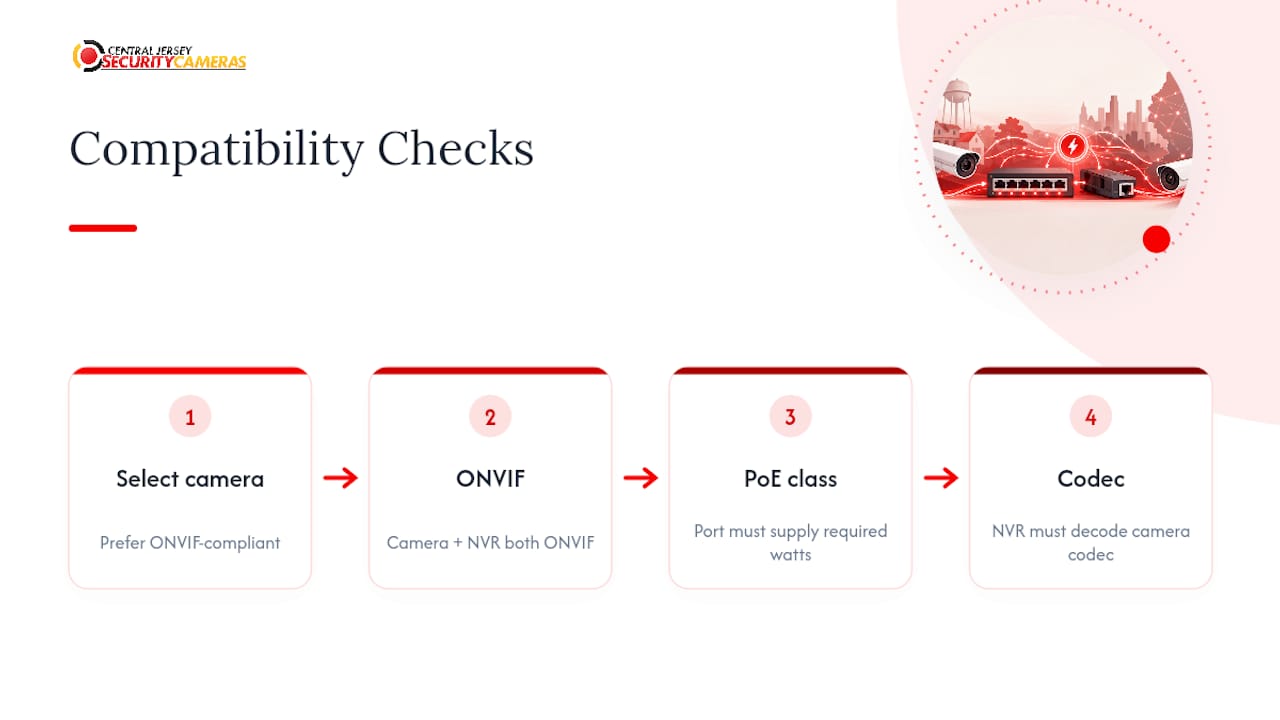
Codec compatibility matters on the recording side. An NVR that only decodes H.264 won’t properly process an H.265 stream from a newer camera, which can mean choppy playback or dropped frames even though the camera itself is transmitting fine. When you’re combining cameras purchased at different times, confirm codec support on the NVR before assuming everything will just work together.
What Are the Legal Rules for Using Security Cameras?
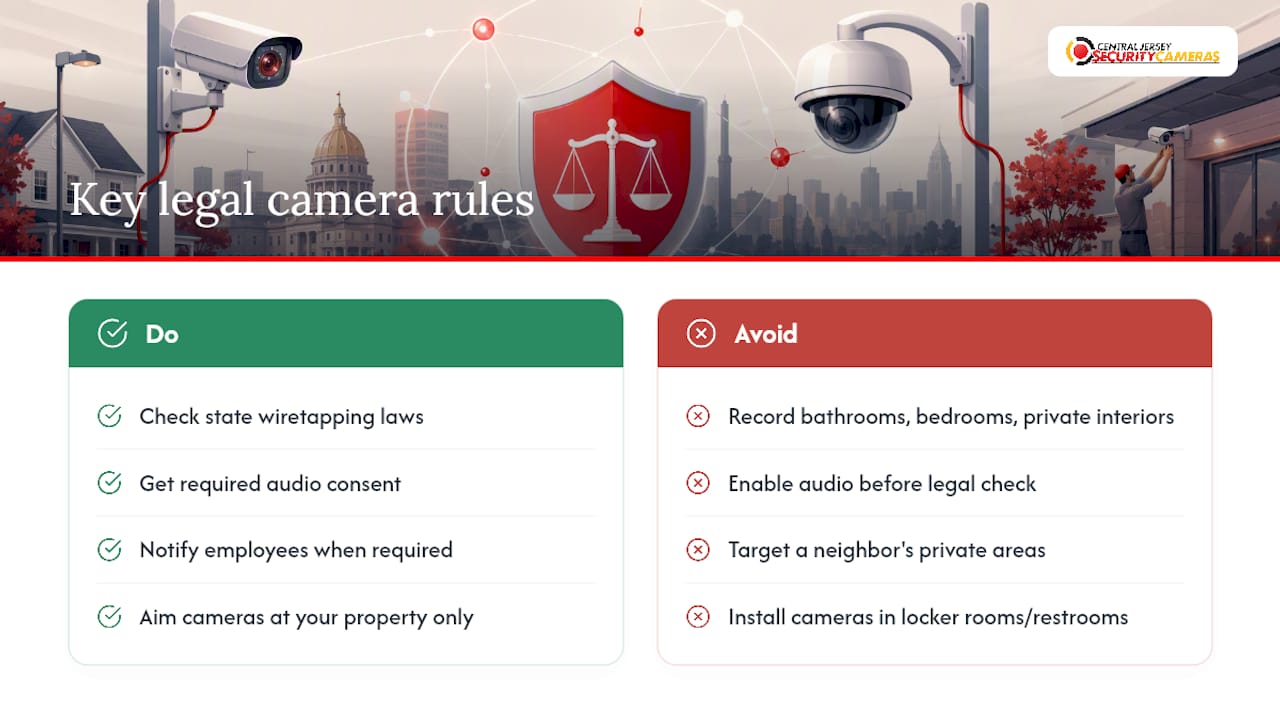
Recording your own property is broadly legal across the United States, but a few boundaries apply regardless of where you install cameras. Interior spaces where someone has a reasonable expectation of privacy, bathrooms, bedrooms, and similar areas, are generally off-limits for surveillance even inside your own home if other people occupy those spaces.
Audio recording carries its own layer of rules separate from video. Many states require consent from at least one party to a conversation before it can be legally recorded, and some require consent from everyone involved. That distinction trips up plenty of camera owners who assume video rules and audio rules are the same thing; they aren’t, and it’s worth checking your specific state’s wiretapping statute before enabling a camera’s audio feature. For a deeper breakdown of how audio recording rules apply to security cameras specifically, this guide on camera audio recording walks through the practical side.
Pointing a camera onto a neighbor’s property or a public sidewalk in a way that specifically targets their private space, rather than incidentally catching the edge of your own frame, can create liability even when the camera sits on your own land. Businesses with employee-facing cameras face an added layer: some states require notice that recording is occurring in employee work areas, and cameras generally cannot be placed in areas like locker rooms or restrooms under any circumstances.
Because these rules vary meaningfully by state and change over time, confirm current requirements with your state attorney general’s office or a local attorney before installing cameras that record audio, cover shared property lines, or monitor employee spaces.
An Installer’s Honest Take on PoE Systems
Most of the PoE installs I’ve seen go wrong don’t fail because of the cameras. They fail because someone undersized the switch’s power budget, then wondered why cameras started dropping offline every time the outdoor units kicked their IR heaters on during a cold snap. The camera spec sheet gets all the attention; the switch and the cable category get none, and that’s backwards.
The other pattern worth calling out: people chase 4K resolution on every camera because it sounds better on paper, then run out of NVR storage in two weeks and start overwriting footage they actually needed. Put your 4K budget on the two or three spots where identification matters, the front door and the driveway, and let the rest run at 2K. Your storage will thank you, and so will you the day you actually need that footage six months from now.
None of this is complicated once someone walks you through it. It’s just rarely explained before the sale.
— Tom
How We Can Help: Central Jersey Security Cameras Services
Central Jersey Security Cameras is the alternative to guessing your way through a PoE install alone. We size the power budget, pick the right switch, and run the cabling correctly the first time, so you’re not troubleshooting a dropped camera feed six months after installation.

Our process runs in four steps: a site survey to map coverage and cable routes, a proposal with a clear camera and equipment list, professional installation with proper power budgeting and surge protection, and ongoing service and maintenance so firmware stays current and drives get checked before they fail. A licensed installer catches the details a DIY job typically misses, undersized switches, missing surge protection, NVRs sized for the wrong retention period, and that reduces both your upfront risk and your long-term repair costs.
We install everything from basic four-camera home systems to full commercial setups with PTZ cameras, license plate recognition, and remote monitoring, throughout Central New Jersey. Browse our CCTV security camera options or reach out to request a site survey and get a proposal built around your actual property, not a generic package.
Sources
For readers who want to go deeper on the technical side, D-Link’s surveillance switch documentation covers long-range PoE distance limits in detail, and TRENDnet’s surveillance switch specs break down PD-alive and power auto-recovery features worth asking about on any commercial quote.
For broader buyer comparisons, Security.org’s PoE camera system guide covers resolution and codec tradeoffs in more depth, SafeHome.org’s PoE camera roundup compares setup and reliability tradeoffs, and property owners planning a larger commercial survey may also find value in a professional building inspection service before finalizing camera placement on a new property.
- DSS-200G Gigabit PoE smart surveillance switches | D-Link
- 12-Port Gigabit PoE+ Smart Surveillance Switch – TRENDnet TPE-3012LS
- Security
- Safehome