
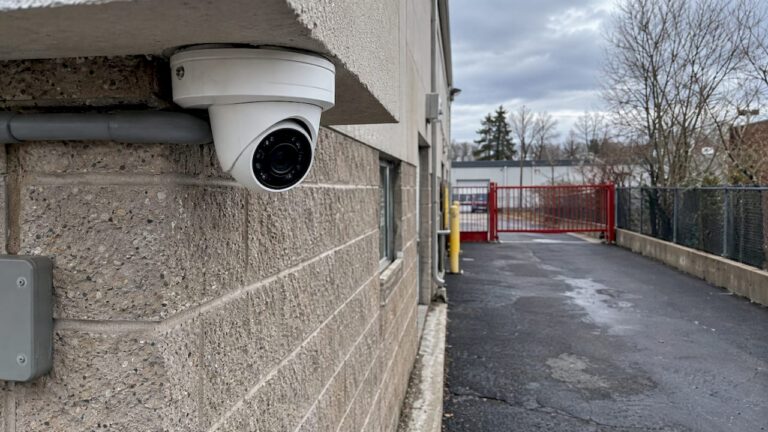
The millimeter number on a security camera lens is its focal length, and it decides one trade-off: how wide the camera sees versus how much detail it holds at a distance. A 2.8mm lens gives a wide view for porches, small yards and rooms. A 4mm lens narrows the view to put more pixels on subjects farther away, such as a driveway. Longer lenses (6mm, 8mm, 12mm) reach farther still, with a tighter view.
Below, we explain what the number means, compare 2.8mm and 4mm with worked numbers, and show how to match a lens to a spot on your property.
TL;DR
- The millimeter figure is the focal length. Shorter means a wider view, longer means more magnification.
- Choose 2.8mm for close, wide areas like porches, patios and indoor rooms. Choose 4mm when the subject is farther away, like a driveway or walkway.
- Lens size alone doesn’t set how far a camera can “see”. Resolution, sensor size, lighting and motion all matter.
- Mixing lens sizes across one system is normal. Each camera position gets the lens that suits its job.
- A site walk before you buy saves you from re-aiming or replacing cameras later.
Table of Contents
- What the millimeter number on a lens actually means
- 2.8mm vs 4mm: the practical difference
- How much detail do you actually need?
- Matching lens size to the spot
- Fixed lens or PTZ?
- Other things that change what the camera shows
- How to find out what lens a camera already has
- A simple way to choose, step by step
- Our perspective
- Get the right lens in the right place
- FAQ
- Sources
What the millimeter number on a lens actually means
The number is the lens’s focal length. According to Axis Communications, focal length is a measure of how strongly the lens bends light, and it determines the field of view and can provide a magnifying effect. A short focal length bends light more sharply and captures a wide scene. A long focal length captures a narrow slice and enlarges it.
Think of it as a trade, not a quality ranking. A 2.8mm lens is not a “worse” lens than a 12mm one. It simply spends the camera’s pixels across a wider scene, while the 12mm spends them on a narrow one.
Common fixed lens sizes and what they suit
Most installed cameras use a fixed lens, meaning the angle is set at the factory. These are the sizes you will meet most often:
| Lens | Typical use | View |
|---|---|---|
| 2.1mm to 2.8mm | Porches, entryways, small rooms, patios, small yards | Very wide |
| 4mm | Driveways, walkways, side yards, medium rooms | Wide to moderate |
| 6mm | Longer driveways, building fronts, small lots | Moderate |
| 8mm to 12mm | Gates, parking aisles, long fences, plate capture at a distance | Narrow |
These are working ranges, not rules. The right answer always depends on how far the camera sits from what you need to see.
2.8mm vs 4mm: the practical difference
Both are common, and the choice between them is the question we hear most. The short version: a 2.8mm lens covers more ground, and a 4mm lens shows more detail on the ground it covers.
The two lenses are not different in image quality. The difference is how the camera distributes its pixels. A 4mm lens narrows the scene, which raises pixel density on distant subjects. That is why a 4mm lens is usually the better pick for a driveway, where you want to read what is happening 30 or 40 feet from the camera, and a 2.8mm lens is usually better where the camera is close to the action.
A worked example you can check yourself
To make this concrete, here is the math for a camera with a sensor about 5.4mm wide (typical of a 1/2.8-inch sensor) and a 4MP image that is 2,560 pixels across. The width of the scene at a given distance is roughly the sensor width times the distance, divided by the focal length. These figures are our own geometry for illustration, and real cameras vary by model.
| Lens | Horizontal view (approx.) | Scene width at 30 ft | Pixels per foot at 30 ft | Pixels per meter |
|---|---|---|---|---|
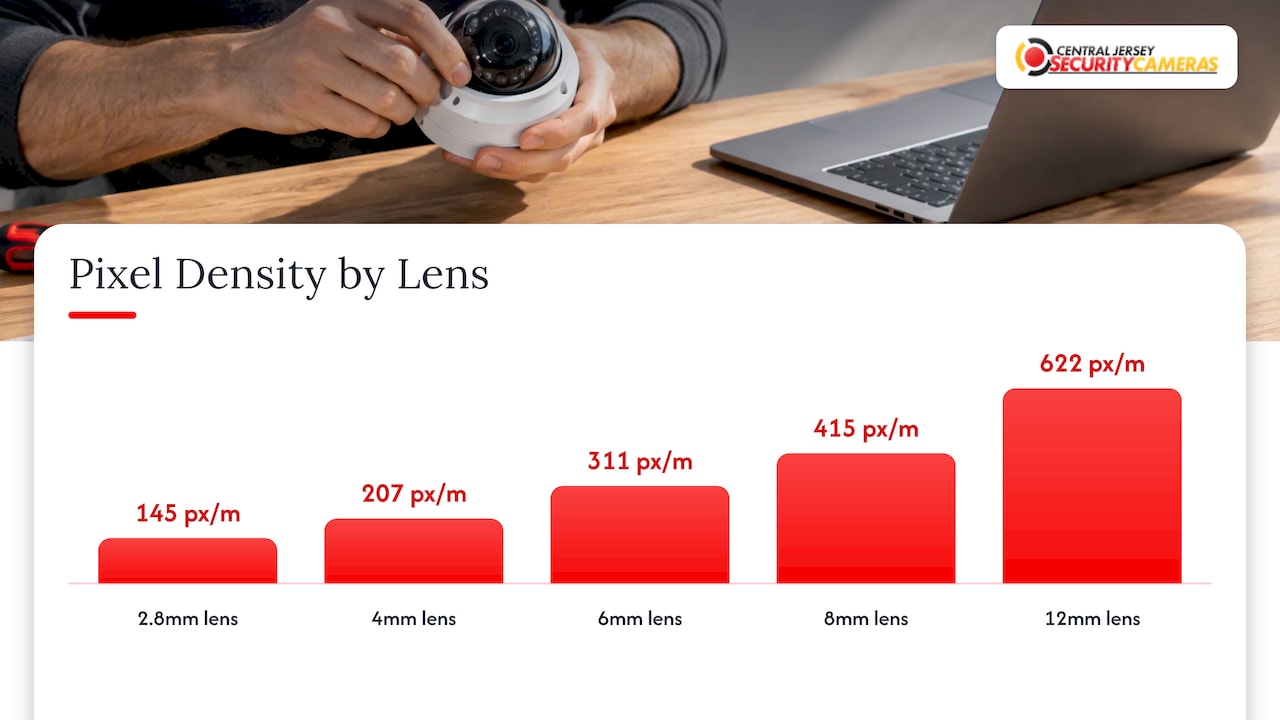
| 2.8mm | 88° | 58 ft | 44 | 145 |
| 4mm | 68° | 40 ft | 63 | 207 |
| 6mm | 48° | 27 ft | 95 | 311 |
| 8mm | 37° | 20 ft | 126 | 415 |
| 12mm | 25° | 13.5 ft | 190 | 622 |
Switching from 2.8mm to 4mm at the same spot narrows the scene by about 30 percent and raises detail on a subject by about 40 percent. That is a big gain for a small change, and it is the reason the two are so often compared.
The view angle also changes with the sensor. The same lens gives a different field of view on a smaller or larger sensor, so always compare lenses on the same sensor size. Our guide to how sensor size changes the view for the same lens covers this in detail.
How much detail do you actually need?
The question to ask is not “how far can this camera see” but “what do I need to be able to do with the footage”: notice that someone is there, tell what they are doing, recognize a person you know, or identify a stranger.
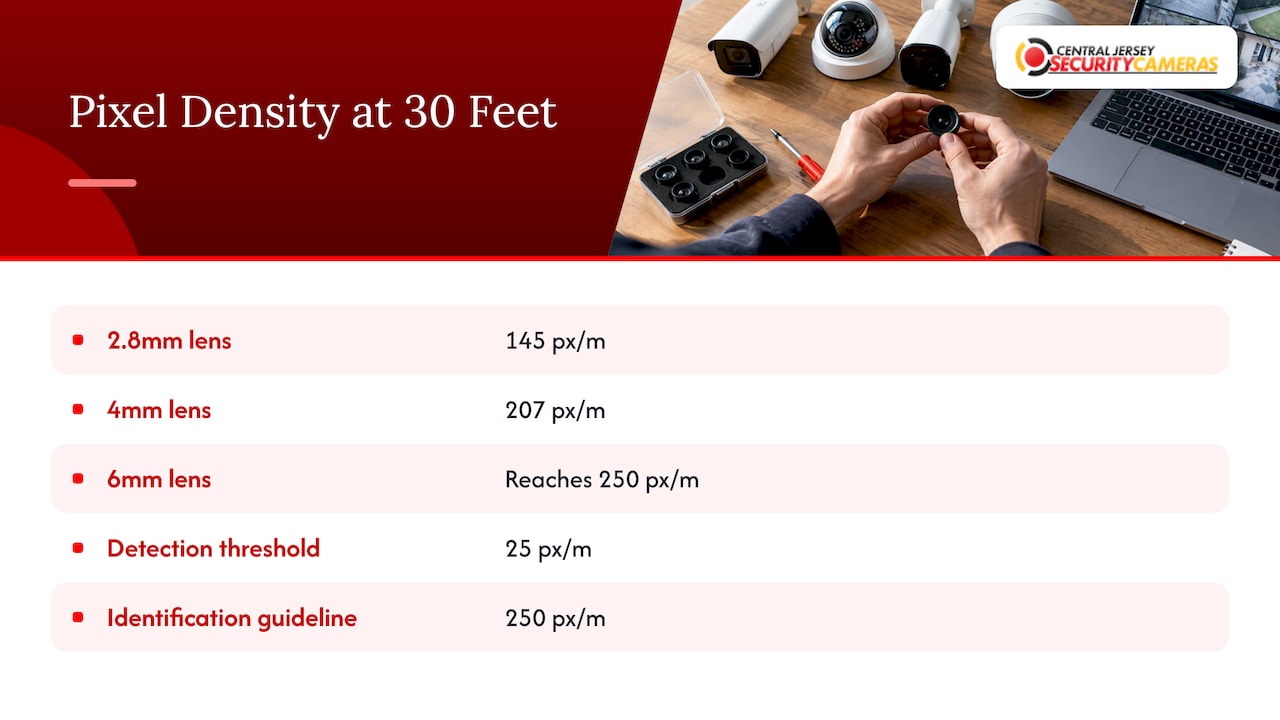
The DORI standard (Detect, Observe, Recognize, Identify) puts numbers on those tasks. Axis lists 25 pixels per meter for detection and 250 pixels per meter for identification, so identifying someone is ten times more demanding than noticing them.
Compare that to the table above. At 30 feet, on a 4MP camera, a 2.8mm lens delivers about 145 pixels per meter and a 4mm lens about 207. Both clear the bar for detection and observation. Neither quite reaches 250 for identification, while a 6mm lens does. If you want a face you can use at that distance, you need a longer lens, a higher-resolution camera, or a camera moved closer to the spot.
Two cautions apply to any such calculation. Axis notes that DORI figures are based on the center of the image and recommends planning margins, because motion, compression and focus affect real-world results. Treat the numbers as a starting point, not a guarantee. And pixel density drops toward the edges of a wide lens, so a subject at the edge of a 2.8mm view is smaller than one in the middle.
What the forensic guidance says about faces
For points where identity matters, such as a front counter or an entry door, the Scientific Working Group on Digital Evidence (SWGDE) gives a useful rule. It recommends that for critical applications like point-of-customer transactions, the area of interest, such as a face, should cover about 15 percent or more of the field of view. For an average head about six inches wide, a field of view about three feet wide meets that guideline.
A three-foot-wide view is tight. It is the reason a camera meant to capture faces at a door is aimed and zoomed differently from one that watches the whole yard. SWGDE also advises that entrance and exit cameras have enough depth of field to stay in focus at three feet and beyond.
Matching lens size to the spot
Here is how we think through common locations. Distances are from the camera to the area you need to cover.
Front door, porch and patio
Cameras sit close to the subject, usually within 10 to 15 feet. A 2.8mm lens covers the whole porch, the steps and part of the walkway, and it catches packages being left or taken. Go wider than you think you need, since the cost of a blind corner is higher than the cost of a bit of extra scene.
Driveway and walkway
Here a 4mm lens is the usual starting point, and a 6mm lens fits long driveways or cameras mounted at the house with the vehicle parked at the far end. A narrower view also keeps neighbors’ windows and the street out of the frame, which makes the footage more useful.
Backyard and side yard
A 2.8mm lens works for small yards, and a 4mm lens suits longer, narrow side yards where you want to see the full length of the fence line. For a deep yard, two cameras with different lenses often beat one camera trying to do both jobs.
Indoor rooms and shop floors
Wide lenses fit rooms where the camera is mounted in a corner or on a ceiling. In a small retail space, a 2.8mm lens on a turret or dome camera covers the floor, while a 4mm or longer lens aimed at the register or door captures faces.
Parking lots, gates and loading docks
These are long-distance jobs. Lens choices of 6mm to 12mm are common, and lighting matters as much as the lens. A camera pointed into shadow gives poor footage at any focal length. For commercial properties, our friends at GuardEX have a useful write-up on parking lot lighting and camera planning that pairs well with lens selection.
When the goal is reading license plates, the lens is only part of the setup. Angle, speed and lighting all matter, which is why plate capture uses purpose-built license plate recognition cameras rather than a general-purpose camera.
Fixed lens or PTZ?
A fixed lens is the simplest and most reliable choice. It sees the same scene all the time, and you can calculate exactly what it covers. A PTZ (pan, tilt, zoom) camera trades that for flexibility: it can sweep a large area and zoom in on activity. It suits big lots, yards and facilities where one camera has to cover a lot of ground. You can see how this works in practice in an example of a PTZ camera installed in a New Jersey CCTV system.
The catch with PTZ is that it only watches one spot at a time. Many professional designs pair fixed cameras for constant coverage with a PTZ camera for follow-up.
Other things that change what the camera shows
Lens size is one input in a chain. These others change the result just as much:
- Sensor size. The same focal length gives a different view on a 1/4-inch, 1/3-inch or 1/2-inch sensor. SWGDE notes that lens selection must be balanced with detector size.
- Resolution. More pixels across the same view means more detail. A 4K camera with a 2.8mm lens can out-resolve a lower-resolution camera with a 4mm lens at a given spot.
- Aperture (f-number). Axis explains that lower f-numbers generally improve low-light performance but decrease the depth of field, while higher f-numbers do the opposite and need more light.
- Light and infrared. Infrared helps recording in low light, but SWGDE cautions that it may not depict tones accurately, so a camera’s night mode should be noted in system documentation.
- Motion, compression and focus. Per Axis, these all affect whether a person can be recognized or identified, whatever the lens says.
If you want the geometry behind this, our page on what determines a camera’s field of view walks through it step by step.
How to find out what lens a camera already has
If you already own cameras and want to know the lens size, check the label on the camera body, the box or the spec sheet. Axis points out that there is no straightforward way to measure focal length physically on the device without documentation. Some manufacturers also build it into the model number. Pelco, for example, includes focal length information in the alpha-numeric part number, which you decode with the product’s spec sheet.
If the label is gone and you have no paperwork, you can estimate the lens by measuring how wide a scene the camera shows at a known distance and comparing it with the table above. A professional can do this in a few minutes on site.
A simple way to choose, step by step
- List the jobs. For each camera position, decide what the footage must do: detect, observe, recognize or identify.
- Measure the distance. From the mounting spot to the farthest point that matters.
- Pick the width. How wide is the area at that distance? A porch might be 15 feet, a driveway 20, a lot 60.
- Choose the lens. Use the geometry: wider area and short distance points to 2.8mm, longer distance and narrower area to 4mm or more.
- Check the pixels. Make sure the resolution gives enough pixels per meter for the job, with margin.
- Test the view. Look at a live image from the planned spot before final mounting.
Our security camera site survey checklist follows this logic, and our camera system design page shows how lens choice fits into the rest of a system.
Our perspective
We see the same mistake again and again: a property owner buys a box of identical cameras, mounts them all at the same height with the same lens, and ends up with a yard full of wide, blurry footage and nothing readable at the driveway.
A camera system is a set of decisions about what you need to see, from where, and how clearly. A porch camera, a driveway camera and a gate camera should rarely share a lens. That is why we design each system around the property itself: we look at distances, angles, lighting and what the footage will be used for, then pick the lens and resolution that fit each position.
This is where professional installation pays for itself. A wrong lens cannot be fixed with a software setting. It has to be swapped, and often the camera has to be moved. We offer free on-site evaluations so you can see the plan before you commit.
If you are choosing between 2.8mm and 4mm, our rule of thumb is simple: go wide where the camera is close, and go tighter where you need to recognize someone at a distance. When you are unsure, ask us to look at the spot.
Tom
Get the right lens in the right place
We design, install and maintain custom camera systems for homes and businesses across Central New Jersey, including Ocean, Monmouth, Middlesex, Mercer and Burlington counties. Every system starts with a look at your property, and we choose lenses, resolution and mounting points for each location. Our installation is a one-time $99 fee, and you can request a free on-site evaluation to see what your property needs.
For houses, start with our home security installation service. For offices, warehouses, schools and retail sites, see our commercial security installations.
FAQ
Is a 2.8mm or 4mm lens better for a home?
Neither is better across the board. A 2.8mm lens suits porches, patios, small yards and rooms, where wide coverage matters. A 4mm lens suits driveways and walkways, where you want more detail at a distance. Most homes end up with a mix.
Does a bigger lens number mean the camera sees farther?
Yes, in the sense that a longer focal length magnifies more and keeps more pixels on distant subjects, but it does so by narrowing the view. Whether you can identify someone also depends on resolution, light and focus, not only the lens.
What lens size do I need to read a license plate?
It depends on distance, angle, speed and lighting, so there is no single lens size. Plate capture is usually handled with dedicated cameras and a longer lens aimed at a controlled point such as a gate or entry lane.
Can I change the lens on my security camera later?
Most fixed-lens cameras used in home and business systems have the lens built in, so the only fix is to replace the camera. Some models have varifocal lenses you can adjust. Getting the lens right at installation avoids the cost of a swap.
Sources
- Lenses in surveillance, white paper (Axis Communications)
- AXIS M4337-SPLVE Panoramic Camera datasheet (Axis Communications)
- AXIS Q6411-LE Bispectral PTZ Camera datasheet (Axis Communications)
- SWGDE Recommendations and Guidelines for Using Video Security Systems
- SWGDE Recommendations and Guidelines for Using Closed-Circuit Television Security Systems in Commercial Institutions
- Pelco Sarix IP Camera Part Number Breakdown