
Choose an 8-channel NVR if you need up to about six or seven camera views today and don’t expect to add many. Choose a 16-channel NVR if you need eight or more views now, run a business, or know the system will grow. The number is a ceiling on how many cameras the recorder can register, so the real question is how many views your property needs over the next five to ten years.
The rest of this guide shows how to count those views, what else changes between the two sizes (PoE ports, bandwidth, drive bays), and where each size fits a New Jersey home or business.
TL;DR
- An 8-channel NVR records up to 8 camera streams, and a 16-channel NVR records up to 16. Neither can register a camera past its limit.
- Count the views you need now, then add 2 to 4 for growth. If that lands above 8, go to 16 channels.
- Channels and built-in PoE ports are different things. A PoE switch can add camera connections, but it cannot raise the channel limit.
- Storage and bandwidth matter as much as channel count. Higher resolution and longer retention mean bigger drives.
- Homes usually fit 8 channels. Small businesses usually do better starting at 16.
Table of Contents
- What “8-channel” and “16-channel” actually mean
- 8-channel vs 16-channel NVR at a glance
- Channels are not the same as PoE ports
- How many cameras you really need
- When an 8-channel NVR is the right call
- When a 16-channel NVR is worth the extra cost
- Storage: the part that surprises people
- Bandwidth and decoding headroom
- Adding a PoE switch to stretch the system
- DVR or NVR?
- A simple way to decide
- Let us size it for your property
- FAQ
- Sources
What “8-channel” and “16-channel” actually mean
A channel is one camera stream the recorder can register and record. An 8-channel NVR supports up to eight cameras, and a 16-channel NVR supports up to sixteen. Reolink’s own support documentation explains that some cameras, such as dual-lens models, can occupy more than one channel, so the number of physical cameras you can connect may be lower than the channel count.
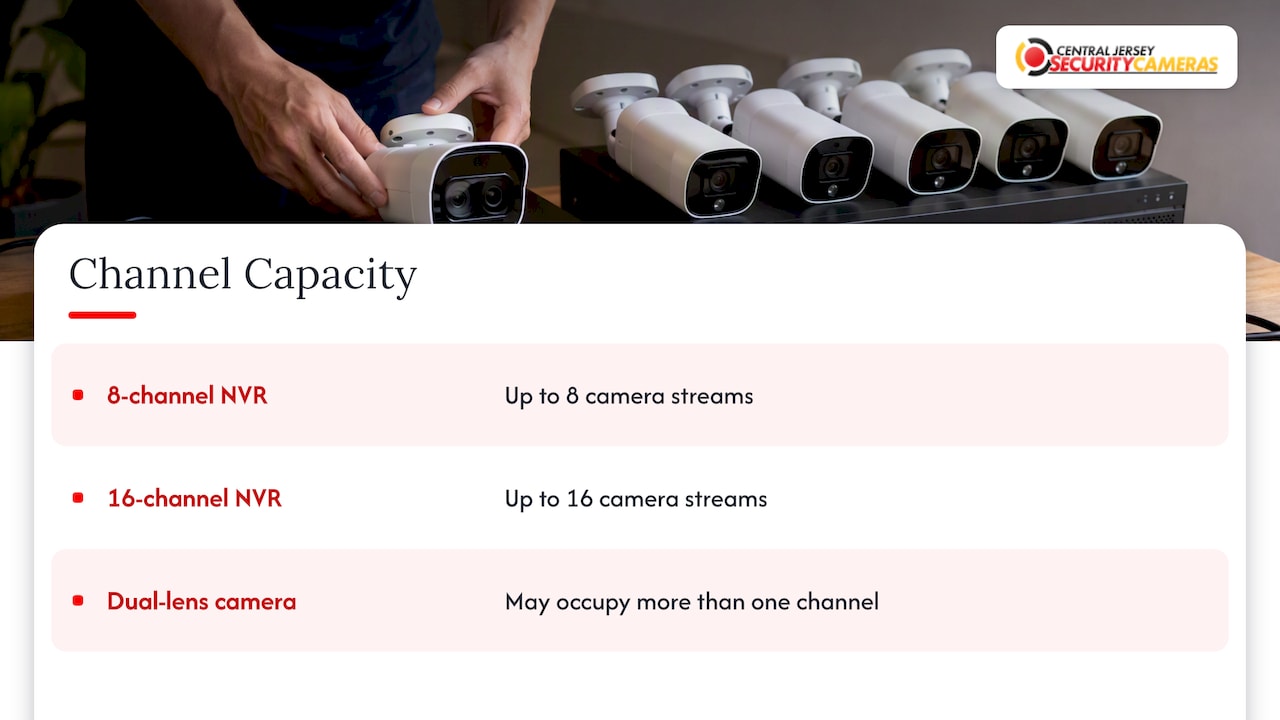
That matters when you pick hardware. A dual-lens camera covering a driveway and a side yard counts as two views. If you plan around the number of lenses, not housings, you won’t be surprised.
The limit is also firm. Extra network bandwidth or a bigger hard drive won’t let an 8-channel recorder register a ninth camera. The only way past the ceiling is a larger recorder, or a second one, which splits your cameras across two apps and two playback systems.
8-channel vs 16-channel NVR at a glance
| Factor | 8-channel NVR | 16-channel NVR |
|---|---|---|
| Maximum camera streams | 8 | 16 |
| Typical fit | Small to mid-size homes, small shops | Large homes, offices, small businesses, light industrial |
| Built-in PoE ports | Often 8 | Often 16, though some models have 8 and need a switch |
| Drive bays | Often 1 | Often 2 or more |
| Incoming bandwidth | Lower ceiling | Higher ceiling |
| Growth room | Limited after 6 to 7 cameras | Comfortable for most properties |
| Upfront cost | Lower | Higher, but the cost per camera view often falls |
The drive-bay and bandwidth rows vary by model. One published spec sheet, for example, lists an 8-channel unit with 160 Mbps incoming bandwidth and one SATA bay, and a 16-channel unit with 260 Mbps and two bays. Always read the spec sheet for the exact model you are considering.
Channels are not the same as PoE ports
This is where most buyers get confused. Channel count is the software limit on camera streams. A PoE port is a physical Ethernet jack that powers a camera and carries its data. A recorder can have fewer PoE ports than channels.
Take a recorder with 16 channels and only 8 built-in PoE ports. You can plug eight cameras straight into it. The other eight need an outside PoE switch, and you can still use all 16 channels. The reverse is not true: a switch can add connections, but it cannot add channels to a recorder that has reached its limit.
What to check on any model:
- Channels: the maximum number of streams it will register.
- PoE ports: how many cameras it can power directly.
- Power budget: the total wattage the recorder can supply across all ports.
- Bandwidth: the combined bitrate it can take in from all cameras at once.
Power budget is the one people overlook. Reolink notes that high-power cameras can reduce the number a recorder’s fixed power budget supports, and that extra power can come from an adapter, a PoE switch or an injector. PTZ cameras, cameras with heaters for winter, and cameras with built-in floodlights draw more than a basic fixed camera. We cover how to add this up in our power budget checklist for PoE security cameras.
Cable quality also decides whether a long run to a detached garage or a rear lot works reliably. See our guide to the best Ethernet cable for cameras before you pull anything through a wall.
How many cameras you really need
Start from the views, not from the kit. Walk the property and list every spot where you want to see something. For a home, that usually means:
- Front door and porch
- Driveway or street approach
- Back door and yard
- Garage and side gates
- Any detached shed, pool area or basement entry
For a business, add the cash counter, loading dock, stockroom, parking lot, back alley and any interior corridor. If you also record license plates at a gate, that is a dedicated camera with its own placement requirements.
Then apply a growth margin. A reasonable rule of thumb from one buying guide is to count current cameras and then add two to four for typical growth. The same source says small homes often end up with 4 to 8 cameras, larger homes with 12 to 16, and small businesses often start at 8 to 16.
Here is how that plays out:
| Your current views | Plus growth (2 to 4) | Recommended recorder |
|---|---|---|
| 4 | 6 to 8 | 8-channel |
| 6 | 8 to 10 | 8-channel if growth is unlikely, otherwise 16 |
| 8 | 10 to 12 | 16-channel |
| 10 to 12 | 12 to 16 | 16-channel |
| 14 or more | 16 or more | 16-channel at the minimum, and a larger recorder or a second unit to plan for |
The six-camera row is the judgment call. If you are certain the property is fully covered, an 8-channel recorder leaves two spare channels and costs less. If you might add a camera for a new addition, a shed, or a second entrance, the 16-channel model usually pays for itself the first time you avoid replacing the recorder.
When an 8-channel NVR is the right call
An 8-channel recorder is a sound, practical baseline for most homes. It makes sense when:
- Your home is a typical suburban house, townhouse or condo with 4 to 6 views.
- You are covering a small shop, studio or office with a few entry points and little interior area.
- You want clean, simple wiring with one PoE port per camera and no extra switch.
- You are setting up a secondary building, like a detached garage or workshop, with its own recorder.
An 8-channel system is not a compromise. A well-placed set of six cameras with the right resolution and lens choices will do more for you than sixteen cameras pointed at the wrong places.
When a 16-channel NVR is worth the extra cost
A 16-channel recorder gives larger homes and small businesses more room to grow. It is the better choice when:
- You need 8 or more views today.
- You run a business with a lot floor space, a parking lot, a dock or several entrances. One installer-oriented guide suggests starting at 16 channels once you reach 10 to 12 camera positions, especially when you need longer retention.
- You expect to add cameras as the property or the business expands.
- You want a second drive bay for more storage or redundancy.
- You want higher bandwidth headroom for 4K cameras and smooth multi-camera playback.
If your plans include expansion, read our guide on how to plan a camera system for business expansion. It covers laying conduit and choosing a switch and recorder so you aren’t re-pulling cable later.
A good rule: if your honest count lands above seven, buy the 16-channel. Cost per channel nearly always drops, and a recorder swap later means redoing configuration and potentially losing continuity in your recording history.
Storage: the part that surprises people
Channel count tells you how many cameras you can connect. Storage tells you how many days of video you will keep. They interact, and a 16-channel recorder filled with 4K cameras can burn through a single drive quickly.
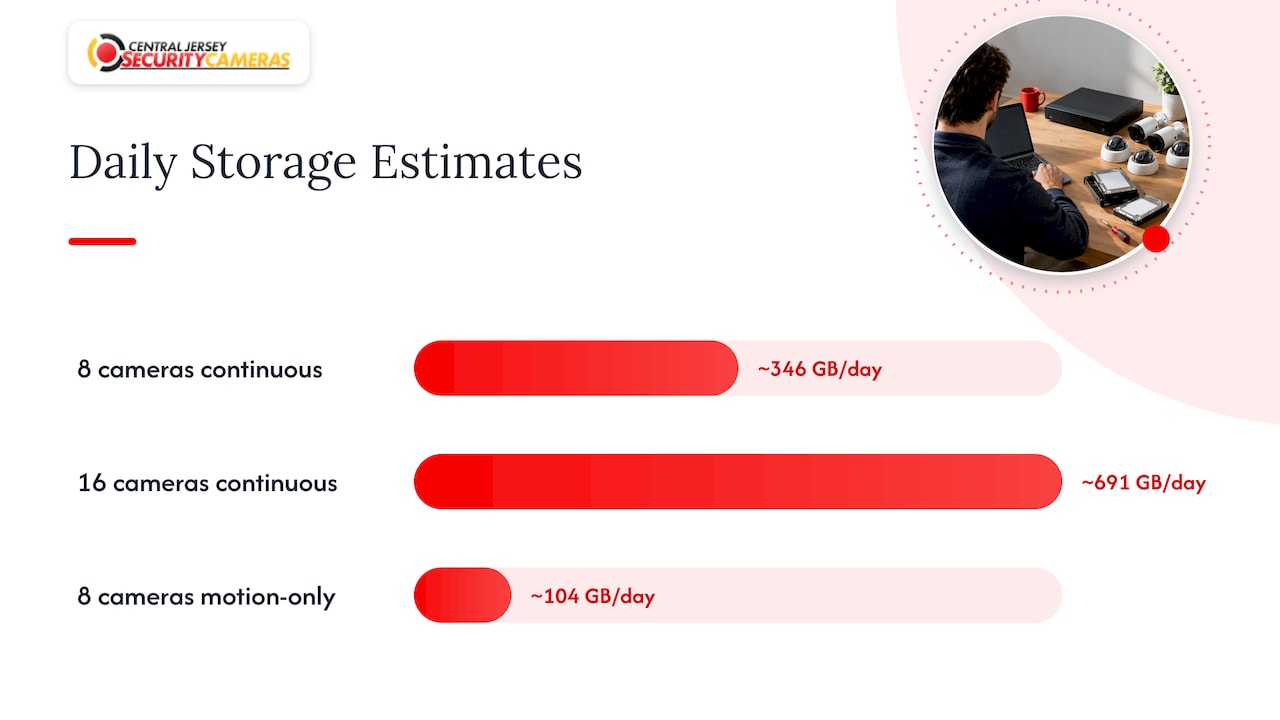
The math is simple. A camera streaming at 4 Mbps writes about 43 GB per day when recording continuously (4 megabits per second is 0.5 megabytes per second, times 86,400 seconds). Multiply by cameras and days:
| Setup | Daily write | 30 days of video |
|---|---|---|
| 8 cameras at 4 Mbps, continuous | About 346 GB | About 10.4 TB |
| 16 cameras at 4 Mbps, continuous | About 691 GB | About 20.7 TB |
| 8 cameras at 4 Mbps, motion-only (about 30% activity) | About 104 GB | About 3.1 TB |
These are estimates from the bitrate, not guarantees. Real usage depends on resolution, frame rate, compression (H.265 uses much less than H.264 for the same quality), scene activity and whether you record continuously or on motion. One guide puts it well: plan storage around the retention period you want and your camera settings instead of guessing drive sizes.
If you want a second opinion on how camera settings and retention shape the drive you need, this walkthrough on NVR storage requirements is worth reading alongside ours. We also compare drive types in HDD vs SSD for an NVR. In short, use surveillance-rated hard drives for continuous recording because of their endurance and capacity per dollar.
Retention is the deciding input for businesses. Many owners want 30 days or more so that an incident noticed late can still be reviewed. That pushes you toward a 16-channel recorder with two or more drive bays, since the extra bay is how you reach that capacity inside one chassis.
Bandwidth and decoding headroom
Every camera sends a stream into the recorder, and the recorder has a limit on the combined stream rate it can accept. Higher resolution and higher frame rates raise the bitrate per camera. Viewing many cameras at once in playback also demands decoding power.
One comparison guide advises weighing bandwidth, playback and decoding headroom, and storage retention together, since higher-resolution cameras and multi-camera playback need adequate headroom. With 16 cameras at 8 MP, the total can approach the ceiling of a lower-end recorder even though the channel count looks fine. Add up the bitrates of your planned cameras and keep the total comfortably under the recorder’s rated incoming bandwidth.
For most homes with a handful of 4 MP or 5 MP cameras, an 8-channel recorder has plenty of room. For a business with a dozen 4K cameras, bandwidth is a real criterion, and it is one more reason the larger unit makes sense.
Adding a PoE switch to stretch the system
A common question: “My recorder has 8 PoE ports and I want 10 cameras. Can I add a switch?” Yes, provided the recorder has at least 10 channels. An 8-channel unit with 8 ports will stop at 8 cameras no matter what you plug into a switch. A 16-channel unit with 8 ports can accept the extra cameras through an external switch, up to 16 total.
Things to plan for with a switch:
- Power: the switch needs its own PoE budget that covers the cameras attached to it.
- Placement: a switch near a cluster of cameras, like the far end of a warehouse, can shorten cable runs and cut cost.
- Cable length: standard Ethernet runs top out at 328 feet (100 m) per segment, so a switch is also how you reach distant buildings.
- Single point of failure: if the switch loses power, every camera on it goes down together. A small battery backup helps.
If you are mixing a switch into an existing system, a pro can check that the combined load stays inside both the switch and the recorder power budgets.
DVR or NVR?
People often compare these before comparing channel counts. A DVR records from analog cameras over coax cable. An NVR records from IP cameras over Ethernet, and offers higher resolutions, PoE power and data on one cable, and more flexible placement. For new installs, IP cameras and an NVR are the standard choice. If you still have analog cameras, a professional can tell you whether a hybrid recorder or a staged upgrade makes sense.
Perspective
When we walk a property in Central New Jersey, the question we hear most is whether 8 channels will be enough. We answer it by counting views, not boxes: every door, every approach, every spot where something has gone missing before.
Our honest experience is that a customer who starts with six cameras often wants eight by the following year. A new gate, a shed, a second loading door. That is why we steer small businesses to 16 channels from day one, and homeowners with larger lots or growing families to do the same. The recorder is the part that is hardest to change once the cable is in the walls, so we size it for the property you will have, not just the one you have today.
Custom design matters here. We choose the recorder, the PoE budget, the drives and the camera mix together, because a recorder with the right channel count but too little storage or too little power headroom still leaves you without the footage you need. That is the difference between a box of cameras and a system designed around your property.
Tom
A simple way to decide
Work through these steps in order:
- List your views. Walk the property and write down each spot you want covered.
- Add growth. Add 2 to 4 views for what you might want in the next few years.
- Pick the channel tier. Up to 8 total: 8-channel. Above 8: 16-channel.
- Check power. Add the wattage of every camera and compare it with the recorder’s PoE budget. Plan a switch if you need one.
- Check bandwidth. Add the bitrates and keep the total under the recorder’s incoming limit.
- Size the storage. Decide the number of days you want to keep, then calculate drive capacity from bitrate and recording mode.
- Plan the cable. Choose cable type and routes before you buy anything.
For a business, our breakdown of what small business security cameras cost in Central NJ shows how these choices translate into a budget. If you run an office, see the right way to set up office security cameras.
Note that a camera kit’s box size is a poor guide. Design from the required views and future coverage, and check bandwidth, storage, bitrate and retention together before choosing the recorder. That is the principle behind every system we design.
Let us size it for your property
Choosing between 8 and 16 channels is easier with someone walking the site with you. We design and install professionally installed camera systems for homes and businesses across Central New Jersey, including Ocean, Monmouth, Middlesex, Mercer and Burlington counties. We offer free on-site evaluations, and our published one-time installation fee is $99 on our security camera installation page.

If you own a business, see our commercial security installations. For a house, start with home security installation. Either way, we will count the views, check the power and storage math, and recommend the recorder that fits.
FAQ
Can I use a 16-channel NVR with only 8 cameras?
Yes. The unused channels simply sit empty until you add cameras. Many owners buy 16 channels with 8 cameras on purpose, so they can add views later without replacing the recorder. Just make sure the storage is sized for the cameras you have now.
Can a PoE switch give an 8-channel NVR more than 8 cameras?
No. A switch adds connections, not channels. Once an 8-channel recorder has registered eight cameras, it will not accept a ninth, regardless of the switch. To go past eight, you need a recorder with more channels.
How many cameras does a typical home need?
Most homes need between four and eight views, which suits an 8-channel recorder. Larger homes with outbuildings or big lots often reach 12 to 16. Count your doors, driveway, yard and outbuildings first, then add a couple of spare channels for growth.
Does a 16-channel NVR need more storage than an 8-channel NVR?
Not by itself, but more cameras write more video. At the same settings, sixteen cameras need roughly twice the drive space of eight for the same retention. That is why 16-channel models often include extra drive bays.
Is a 16-channel NVR better for a small business?
Usually, yes. Small businesses tend to need more views and longer retention, and they often expand. A 16-channel recorder gives you room for both, and it avoids a mid-project recorder swap.
Sources
- FAQs: RLN16-410/NVS16
- How Many Cameras Can be Added to Reolink NVRs?
- PoE NVRs: 4, 8 & 16 Channels
- How to Choose an NVR: 7 Things to Compare Before Buying
- 8 Channel vs 16 Channel NVR: Which PoE Kit Fits Your Property
- NVR Buying Guide: 4, 8 and 16-Channel Systems Explained