
A VPN (virtual private network) is one of the safest ways to watch your security cameras from outside your building, because it lets you reach the cameras through an encrypted tunnel instead of leaving them open to the internet. But a VPN only protects the path your video travels. Weak camera passwords, old firmware and an over-wide network still put your footage at risk. The strongest setup starts with how the system is designed and installed, and our team at Central Jersey Security Cameras designs and installs custom systems for New Jersey homes and businesses with remote viewing in mind.
TL;DR
- A VPN keeps camera and recorder ports closed to the public internet. You connect to the VPN first, then view the cameras on your private network.
- A regular consumer VPN app (the kind that changes your apparent location) does not by itself give you a route to cameras at home or at the office.
- A VPN does not fix default passwords, outdated firmware or a hacked phone. Those need separate attention.
- Cameras belong on their own network segment, with unique credentials and a plan for updates.
- Two buildings usually call for a site-to-site VPN, which needs different address ranges at each location.
Table of Contents
- What a VPN does for a camera system
- Why the risk is real
- What a VPN does not fix
- Consumer VPN apps vs. a VPN into your cameras
- How a safe remote-access setup is built
- Two locations: remote access or site-to-site?
- When the VPN connects but the cameras don’t show up
- What this means for a business
- Our perspective
- Get a system built for remote viewing
- FAQ
- Sources
What a VPN does for a camera system
A security camera system has cameras, usually a network video recorder (NVR) that stores the footage, and a router that connects it all to the internet. To watch live video from your phone while away, something has to let your phone reach that system.
The risky way is to open a hole in the router (a “port forward”) so the recorder is reachable from anywhere. Anyone on the internet can then probe it. The safer way is a VPN. Your phone or laptop first connects to a VPN server on your network, then reaches the cameras as if you were standing in the building. Remote-access guidance advises that you avoid forwarding the camera streaming port 554, because that makes the stream reachable from the internet.
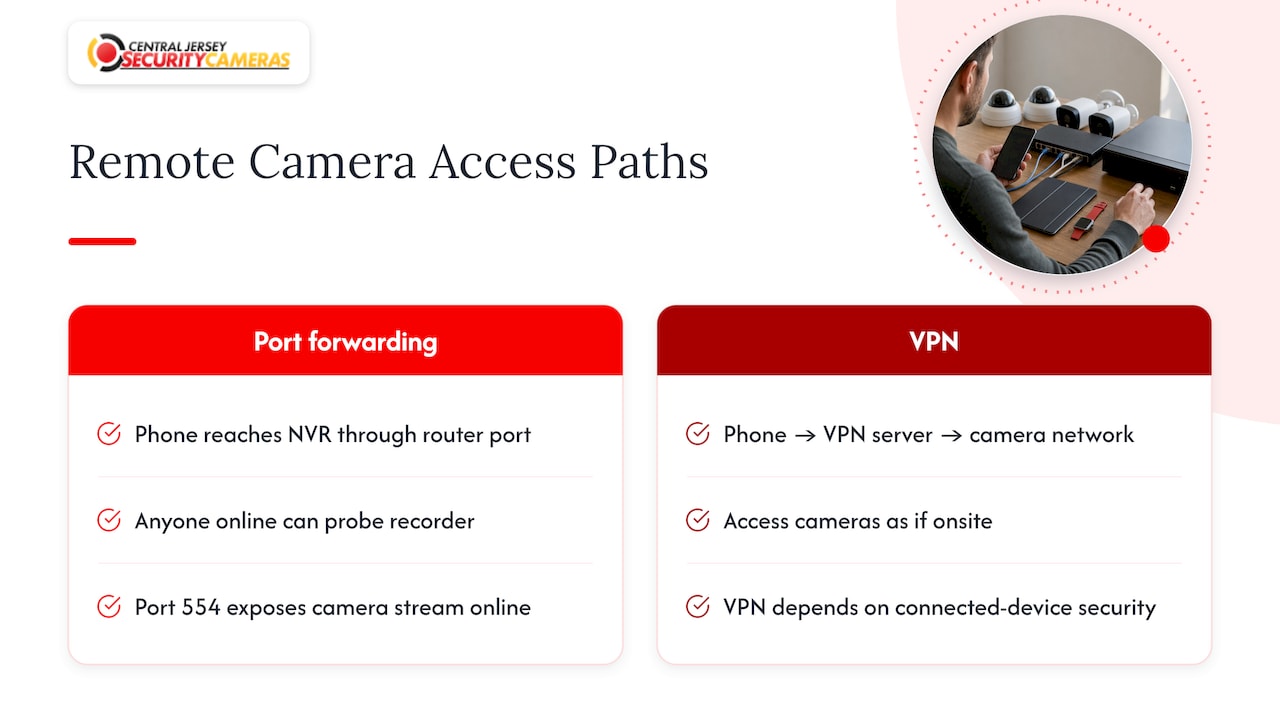
Federal guidance points the same way. CISA, the U.S. government’s cybersecurity agency, advises minimizing network exposure, putting remote devices behind firewalls and isolating them from business networks. When remote access is needed, it says to use an updated VPN, and it adds that a VPN is only as secure as the devices connected to it.
Why the risk is real
Cameras get targeted because they are internet-connected computers that often run for years without attention. CISA has warned that an authentication-bypass flaw in certain XM530 camera firmware could let remote attackers see device information and live video. Another CISA advisory covers a peer-to-peer camera software kit whose affected versions do not sufficiently protect data sent between a device and vendor servers, which could expose camera feeds.
So yes, someone can reach a camera without the owner knowing when the camera is exposed or has a known flaw. A VPN closes one of those doors. It does not close all of them.
What a VPN does not fix
A VPN protects video while it travels. A VPN does not correct weak camera passwords, obsolete firmware, compromised viewing devices, shared tunnel accounts or excessive permissions after connecting. CISA’s Ubia Ubox advisory describes a credential-protection flaw that could allow unauthorized live viewing or settings changes, which is an account problem and not a tunnel problem.
In practice, that means a VPN is one layer. The others are:
- Unique passwords on every camera, the recorder and each VPN user.
- Current firmware. CISA’s March 2026 advisory on Honeywell cameras tells owners to put affected equipment behind a firewall and contact the vendor about patches.
- A clean phone or laptop. If the device you view from is compromised, the tunnel carries the problem straight to your cameras.
- One VPN key per person and device, so you can cut off a lost phone without touching anyone else.
Consumer VPN apps vs. a VPN into your cameras
This is the most common confusion with this search. A consumer VPN subscription routes your traffic through a provider’s server, which helps on hotel or café Wi-Fi. It does not automatically build a path back to your cameras. A subscription that changes your internet exit location is not automatically a VPN into the camera site.
For remote viewing you need a VPN server at the camera location. That can be built into a business-grade firewall or router, or run as a WireGuard or OpenVPN service. Your phone connects to it, and the VPN is told to route traffic for the camera network only.
What about free VPNs?
Free VPN apps are built for a different job (privacy on public Wi-Fi) and are the wrong tool for reaching your cameras. If you use any VPN app, the FTC advises researching it first, reviewing the permissions it requests, confirming it encrypts your data and checking whether it shares information with third parties. For camera access, the answer is a VPN you control at your own network, with your own keys.
How a safe remote-access setup is built
The steps below are the sequence a well-built system follows. Each has a spot where it commonly goes wrong.
1. Start with the design
Decide where cameras, recorder and router go, and how many cameras the internet connection can handle. Bandwidth, power over Ethernet (PoE, which carries power and data over one cable) and cybersecurity are all design questions. Our security camera system design guide covers these together. Where it goes wrong: cameras plugged into whatever switch was handy, sharing a network with laptops and smart TVs.
2. Separate the cameras from everyday devices
NIST, the federal standards agency, notes that networks can restrict an IoT device to only the communications it needs and can place devices in separate network segments by function. For a camera system, that means a separate camera network (a VLAN) where cameras can talk to the recorder and little else. Where it goes wrong: a flat network where one infected PC can see every camera. Our overview of how home networks support security cameras explains the home side of this.
3. Close the doors you don’t need
Turn off UPnP (a router feature that opens ports automatically) and remove any port forwards to cameras or the recorder. Switch off vendor cloud relay or peer-to-peer features you do not use. Where it goes wrong: forwards left from an earlier setup that nobody remembers.
4. Put the VPN at the network edge
Run a WireGuard or OpenVPN server on the firewall or router. One walk-through suggests picking a private VPN subnet such as 10.8.0.0/24 and generating a key for each client. Then check that you receive a VPN address and can reach the recorder’s local address before opening its web page. Where it goes wrong: a connected VPN that reaches nothing because the camera subnet is missing from the routes.
5. Limit what each user can reach
Route only the camera and recorder subnets. Guidance on recorder access says VPN users reach the network only subject to routing and firewall rules, and recommends limiting users to the subnets they need. Give each person and device its own credentials, turn on multi-factor authentication where offered, and know how to revoke access.
6. Test from outside
With the VPN off and on a cellular connection, confirm the camera and recorder pages are not reachable from the public internet. Then connect the VPN and test live view and playback.
7. Keep it maintained
NIST’s onboarding project calls for distinct credentials per device and lifecycle management, including firmware and configuration updates. Security does not end when the VPN turns on.
Two locations: remote access or site-to-site?
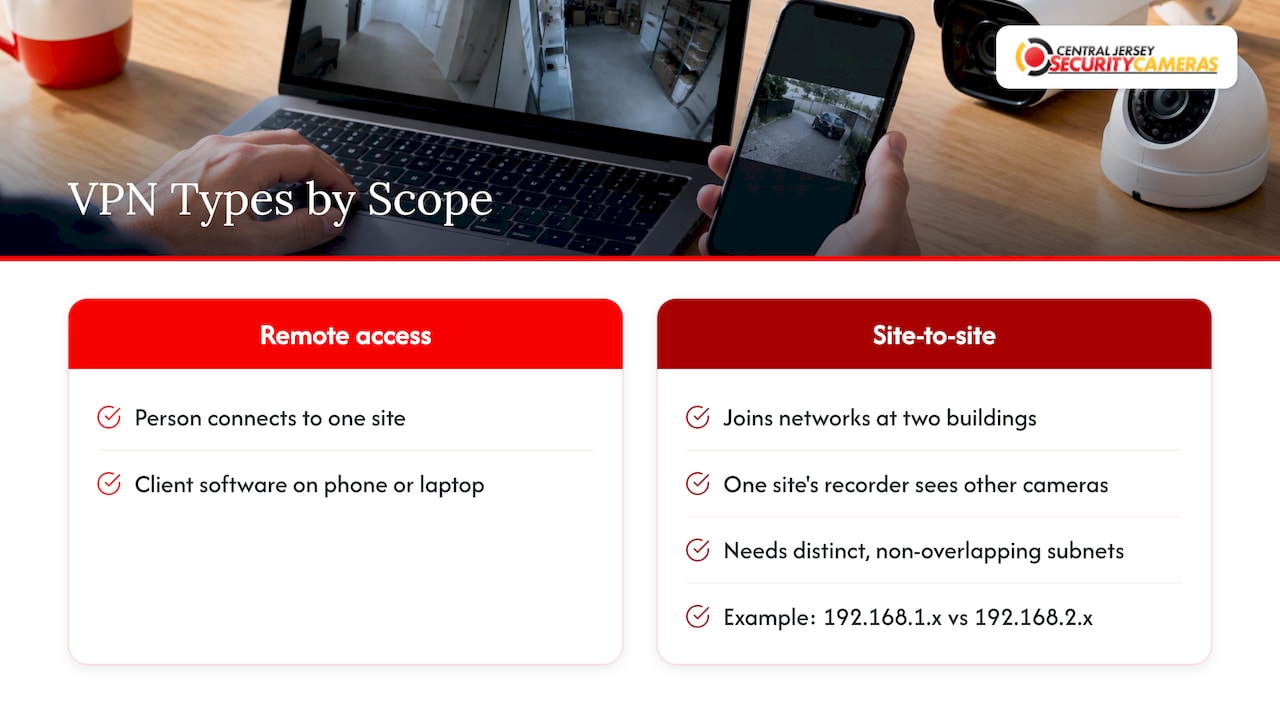
A remote-access VPN is for a person connecting to a site with client software on a phone or laptop. A site-to-site VPN joins two buildings’ networks so a recorder or viewing station at one can see cameras at the other. IPVM, the video surveillance research group, explains that site-to-site links need distinct, non-overlapping subnets at each end, for example 192.168.1.x at one site and 192.168.2.x at the other.
This matters for New Jersey owners who run a shop plus a warehouse, or a home plus a rental property. Many routers ship with the same default address range, and two identical ranges cannot be joined cleanly. Settle the address plan before the second location goes live. If you are growing, our guide to planning a camera system for business expansion walks through it.
When the VPN connects but the cameras don’t show up
These are the usual causes.
- Missing routes. A VPN that connects but cannot reach a camera often means missing subnet routing, a wrong allowed-IP range, firewall rules or overlapping private address ranges.
- Discovery tools failing. Camera discovery relies on multicast traffic that VPNs and VLANs often block. The fix is to add the camera by IP address with a dedicated ONVIF user instead of relying on discovery. ONVIF is the common standard that lets cameras and recorders from different makers work together.
- Wrong network. TP-Link’s U.S. support page advises turning off any VPN on the phone before local discovery and checking that the camera and management device share a subnet and that VLAN isolation isn’t blocking them.
- Choppy video. Switch the mobile view to a lower-bandwidth substream, and confirm routes cover the whole camera subnet.
- Port open but no picture. A successful connection to a port proves reachability, not correct credentials or a decoded image, so test one camera and one stream first.
What this means for a business
A business has more at stake than a home: employee and customer footage, several users, and often a second site. Each staff member who views cameras needs their own access that can be removed when they leave. Our commercial camera cybersecurity basics article goes through the practical checklist. Businesses that handle customer data and want to show clients a formal security posture may also look at security certification and growth, since managing connected equipment through its whole life is part of that work.
Our perspective
Most of the camera problems we hear about start before anyone mentions a VPN. A camera system is a network, and it should be designed as one: where the recorder lives, how the cameras are powered, how much bandwidth they need, and how you will reach the footage from your phone.
That is why we build custom systems for each property instead of handing you a box and a manual. A VPN is a good lock, but a lock on a poorly built door does not help much. Passwords, updates, separated networks and a clear plan for who can view what matter just as much.
We design, install and maintain systems for homes and businesses across Central New Jersey, with remote viewing and ongoing service as part of the picture. Security is not finished on installation day, and the local support that follows is what keeps a system dependable for years.
Tom
Get a system built for remote viewing
If you want to watch your cameras from anywhere without taking on the network engineering yourself, we offer free on-site evaluations across Central New Jersey, including Ocean, Monmouth, Middlesex, Mercer and Burlington counties. Our New Jersey security camera installations carry a one-time installation fee of $99. We also install for homes and for commercial properties.
Tell us what you need to see and from where, and we will design the system around it.
FAQ
Do I need a VPN to watch my security cameras remotely?
Not always, but you need a safe way in. A VPN into your own network is a recommended approach because it keeps camera and recorder ports closed to the public internet. The alternative is exposing those ports, which federal guidance advises against.
Can someone access my camera without me knowing?
Yes, if the camera is exposed to the internet, uses a default or reused password, or runs firmware with a known flaw. CISA has published advisories on such flaws. Unique passwords, current firmware, closed ports and a firewall reduce the risk considerably.
Will a VPN app on my phone let me see my home cameras?
Only if the VPN connects to your home or office network. A typical consumer VPN app connects you to the provider’s servers, not to your cameras. You need a VPN server at the camera location.
Can a Wi-Fi owner see that I use a VPN?
A network owner can generally see that a device is sending encrypted traffic to a VPN server, but not the contents of that traffic. For camera access, the VPN protects your video from anyone on the Wi-Fi network you are using.
Sources
- CISA: ThroughTek P2P SDK advisory
- CISA: XM530 IP camera advisory
- CISA: Ubia Ubox advisory
- CISA: Honeywell CCTV cameras advisory
- NIST: Securing Small-Business and Home IoT
- NIST NCCoE: Trusted IoT Device Network-Layer Onboarding
- FTC: Tips for using VPN apps
- IPVM: VPNs for Video Surveillance
- TP-Link: VIGI camera discovery troubleshooting
- Remote access VPN setup guide
- RTSP remote viewing threat model
- Secure remote access to a local NVR
- Remote internet access to a security recorder
- Securely accessing an NVR with a VPN
- Camera does not appear in ONVIF discovery
- Camera works locally but not over a VPN
- Security certification and growth