
For single-family homes, a cloud-enabled IP kit with a PoE outdoor station gives you the best mix of video quality and simple installation. For multifamily buildings, a networked door station with real access-control integration, like the kind Axis or Viking Electronics build, is worth the extra cost. For commercial and enterprise sites, prioritize systems with SIP compliance and multiple relay outputs. A full comparison of these approaches follows below.
TL;DR:
- Installing a PoE outdoor station is cost-effective for single-family homes, but multifamily and commercial sites benefit from systems with integrated access-control features.
- The primary cost drivers are installation labor, network upgrades, and lock hardware, which can significantly raise the total project expense beyond device prices.
- Properly specifying components like resolution, lock type, VLAN configuration, and system protocols such as SIP ensures better integration and future scalability.
- Vendor questions about ownership of recorded footage, cloud costs, and compatibility are critical to avoid locking into proprietary or costly solutions.
- Professional installation is recommended for complex projects to ensure reliable operation, proper wiring, and compliance with safety and building standards.
Table of Contents
- Which Video Intercom Systems Should Be On Your Shortlist?
- How Do These Systems Compare Side By Side?
- How Do Video Intercom Systems Actually Work?
- What Components And Integrations Do You Need To Specify?
- What Questions Should You Ask Before Signing A Contract?
- What Does A Video Intercom System Cost, And How Long Does Installation Take?
- When Should You DIY And When Should You Hire A Pro?
- How Do You Maintain And Troubleshoot A Video Intercom System?
- How Do The Major Brands Actually Compare?
- What Security Features And Cybersecurity Risks Should You Weigh?
- Can These Systems Grow With Your Property?
- What’s The Real Priority When Choosing A System?
- How Central Jersey Security Cameras Helps With Video Intercom Projects
- Where To Verify Specs And Standards
- Sources
Which Video Intercom Systems Should Be On Your Shortlist?
A video intercom system pairs a camera, microphone, and speaker with a door-release relay so whoever answers the call can see, talk to, and unlock the door for a visitor without walking to the entrance. That’s the core function whether you’re pricing out a $200 doorbell replacement or a $3,000 commercial door station, and the buyer’s guide from Avigilon lays out that basic anatomy clearly. What changes across price tiers is how much control, integration, and durability you get for the money.
Here’s how the main categories break down, mapped to who they actually fit.
- Entry-level IP kits. These are PoE-powered outdoor stations paired with an indoor touchscreen or a phone app, aimed at single-family homes and small duplexes. They’re straightforward to wire if you already have an ethernet run to the door, and most support standard HD video without a subscription.
- Cloud/mobile-first systems. Built for owners who want remote access without staffing a front desk or running a local server. DoorBird’s consumer and small-multifamily lineup fits here, with smartphone push notifications and modular accessories that let you add keypads or extra cameras later. The tradeoff is a recurring cloud fee and, in some cases, less control over where your video is stored.
- Enterprise-grade network door stations. This is where Axis and Viking Electronics operate. The Axis A8207-VE Mk II is a network video door station built for multifamily and commercial properties that need integrated access-control readers, not just a camera and a buzzer. Viking’s K-1775-IP is a stainless-steel, SIP-compliant entry phone with a built-in proximity reader, aimed at gated access points and buildings that need vandal-resistant hardware over curb appeal.
- Retrofit and wireless options. For older buildings where trenching new cable is impractical, a cellular or wireless-bridge intercom avoids tearing up walkways, though you’ll want to check signal strength and ongoing data costs before committing.
Hikvision also sells network door stations that compete on price in the mid-tier IP category, often bundled with their NVR ecosystem, which makes them a common pick for property managers already running Hikvision cameras elsewhere on site.
How Do These Systems Compare Side By Side?
The single biggest driver of total project cost usually isn’t the device itself. It’s installation labor, especially when a site needs new PoE cabling run to the door, a network switch upgrade, or new lock hardware to replace an old buzzer-only strike.
Pro Tip: Get a firm number on cabling and lock hardware before you fall in love with a specific intercom model. A $250 device can turn into an $1,800 project once an installer has to fish cable through masonry or swap a mechanical lock for an electric strike.
If you own or manage a single home, DoorBird or a comparable consumer IP kit covers what you need without overbuying. If you manage a multifamily building or gated commercial property, Axis or Viking Electronics hardware earns its higher price tag through relay flexibility and access-control integration that a consumer kit simply doesn’t offer. Hikvision sits in between: a reasonable choice if you’re standardizing on their ecosystem already, but it doesn’t match Axis’s I/O depth for complex access-control jobs.
How Do Video Intercom Systems Actually Work?
Every video intercom system moves three things between the door and whoever answers: video, audio, and a door-release signal. The outdoor station captures video and audio, sends it over a cable or wireless connection to an indoor monitor or app, and waits for a command to trigger the release relay on the door hardware. How that signal travels is what separates the major architectures.
IP/PoE systems send everything over standard ethernet cabling, with a single Power over Ethernet cable supplying both power and data to the outdoor station. This is why IP/PoE has become the default for new installs. According to Swiftlane’s guide to video intercom systems, IP-based door stations deliver higher-resolution video, remote management, and far easier scalability than older analog wiring. The catch: you need a PoE switch with enough ports and bandwidth headroom, and your network has to be able to handle multiple simultaneous video streams without choking.
Analog systems still show up in older buildings, running dedicated coax or twisted-pair wiring straight to a single monitor. They’re cheap to maintain if the wiring is already in place, but they don’t scale. Adding a second monitor or remote access usually means new wiring runs.
Cloud-managed systems shift video storage and device management off-site to a vendor’s servers, which is genuinely useful for property managers juggling multiple locations. The tradeoff, per Swiftlane’s research, is that cloud intercoms introduce subscription fees and raise real questions about who actually owns the recorded footage.
Wireless and cellular systems skip cabling entirely by using Wi-Fi or a cellular modem, a practical fix for retrofits where trenching is expensive, though signal strength and latency need to be checked on-site before installation, not assumed from a spec sheet.
What Components And Integrations Do You Need To Specify?
Getting a quote that actually matches your needs means specifying more than “a video intercom.” Vague requests get vague, mismatched proposals.
For the outdoor station, confirm the resolution, low-light performance (a doorway at night is a real test of any camera), an ingress protection rating if it’s exposed to weather, and whether you need a directory keypad for multiple units.
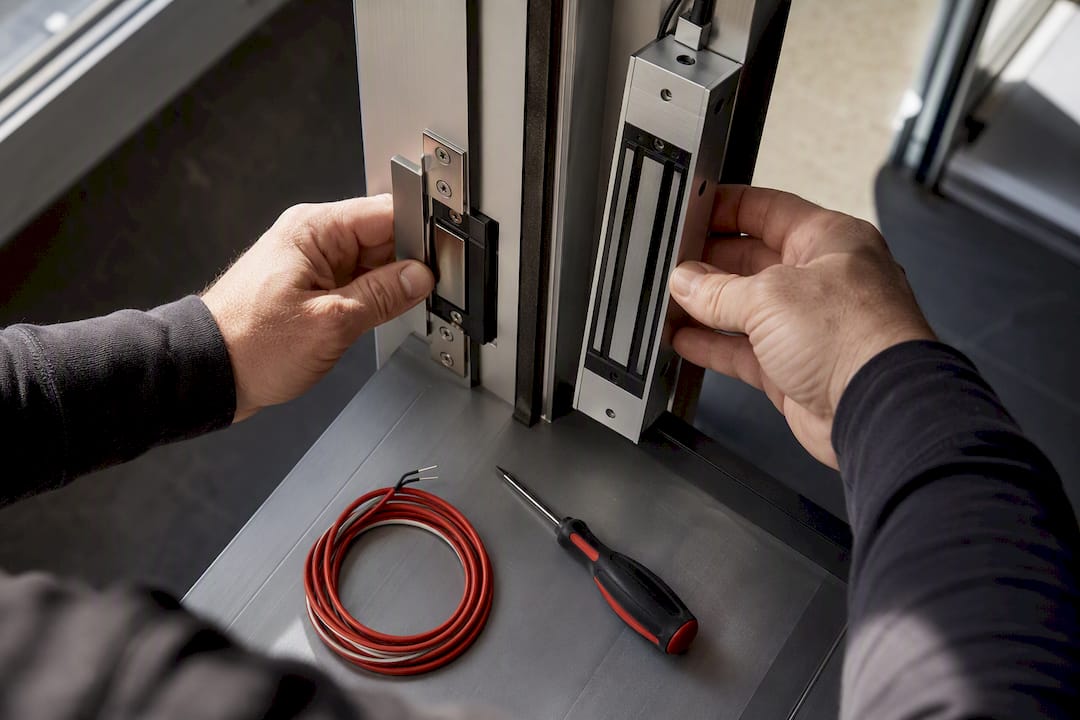
For door-release hardware, decide between an electric strike and a magnetic lock. Electric strikes are generally easier to retrofit onto existing door frames, while mag locks offer more holding force but usually need a door-position sensor and a fail-safe power setup to stay code-compliant during a fire alarm. Life-safety egress requirements, including how locks behave during an emergency, fall under NFPA codes and standards, and any installer worth hiring should know how those rules apply to your specific door hardware.
For network infrastructure, size your PoE switch for the number of stations you’re running plus headroom, and consider a separate VLAN for intercom and access-control traffic so it isn’t competing with guest Wi-Fi or office data.
For integration, ask specifically about SIP support for VoIP-based calling, Wiegand compatibility if you’re tying into an existing card-access system, and whether the door station can talk to your video management software or elevator controls.
- Confirm outdoor station resolution and low-light rating
- Decide electric strike vs. magnetic lock, and document fail-safe vs. fail-secure behavior
- Size PoE switch capacity and consider VLAN segmentation
- Verify SIP, Wiegand, and VMS integration support in writing
Professional installers increasingly wire door stations into relay outputs that do more than unlock a door. A single station can trigger an alarm, a strobe light, or a camera preset the moment someone approaches, according to technical notes on the Axis A8207-VE Mk II. That kind of relay flexibility is exactly what separates enterprise door stations from consumer kits.
What Questions Should You Ask Before Signing A Contract?
Most bad intercom installs trace back to questions nobody asked before signing. Work through these in order, because each one narrows the field faster than the last.
- What’s the actual use case and scale? A single front door needs a different system than a 40-unit building with a shared lobby and individual unit call buttons.
- What wiring already exists? If there’s ethernet at the door, IP/PoE is straightforward. If there’s nothing, you’re comparing the cost of new cabling against a wireless or cellular alternative.
- Is the network ready? Ask whether your existing switch has open PoE ports and enough bandwidth for continuous video streams, not just idle capacity.
- What are the ongoing cloud costs? If the system is cloud-managed, get the subscription price in writing and ask what happens to stored video if you cancel.
- Who owns the recorded video and where is it stored? This matters more than most buyers realize, and cloud vendors don’t all answer it the same way.
When you’re actually talking to a vendor or installer, ask directly: What’s the warranty and service-level agreement? Does the quote include an on-site survey before pricing, or is it a phone estimate? Is the door hardware compatible with my existing locks, or does that require replacement? Does the intercom support SIP and standard encryption, or is it a closed, proprietary protocol?
Walk away from anyone who skips the on-site survey, can’t clearly explain who owns your recorded footage, or pushes a system that only talks to its own proprietary app with no SIP or standard integration path. That last one locks you into a single vendor for every future repair or expansion.
Pro Tip: Ask every bidder the same five questions in the same order. Vague or inconsistent answers on video ownership or cloud fees are the easiest red flag to spot before you’ve spent a dollar.
What Does A Video Intercom System Cost, And How Long Does Installation Take?
Device pricing splits into three rough tiers. Consumer IP kits, the DoorBird-style residential category, run roughly $300 to $900 for the outdoor unit alone. Prosumer and commercial entry phones like the Viking K-1775-IP land between $800 and $1,500. Enterprise door stations such as the Axis A8207-VE Mk II run from $1,500 to $3,000 or more before installation. Retail listings across the U.S. market, including consumer and commercial kits sold through Amazon, reflect that same spread from budget consumer hardware to enterprise-grade stations.
Installation cost can vary widely and may significantly increase budgets. Tasks like running new cable through finished walls or masonry, upgrading network equipment, trenching for entry points, or changing lock hardware can add substantial expenses beyond the device price.
- Site survey and design: typically a few days from first contact
- Permitting, if required for electrical or lock hardware changes: can take several weeks depending on the municipality
- Installation and wiring: ranges from a day for a single door to several days for larger buildings
- Commissioning and staff training: may require half a day to a full day
A single-door residential install can often be completed in a couple of weeks. Multifamily projects with permitting and multiple access points may take over a month to complete.
When Should You DIY And When Should You Hire A Pro?
A consumer kit at a single-family front door is a reasonable DIY project if you’re comfortable with basic wiring and app setup. Once you’re talking about multifamily buildings, integrated access control, or tying an intercom into a larger networked security system, professional installation stops being a luxury and starts being the difference between a system that works reliably and one that becomes a recurring service call.
A professional engagement typically includes:
- A site survey to confirm wiring paths, network capacity, and lock compatibility
- Custom system design matched to the building’s layout and access needs
- Wiring, mounting, and lock integration done to code
- On-site testing of video, audio, and relay function before handoff
- Documentation and training so staff can operate and troubleshoot the system
- An ongoing maintenance plan for firmware updates and hardware wear
Pro Tip: If your building already has networked security cameras installed, ask your installer whether the intercom can share that existing PoE infrastructure. It often cuts installation cost noticeably.
How Do You Maintain And Troubleshoot A Video Intercom System?
Most intercom failures aren’t dramatic. They’re a loose cable connector, an outdated firmware version, or a PoE switch port that’s quietly failed. A basic maintenance routine catches most of this before it becomes a locked-out resident calling at 11 p.m.
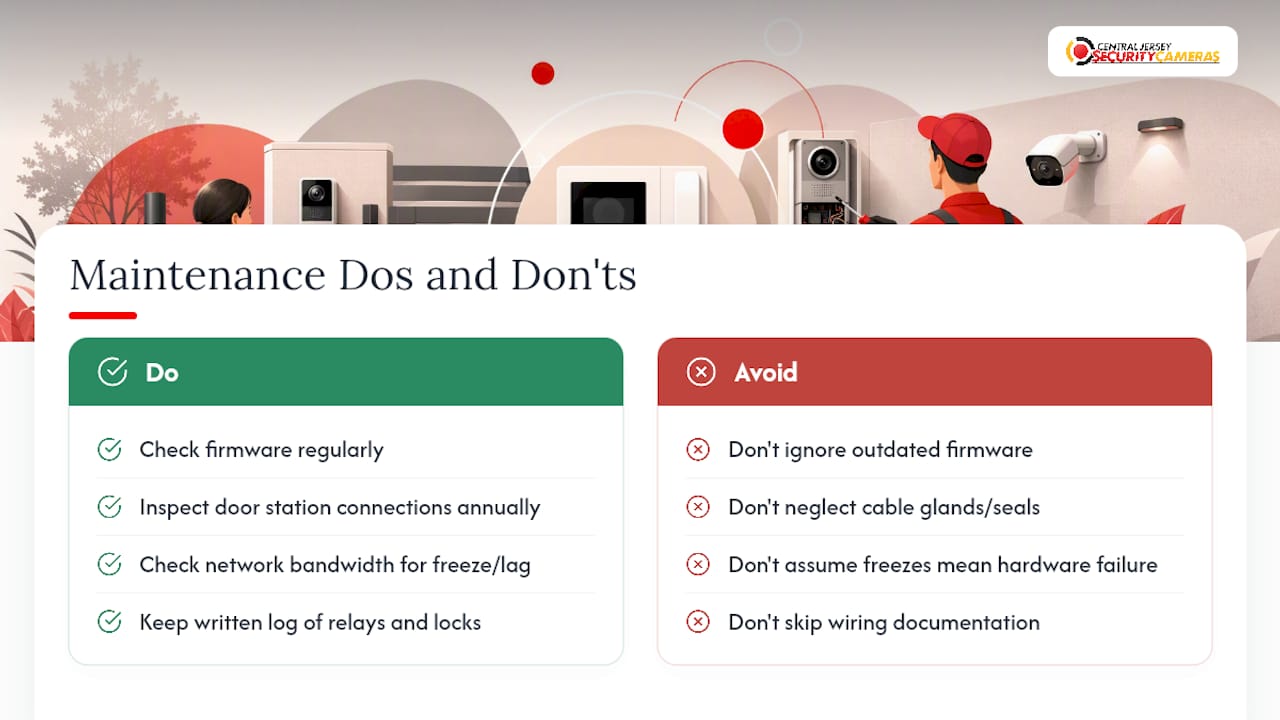
Check firmware on outdoor stations and indoor monitors on a regular schedule. Manufacturers patch security vulnerabilities and fix call-quality bugs through firmware updates, and a system running two-year-old firmware is both less secure and more prone to glitches.
Inspect the physical connection points at the door station annually at minimum, since outdoor units take weather exposure and thermal cycling that indoor equipment never sees. Water intrusion around cable glands is a common failure point on stations that aren’t properly sealed.
If video freezes or audio cuts out intermittently, check network bandwidth first. A door station competing with heavy guest Wi-Fi traffic on the same switch will often drop frames or lag on calls, and that’s a network problem, not a hardware defect.
Keep a written log of relay and lock behavior. If a mag lock starts releasing late or an electric strike buzzes without unlocking, that’s usually a power supply or relay wiring issue rather than a failed intercom unit; a professional installer with the original wiring documentation can diagnose that in minutes instead of hours.
How Do The Major Brands Actually Compare?
Axis leads on integration depth. The A8207-VE Mk II supports multiple relay outputs, SIP calling, and open API access, which is why it shows up repeatedly in multifamily and commercial specifications that need to talk to other building systems. The tradeoff is price and installation complexity; it’s not a weekend DIY project.
Viking Electronics, including the K-1775-IP, is built for durability first. Stainless-steel, vandal-resistant housings and SIP compliance make it a common choice for gated communities and parking structures where the hardware takes physical abuse. It doesn’t have the sleek consumer app polish of DoorBird, but that’s not what it’s built for.
DoorBird wins on ease of use and design for single-family homes and small multifamily properties. Smartphone notifications and a clean mobile app make it approachable for owners who don’t want to manage a server or a VMS. Its access-control integration is lighter than Axis or Viking, which is fine for a duplex and a limitation for a 30-unit building.
Hikvision competes mainly on price within its own ecosystem, useful for property managers who’ve already standardized on Hikvision NVRs and cameras and want one vendor to call for support. It doesn’t match Axis’s relay flexibility, but for straightforward video-and-buzzer needs, it covers the basics at a lower cost.
What Security Features And Cybersecurity Risks Should You Weigh?
A video intercom is a network device sitting at your front door, which means it inherits every risk that comes with any connected camera or access-control reader. Encryption in transit, strong default-password policies, and regular firmware updates aren’t optional extras. They’re the baseline that separates a secure system from an easy target.
SIP and PoE compatibility matter here beyond convenience. As Viking’s own product documentation reflects, adherence to open standards like SIP is a practical signal that a device will integrate cleanly with existing VoIP and network gear instead of forcing you into a closed vendor ecosystem, which also tends to correlate with better long-term firmware support.
Segmenting intercom traffic onto its own VLAN, separate from guest Wi-Fi and general office data, limits how far an attacker can move if a single device is compromised. This is standard practice in broader network security, and the network hardening guidance from Netverge covers the same segmentation principles that apply directly to intercom and access-control deployments.
Cloud-managed systems raise a second layer of risk: where is your video actually stored, and who can access it? That question deserves a direct answer from any cloud vendor before you sign, not an assumption based on a slick app interface.
Can These Systems Grow With Your Property?
The systems worth buying today are the ones that won’t box you in next year. IP/PoE architecture scales more gracefully than analog wiring because adding a second door or a new monitor is a network configuration change, not a new cable run through finished walls.
Look for open I/O and relay capacity beyond what you need right now. A door station with two spare relay outputs today can trigger an added alarm zone or a second lock next year without a hardware swap. Enterprise door stations like the Axis line are built with this headroom in mind, which is part of why they cost more upfront.
Industry movement toward audio-video analytics, PIR-based approach detection and audio analytics that improve alert accuracy, is also reshaping what “future-proof” means for intercoms. Coverage from the Security Industry Association on integrating audio and video for smarter security points to intercoms increasingly functioning as active deterrence tools, not just call boxes. A system with an open API and analytics support today is more likely to accept that kind of upgrade without a full hardware replacement.
For property managers adding units or buildings over time, a cloud-managed platform can also simplify scaling across multiple sites from one dashboard, provided you’ve already settled the data-ownership questions raised earlier.
What’s The Real Priority When Choosing A System?
Most buyers over-index on video resolution and app polish, and under-index on the two things that actually determine whether an install succeeds: door hardware compatibility and who controls your recorded footage. A gorgeous 4K image doesn’t matter if the relay wiring doesn’t match your existing electric strike, or if a cloud vendor’s terms leave you without access to your own video after a contract dispute.
The conventional advice to “just compare features” misses that installation labor and network readiness usually cost more than the device itself. I’d tell any property manager to get the site survey and a written cabling estimate before comparing intercom brands, not after. That single step prevents most of the budget surprises that show up in this category.
If there’s one thing worth prioritizing first, it’s asking every vendor the ownership and integration questions directly, in writing, before comparing a single spec sheet. The brand name on the door station matters far less than whether the person installing it actually tested the relay wiring before handing you the keys.
— Tom
How Central Jersey Security Cameras Helps With Video Intercom Projects
Professional installers are the alternative to piecing together a DIY kit and hoping the wiring, lock hardware, and network all cooperate. Video intercom procurement and installation for homes and businesses is best handled with a real site survey first, a written estimate second, and a professional install that’s actually tested before departure.

When you reach out, expect a site visit to check existing wiring, network capacity, and door hardware, followed by a custom design and a clear written timeline, not a vague ballpark. Installers handle the electric strike or mag lock integration, PoE network setup, and relay configuration so the intercom can integrate with an existing security system instead of sitting next to it as a separate gadget. We also offer ongoing service plans for firmware updates and hardware troubleshooting long after installation.
If you’re weighing a video intercom for a single home or a full multifamily property, request a site survey and quote and we’ll walk the property with you before any hardware gets ordered.
Where To Verify Specs And Standards
For technical specs and access-control capability, check the Axis A8207-VE Mk II product page and DoorBird’s product lineup. For SIP and relay documentation on commercial entry phones, see Viking Electronics’ E-35-IP product page. For life-safety egress rules affecting lock hardware, consult NFPA’s codes and standards.
Sources
- Complete Buyer’s Guide to Video Door Intercom Systems
- Video Intercom System – A Complete Guide | Swiftlane
- Audio matters: integrating audio, video and intercom for smarter and more responsive security