
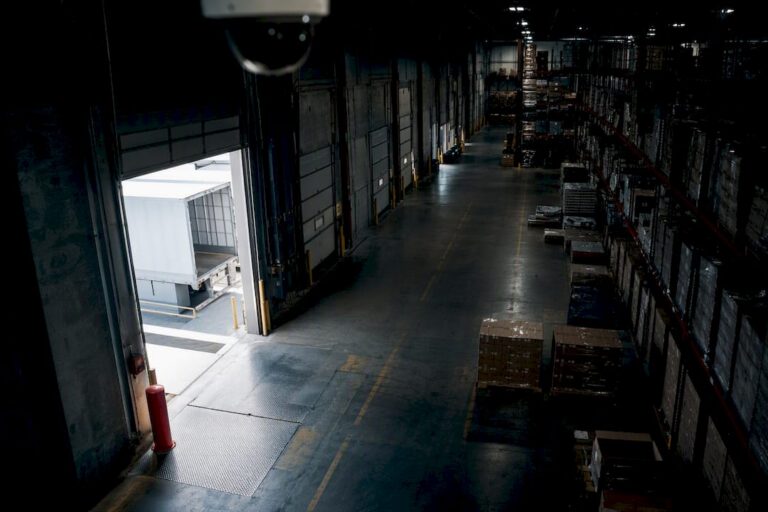
For reliable warehouse security, prioritize a professionally designed PoE IP system that pairs mixed resolutions (4K at docks and entry points, 1080p for general aisle overview) with local NVR or hybrid cloud recording. Layer in targeted AI analytics like ALPR and PPE detection where they solve a real problem. Coverage planning, recording architecture, and basic network hardening matter more than any single camera spec, and the sections below walk through each one.
TL;DR:
- Prioritize a mixed-resolution PoE IP camera system with local or hybrid recording, focusing on key zones like docks, cages, and entrances for cost-effective coverage.
- Match camera types to specific zones, using PTZs for active tracking, bullet and turret cameras for docks, and thermal cameras for perimeter detection.
- Plan camera placement based on zone needs, with one overview camera per 2,000 to 3,000 square feet and dedicated cameras for every dock door to prevent blind spots.
- Use a hybrid recording architecture to balance local storage with cloud access, ensuring continuous footage availability and efficient AI analytics deployment.
- Conduct thorough site surveys and implement network security measures like VLAN segmentation, strong passwords, and firmware updates to ensure system reliability and security.
Table of Contents
- Why Warehouse Security Cameras Matter More Than Owners Think
- Which Camera Types Actually Belong in a Warehouse?
- How Many Cameras Does a Warehouse Actually Need?
- What’s the Right Recording Architecture for a Warehouse?
- How Much Storage and Budget Should You Plan For?
- Installation, Hardening, and Keeping the System Reliable
- What Do Installers See on Real Warehouse Sites?
- What the Research Actually Supports, and What Doesn’t Hold Up
- Getting a Professional Warehouse Camera System Installed
- Sources
Why Warehouse Security Cameras Matter More Than Owners Think
A warehouse loses money in ways that rarely make headlines. Inventory shrinkage from employee theft, damaged pallets nobody claims responsibility for, a forklift collision that turns into a workers’ comp dispute. Warehouse security cameras solve a documentation problem as much as a deterrence problem.
Behavioral research on burglars shows that visible cameras and lighting change how intruders choose targets, which supports investing in perimeter and access-point coverage before anything else. That’s not intuition. It’s a pattern researchers at UNC Charlotte found when they studied how burglars actually pick and avoid targets.
Beyond theft, footage settles disputes that would otherwise drag on for weeks. A driver claims a pallet arrived damaged. A supervisor disputes an incident report. An insurance adjuster wants proof of what happened before a claim gets paid. Camera systems that cover the right zones turn these arguments into five-minute reviews instead of he-said-she-said standoffs.
The zones that pay for themselves fastest:
- Loading docks, where product changes hands and shrinkage spikes
- High-value storage cages and staging areas
- Main aisles and intersections where forklift incidents happen
- Perimeter fencing, gates, and employee entrances
Facilities that document incidents quickly also tend to close OSHA-related investigations faster, since timestamped video removes the guesswork from “what actually happened” conversations with safety officers.
Which Camera Types Actually Belong in a Warehouse?
Not every camera does the same job, and buying one type for the whole building is the most common mistake facility managers make. Match the camera to the zone, not the other way around.
- PTZ (pan tilt zoom): Best for open yards, truck staging areas, and anywhere a guard or dispatcher needs to actively track a vehicle or person in real time.
- Bullet and turret: The workhorses for docks and long aisles. Varifocal bullet and turret IP cameras hold identifiable detail at mounting heights of 20 to 40 feet, which covers most warehouse ceiling heights without needing exotic lenses.
- Dome: Tamper-resistant housing makes these a good fit for employee break rooms, office corridors, and anywhere someone might try to knock a camera off-axis.
- Fisheye or 360-degree: Useful for wide, open high-bay areas where one camera needs to see an entire intersection rather than one aisle.
- Thermal: Detects a person or vehicle in total darkness or fog along a fence line, where a standard lens is useless without added lighting.
Resolution decisions come down to what you need to prove, not just what looks sharpest on a monitor. A 4K camera at a dock door can read a license plate or a shipping label; a 1080p overview camera watching a wide aisle doesn’t need that pixel density because its job is context, not detail. AI analytics change this math, too: license plate recognition and facial detail both need higher resolution and a tighter field of view than a general activity camera.
Pro Tip: Don’t put your budget entirely into camera count. One well-placed 4K bullet camera at a dock door, paired with three cheaper 1080p overview cameras covering the rest of the yard, beats five mediocre cameras spread evenly with no standout detail shot anywhere.
How Many Cameras Does a Warehouse Actually Need?
Camera-count math starts with zones, not square footage alone. Facility size still drives the baseline. Larger buildings carry different power, cabling, and bandwidth demands than a small distribution point, a factor the U.S. Energy Information Administration’s building surveys capture when tracking how commercial facility characteristics affect infrastructure planning.
- Map your priority zones first. Walk the floor and mark every dock door, high-value cage, entry point, and blind corner before opening a camera catalog.
- Apply the overview rule of thumb. Plan roughly one wide-angle overview camera per 2,000 to 3,000 square feet of general floor space, adjusting for racking height and layout density.
- Give every dock door its own camera. Shared coverage across multiple doors almost always leaves a gap exactly where a claim dispute happens.
- Cover aisle ends based on racking configuration. Tall, dense racking blocks sightlines fast, so aisle-end cameras need to be positioned where product actually gets picked or staged, not just where the ceiling has a convenient beam.
- Mix mounting heights deliberately. Ceiling-mounted overview cameras handle general activity, while mid-height cameras near checkpoints, cages, and dock doors capture the facial and hand-level detail an overview camera misses.
- Account for forklift traffic and occlusion. A camera that looks great on an empty floor can lose its whole field of view once pallets are stacked to height.
Large distribution centers illustrate the range this planning produces. A 500,000-square-foot facility commonly needs 80 to 150 cameras depending on racking density and dock count, a spread wide enough to show why generic per-square-foot formulas break down without a zone-by-zone walk.
What’s the Right Recording Architecture for a Warehouse?
IP cameras running on Power over Ethernet, paired with a network video recorder, remain the standard warehouse configuration because they deliver higher resolution and easier scaling than older analog wiring. PoE also cuts labor on high-ceiling installs since one cable carries both power and data, avoiding a separate electrical run to every mounting point.
The bigger decision is where footage lives and who can reach it:
- Local NVR: Fast, no monthly bandwidth dependency, and footage stays on-site. The tradeoff is single-point risk if the recorder itself is damaged or stolen.
- Cloud VMS: Centralizes multi-site visibility for operators running more than one facility and unlocks AI forensic search, letting a manager describe an event in plain language instead of scrubbing through hours of footage.
- Hybrid: Local recording continues even during a WAN outage, then syncs to the cloud once connectivity returns, which is why most multi-site logistics operators lean this direction.
Bandwidth planning is where a lot of DIY installs fall apart. A single 1080p camera at standard frame rates typically needs somewhere in the range of 2 to 4 Mbps, while a 4K camera can run 8 to 16 Mbps depending on compression and motion. Multiply that across 80 or more cameras and the network backbone becomes as important as the cameras themselves.
AI analytics earn their cost when tied to a specific problem: automatic license plate recognition at gates for trailer tracking, PPE detection near forklift zones for safety compliance, and loitering alerts along the perimeter fence overnight. ALPR and describe-to-find analytics can cut investigation time from hours to minutes once a facility has enough camera coverage to make searching worthwhile.
How Much Storage and Budget Should You Plan For?
Storage math is simple once you know the inputs: resolution, frame rate, and camera count multiply directly into gigabytes per day. Many warehouses target 30 to 60 days of retained footage, which gives enough runway to investigate a claim, resolve a disputed insurance issue, or respond to a delayed complaint without footage aging out first.
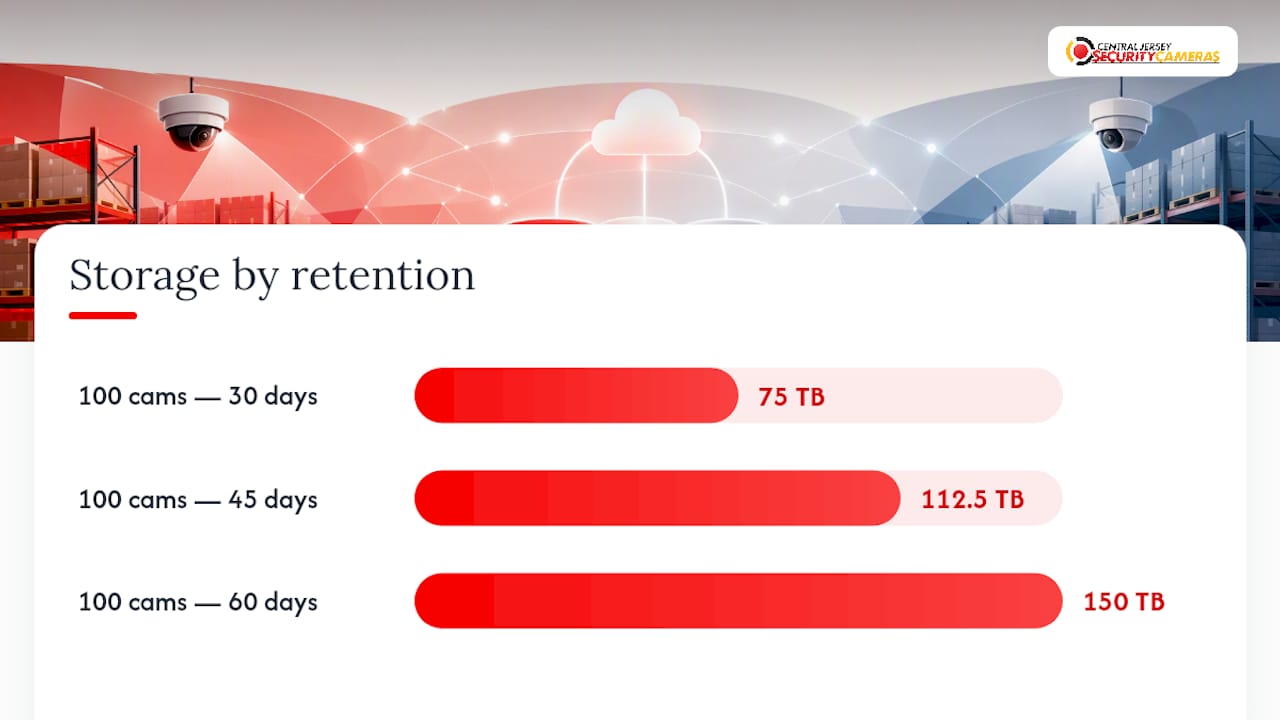
A rough working example: a 1080p camera recording continuously at a moderate frame rate uses roughly 15 to 25 gigabytes per day, depending on compression. Multiply that by 100 cameras and 45 days of retention, and a facility is looking at well over 100 terabytes of raw storage before accounting for any 4K cameras layered in at higher rates.
Budget planning for a professional install typically breaks into these categories:
- Camera hardware, weighted toward higher resolution at docks and entry points
- NVR hardware or cloud subscription fees, depending on architecture
- Cabling, conduit, and any lift rental needed for high-ceiling mounts
- Installation labor, which scales with camera count and building height
- Optional AI analytics licensing for ALPR or PPE detection features
Timeline expectations run in three phases: a site survey to map zones and confirm mounting logistics, the physical install and cabling work, and a tuning period where motion zones, analytics, and recording schedules get adjusted based on real footage.
Installation, Hardening, and Keeping the System Reliable
A camera system is only as good as its weakest network setting or its most-skipped maintenance check. Facility managers who treat installation as a one-time event usually end up with blind spots and outdated firmware within a year.
- Run a proper site survey before ordering hardware. Confirm mounting heights, lighting conditions at night, and whether existing conduit or cable trays can be reused.
- Segment cameras onto their own VLAN. Keeping surveillance traffic off the same network as warehouse management systems limits exposure if either side gets compromised, and it’s worth coordinating with whatever platform runs your warehouse management software so the two systems don’t collide on bandwidth.
- Change every default password and enable multi-factor authentication where the NVR or VMS supports it. Default credentials are the single most common way outside actors access footage remotely.
- Set a firmware update schedule. Quarterly checks catch security patches before they become a liability.
- Build a recurring maintenance routine. Clean lenses, test infrared performance at night, and verify that recordings are actually being written, not just that the camera shows a live feed.
- Document a chain-of-custody process for pulled footage. Know who can export clips, how they’re logged, and where copies are stored once an incident happens.
Pro Tip: Test your infrared and low-light performance during an actual overnight walk-through, not just on a spec sheet. A camera rated for 100 feet of IR range in ideal conditions often performs closer to half that once dust, glass, or ambient light gets involved.
What Do Installers See on Real Warehouse Sites?
Site assessments almost always reveal the same gap: managers expect uniform camera specs across the building, but the floor plan rarely supports it. Dock doors need the highest resolution the budget allows, since license plates and package labels demand real detail. Open floor areas and high aisles do better with wider-angle overview cameras at a lower resolution, since the goal there is activity tracking, not close identification.

Mixed-resolution layouts consistently balance cost against investigative value better than a blanket 4K approach, which drives up storage costs for zones that never needed that level of detail.
The most common installation mistakes come down to fundamentals: cameras mounted too high to capture usable facial detail, cable runs left without enough slack for future adjustments, and lighting that looked fine during a daytime site visit but leaves cameras nearly blind after dark.
What the Research Actually Supports, and What Doesn’t Hold Up
Most advice on warehouse security treats camera count as the whole conversation. It isn’t. The research here points somewhere more specific: placement discipline and recording architecture decide whether a system earns its cost, not how many lenses get bolted to the ceiling.
Conventional wisdom pushes facility managers toward buying 4K everywhere “to be safe.” That’s usually wasted money. A 4K camera watching an empty aisle produces the same investigative value as a 1080p one, just with a much bigger storage bill attached. Spend the resolution budget where detail actually gets used, which almost always means dock doors, cages, and entry points.
The bigger blind spot is hardening. Facility managers spend weeks debating camera brands and barely a minute on VLANs, password policy, or firmware schedules. A system with excellent cameras and a wide-open network is a liability wearing a security label.
If you’re scoping a system, start with a zone map, not a camera catalog. Everything else, resolution, recording architecture, analytics, follows from that map.
— Tom
Getting a Professional Warehouse Camera System Installed
Professional security camera installation services provide an alternative to guessing your way through a DIY camera kit built for a house, not a 200,000-square-foot facility. Where retail camera bundles force one resolution and one recording style across an entire building, a professionally designed system matches hardware to each zone’s actual job, dock detail where it counts, wide coverage where it doesn’t, and hardens the network from day one instead of leaving default passwords in place.

A professional site assessment covers the ground this guide walks through: a zone-by-zone walk of your docks, aisles, and perimeter, a camera count and layout map tailored to your racking and traffic patterns, a storage estimate based on your retention needs, and a realistic installation timeline. Services for warehouses and industrial facilities include commercial security installation, PTZ and license plate recognition cameras for dock gates, hybrid NVR and cloud recording setups, and ongoing maintenance so firmware and hardware stay current long after installation day.
If your facility handles high-value inventory or has had trouble documenting incidents cleanly, start with a site assessment. Reach out to Central Jersey Security Cameras and get a warehouse-ready security camera system quote scoped to your actual floor plan, not a generic package built for someone else’s building.
Sources
- Cloud Surveillance for Warehouses | AI VMS for Distribution Centers | iFovea
- Warehouse Surveillance Installation: 2026 Guide
- Warehouse Security Camera Systems | Arcdyn
- Commercial building characteristics (CBECS) — EIA