
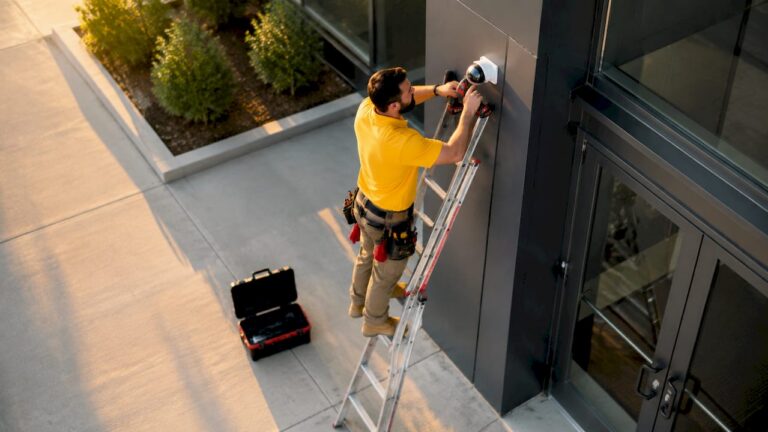
Cameras in access point monitoring are defined as the primary tools for capturing, transmitting, and analyzing visual data at entry and exit points to prevent unauthorized access and support security operations. Whether you manage a warehouse in Middlesex County or a commercial property in Monmouth County, the placement of IP cameras at access points is the single most direct way to control who enters your facility and what happens there. Research confirms that 60% of burglars avoid targets with visible cameras. That one statistic explains why access point surveillance is the foundation of any serious security plan.
What is the role of cameras in access point monitoring?
Access point monitoring, in the IP surveillance context, refers to the use of networked cameras positioned at entry and exit points to transmit video data to a recording system or monitoring platform. The industry term for this infrastructure is IP video surveillance, and it combines high-definition cameras, network access points, video management software (VMS), and AI-enabled analytics into a single system.
The access point itself is the wireless or wired bridge between a camera and the recording or monitoring system. Without a reliable access point connection, even the best camera delivers fragmented or delayed footage. Modern IP surveillance systems use both wired connections like Power over Ethernet (PoE) and wireless protocols to maintain that link.
Three core technologies define how cameras function at access points today:
- IP cameras capture high-definition video and encode it for transmission over a network.
- Network access points relay that video data to NVRs, cloud storage, or edge devices.
- AI analytics platforms process the video locally or in the cloud to flag events, recognize license plates, or detect intrusions.
Pro Tip: Position your wireless access points within direct line of sight of cameras wherever possible. Obstructions reduce signal strength and increase the risk of dropped frames during critical events.
How do cameras transmit data through access points?
IP video surveillance combines cameras with video management software, AI analytics, and access control for centralized monitoring. The camera captures video, compresses it using codecs like H.265, and sends the data stream through the access point to a recording device or cloud server. Wired PoE connections offer the most reliability. Wireless connections using Wi-Fi or cellular protocols like LTE-M and NB-IoT give installers flexibility in locations where running cable is not practical.

Edge AI is changing how that data moves. Edge-AI-integrated cameras perform local inference on the device itself, which means only relevant event data gets transmitted rather than a continuous full-resolution stream. That reduces bandwidth consumption and eliminates cloud latency. A camera at a server room door, for example, sends an alert clip only when motion is detected rather than streaming 24 hours of empty hallway footage.
Event-based monitoring also improves response time. When a camera processes video locally and triggers an alert within milliseconds, the security team receives a notification before an intruder has time to move deeper into the facility. That speed advantage is not available with passive recording systems that require someone to review footage after the fact.
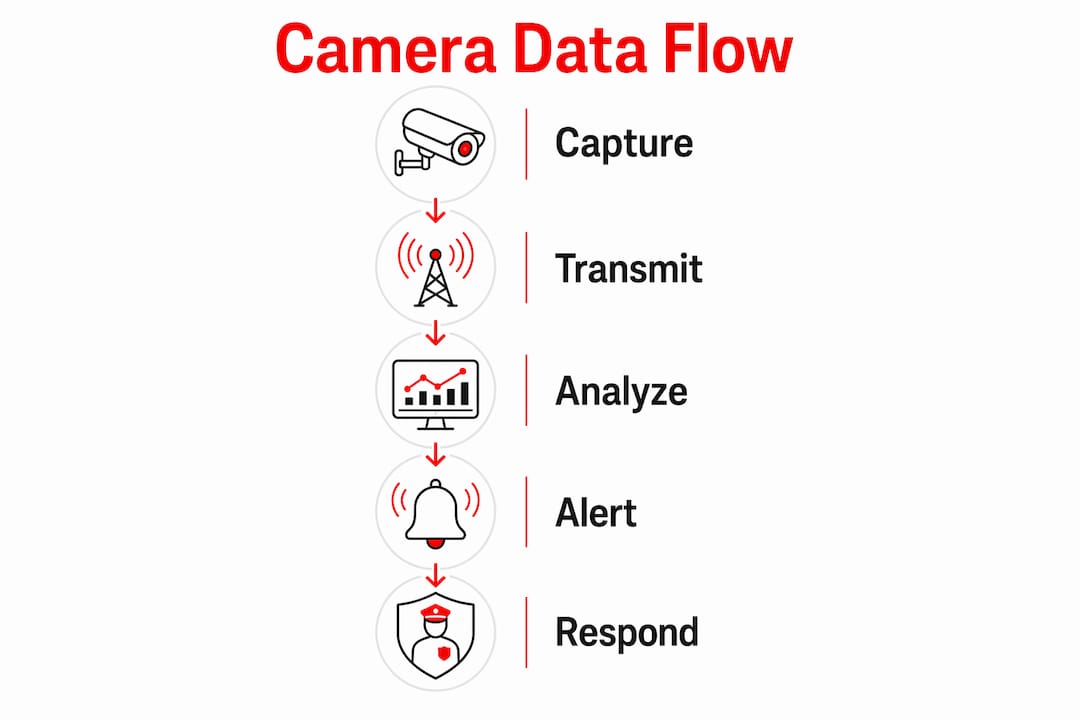
The practical result is that edge-AI cameras reduce operational costs and improve responsiveness at the same time. Fewer false alerts, lower storage requirements, and faster incident response all follow from processing video at the source rather than in the cloud.
How effective are cameras at deterring crime at access points?
Camera effectiveness at access points is measurable and well-documented. Monitored zones show a 20% drop in total crime when cameras are visible and actively watched. That figure rises sharply in specific environments. Property crime drops by 40–50% in parking structures equipped with camera networks. Parking areas are among the highest-risk access zones for any commercial property, which makes that reduction especially significant.
The type of monitoring matters as much as the camera itself. Deterrence effects range from roughly 1% with passive recording to 15% with active monitoring, and up to 34% with fully integrated systems. Passive recording means footage exists but no one watches it in real time. Active monitoring means a trained operator reviews live feeds. Fully integrated systems combine cameras, alarms, access control, and lighting into a coordinated response.
“Camera effectiveness hinges on human contextual factors. Passive recording yields minimal deterrence, but integration with active monitoring and layered security can enhance crime reduction up to 34%.” — Convoy Group Security Watch Blog
The table below shows how monitoring type affects deterrence outcomes:
| Monitoring type | Deterrence effect | Key characteristic |
|---|---|---|
| Passive recording | ~1% | Footage stored, no live review |
| Active monitoring | ~15% | Operator watches live feeds |
| Fully integrated system | Up to 34% | Cameras, alarms, access control combined |
Beyond crime deterrence, cameras at access points support faster emergency response. When an incident occurs, live footage gives dispatchers and security teams real-time situational awareness. Post-event, recorded video provides investigators with a clear timeline. Video systems also improve operational efficiency by monitoring workflow and compliance, which contributes directly to return on investment beyond the security function alone.
What camera types work best at access points?
Fixed cameras are the standard choice for doorways, gates, and lobby entrances where the field of view does not need to change. PTZ (pan-tilt-zoom) cameras suit larger access zones like loading docks or parking lots where an operator may need to track a moving subject. Active deterrence cameras add a visible and audible warning when motion is detected, which raises the deterrence effect beyond what a passive fixed camera achieves.
Advanced analytic cameras use on-device AI to perform license plate recognition, facial detection, and crowd counting directly at the access point. These cameras reduce the processing load on central servers and deliver faster alerts. For high-security access points like server rooms, data centers, or pharmaceutical storage, analytic cameras are the correct choice.
Camera positioning directly affects identification quality. NPSA guidelines recommend mounting cameras at 50% or above screen height for effective identification at sensitive access points. That height ensures the camera captures a full face rather than the top of a head.
Key access point surveillance techniques used by security professionals include:
- Alarm verification: Camera footage confirms whether a triggered alarm reflects a real intrusion or a false positive before dispatching a response.
- Intrusion tracking: PTZ cameras follow a subject from the access point through the facility in real time.
- License plate recognition: Cameras at vehicle entry points log every plate automatically for audit and investigation.
- Visitor flow monitoring: Fixed cameras track entry and exit patterns to identify unusual behavior or overcrowding.
- Integration with access control: Camera footage is time-stamped and linked to badge swipe events for complete audit trails.
Pro Tip: Pair every access point camera with adequate lighting. Cameras capture better identification detail under consistent illumination, and lighting itself acts as a secondary deterrent.
What are the best practices for camera-based access point monitoring?
Trained personnel and active monitoring are the single biggest factor in system effectiveness. Combining cameras with alarms and lighting achieves the highest crime deterrence and the lowest false alarm rates. Technology alone does not produce a 34% crime reduction. The human element, specifically an operator who responds to alerts, is what converts a recording system into a deterrence system.
Network infrastructure must match the camera load. A single access point can support only a limited number of high-definition camera streams before performance degrades. Security professionals should calculate bandwidth requirements before installation and deploy dedicated network infrastructure for surveillance traffic rather than sharing it with general office or business networks.
Video management software centralizes control. Platforms like Milestone XProtect, Genetec Security Center, and Hanwha Wisenet WAVE allow operators to manage dozens of camera feeds from a single interface, configure alert rules, and export footage for investigations. Choosing a VMS that integrates with your access control system closes the gap between who badged in and what the camera recorded at that moment.
Best practices for property owners and security professionals include:
- Layer your security: Cameras work best alongside alarms, access control readers, and perimeter lighting.
- Audit camera angles regularly: Access points change over time as furniture, signage, or construction alters sightlines.
- Set retention policies: Define how long footage is stored based on regulatory requirements and investigation needs.
- Segment your network: Keep surveillance traffic on a dedicated VLAN to protect against cyber threats targeting networked cameras.
- Test your system monthly: Verify that cameras are recording, access points are transmitting, and alerts are reaching operators.
Privacy compliance is not optional. Properties in New Jersey must post visible notice of video surveillance in monitored areas. Consult local ordinances and legal counsel before deploying cameras in areas where employees or visitors have a reasonable expectation of privacy.
Key takeaways
Cameras in access point monitoring deliver measurable crime reduction only when paired with active monitoring, proper positioning, and integration with alarms and access control.
| Point | Details |
|---|---|
| Deterrence depends on monitoring type | Passive recording deters ~1% of crime; fully integrated systems reach up to 34% reduction. |
| Edge AI reduces bandwidth and latency | Local inference sends only event data, cutting costs and improving alert speed. |
| Camera height affects identification | Mount cameras at 50% or above screen height for reliable face and plate capture. |
| Integration multiplies effectiveness | Combining cameras with alarms, lighting, and access control produces the highest deterrence. |
| Active monitoring is non-negotiable | Technology investment without trained operators watching live feeds produces minimal results. |
What I’ve learned after years of access point camera installs
The biggest mistake property owners make is treating cameras as a set-and-forget solution. I have seen facilities spend significant money on high-resolution IP cameras, only to leave them on passive recording with no one watching the feeds. The research backs up what I see in the field: passive recording produces roughly 1% deterrence. That is barely measurable.
The properties that get real results are the ones that treat cameras as part of a system. They pair cameras with alarm monitoring, they brief their staff on what to look for, and they review footage after every incident rather than only after a major loss. Edge AI is genuinely changing the calculus here. When a camera at a loading dock can detect an unauthorized person and trigger an alert in under a second, the operator’s job becomes much easier. The system does the filtering; the human makes the decision.
Cyber security is the challenge most property owners underestimate. Networked cameras are endpoints, and endpoints get attacked. Keeping firmware updated, segmenting surveillance traffic, and using strong credentials on every device are not optional steps. They are the difference between a surveillance system and a liability.
My honest view is that the best access point monitoring setups are the ones that would still function if the technology failed. That means trained staff, clear protocols, and physical security measures that do not depend entirely on a camera feed. Cameras amplify a good security program. They cannot replace one.
— Tom
How Centraljerseysecuritycameras supports your access point security
Centraljerseysecuritycameras designs and installs professionally configured camera systems for homes, businesses, warehouses, and commercial properties throughout Central New Jersey, including Ocean County, Monmouth County, and Middlesex County.
Whether you need CCTV cameras for a parking area or a complete IP surveillance system with AI analytics and access control integration, Centraljerseysecuritycameras builds each system to match the specific layout and risk profile of your property. Every installation includes professional camera positioning, network configuration, and ongoing support. Explore the best CCTV camera options for your access points or contact Centraljerseysecuritycameras directly to schedule a site assessment.
FAQ
What does a camera do at an access point?
A camera at an access point captures and transmits video of everyone entering or exiting a facility, enabling real-time monitoring, alarm verification, and post-event investigation. When paired with AI analytics, it can also trigger automatic alerts for unauthorized access attempts.
How much does camera monitoring reduce crime?
Monitored zones see a 20% overall crime reduction, while parking structures with camera networks report a 40–50% drop in property crime. Fully integrated systems that combine cameras with alarms and access control can achieve up to 34% deterrence.
What is the difference between active and passive camera monitoring?
Passive monitoring stores footage without live review and deters roughly 1% of criminal activity. Active monitoring, where a trained operator watches live feeds, raises deterrence to approximately 15% and enables real-time response to incidents.
What camera type is best for access point security?
Fixed IP cameras suit doorways and lobbies, PTZ cameras cover large zones like parking lots, and active deterrence cameras add audible and visual warnings that increase deterrence beyond passive recording. AI-enabled analytic cameras are the best choice for high-security access points requiring license plate recognition or facial detection.
How do I protect networked cameras from cyber threats?
Segment surveillance traffic on a dedicated VLAN, update camera firmware regularly, and use strong unique credentials on every device. Networked cameras are endpoints and must be treated with the same security discipline as any other device on your network.