
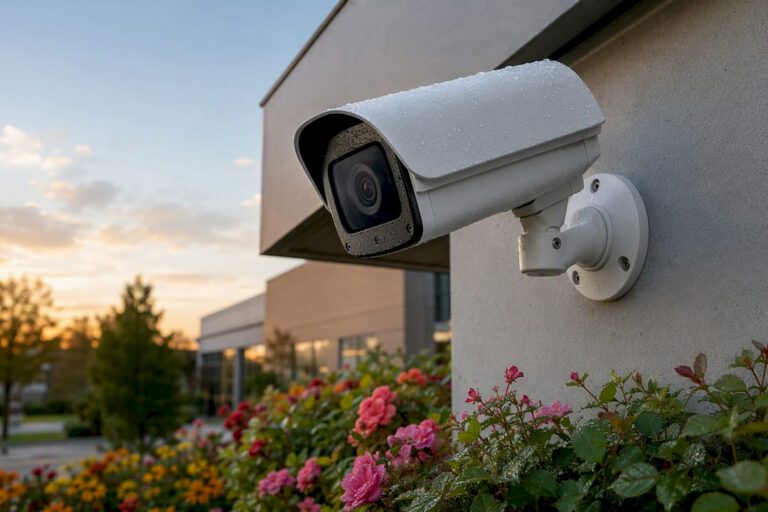
Thermal security cameras detect heat, not light, which makes them the right call when your problem is total darkness, fog, smoke, dense foliage, or a fence line that stretches farther than any spotlight can reach. They excel at perimeter detection, spotting movement through visual obscurants, and catching equipment that’s overheating before it fails. They don’t excel at identification. A thermal camera will tell you a person is walking your tree line at night; it won’t give you a face or a license plate. That’s what visible-light cameras are for, and most serious installations run both side by side.
If any of these describe your property, keep reading:
- A long or wooded perimeter where standard cameras lose detail past 50 to 100 feet
- Recurring problems with fog, glare, or low light defeating your current cameras
- Industrial equipment, electrical panels, or machinery where overheating is a real risk
- A need to detect presence without capturing identifiable footage in shared or public-adjacent spaces
If none of those apply, a good 4K visible camera with strong low-light performance may solve your problem for less money. Start with a short site read, or a walk-through with an installer, to match sensor specs to the actual detection range your property requires.
Key Takeaways
Thermal security cameras work by detecting heat rather than light, which makes them most effective for perimeter detection, obscured-visibility conditions, and equipment overheating monitoring rather than for facial or license plate identification.
| Point | Details |
|---|---|
| Best-fit use case | Long or wooded perimeters, fog-prone properties, and industrial equipment monitoring benefit most from thermal. |
| Key spec to check | Lower NETD (under 20 mK on premium units) means finer detection through fog, glare, and darkness. |
| Pair, don’t replace | Combine thermal with visible or IR cameras where you need identification detail, not just detection. |
| Watch for nuisance triggers | Animals, HVAC exhaust, and sun-heated surfaces cause false alarms without onboard classification analytics. |
| Get a professional site survey | Central Jersey Security Cameras maps detection zones and matches camera class to your property before you buy. |
Table of Contents
- How Do Thermal Security Cameras Actually Work?
- What Are the Real Benefits and Use Cases for Thermal Cameras?
- How Do You Choose the Right Thermal Camera for Your Property?
- What Drives the Cost of a Thermal Camera Installation?
- How Do Thermal Cameras Integrate with Your Existing Security System?
- What Are Thermal Cameras Bad At, and What About Privacy?
- Thermal vs. Standard CCTV vs. Infrared: Which Do You Actually Need?
- How Do Weather and Environment Affect Thermal Camera Performance?
- How Often Do Thermal Cameras Need Maintenance and Recalibration?
- What Can Thermal Analytics Actually Detect Beyond Motion?
- What Legal Rules Apply to Thermal Camera Use?
- Where Have Thermal Cameras Made a Measurable Difference?
- Why Professional Design and Installation Matter for Thermal Systems
- Ready to See What a Thermal System Would Look Like on Your Property?
- Sources
How Do Thermal Security Cameras Actually Work?
Every thermal security camera relies on a microbolometer, a sensor grid that reads long-wave infrared radiation in the 8 to 14 micron range, the band where heat naturally radiates off people, vehicles, and machinery. No visible light needed. No infrared illuminator needed either, which is the core difference from night-vision IR cameras. Standard IR cameras bounce infrared light off a scene and capture the reflection, similar to how a flash works, just outside the visible spectrum. Thermal cameras skip the illumination step entirely and just read temperature contrast, which is why they see through fog, drizzle, and glare that would blind an IR unit.
Three specs decide how well a given camera performs for your property:
- NETD (sensitivity): measured in millikelvin (mK), lower numbers mean the sensor picks up finer temperature differences. Cameras with NETD under 20 mK can resolve subtle heat signatures through fog and night glare that coarser sensors miss entirely.
- Resolution and pixel pitch: higher resolution sensors, up to 640 by 480 on premium models, extend usable detection distance and improve the odds that onboard analytics classify a target correctly instead of flagging a false alarm.
- Radiometry: select models measure absolute temperature per pixel, not just contrast, which matters if you’re monitoring equipment for overheating rather than watching for intruders.
Field of view and frame rate round things out, and both trade off against price. A wide lens covers more ground but shortens detection range for any given resolution.
What Are the Real Benefits and Use Cases for Thermal Cameras?
The specs above translate into a short list of situations where thermal cameras earn their keep, and a few where they’re honestly overkill.
- Perimeter protection at night and through obscurants. A property line running through trees, along a creek, or bordering an unlit field is exactly where thermal shines, since heat-sensing detection works through smoke, mist, and complete darkness conditions that would render a standard camera nearly useless.
- Long-range coverage for campuses, warehouses, and industrial yards. A longer lens on a thermal unit can flag a person or vehicle hundreds of feet out, well before they reach a building. That early warning is the whole point of perimeter analytics like fence and motion detection zones used in some thermal cameras, which trigger before an intruder ever gets close.
- Equipment monitoring, not just intrusion detection. Radiometric thermal cameras can flag overheating electrical panels, motors, or HVAC equipment as part of a preventive maintenance routine, catching a failing bearing or a loose connection before it becomes a fire.
- Presence detection with a privacy buffer. Because thermal footage shows a heat outline rather than a recognizable face, it can detect that someone is present without capturing identifying details, useful for shared spaces or properties where full facial capture raises privacy concerns.
Pro Tip: If your main goal is stopping package theft on a porch or watching a retail entrance, skip thermal. A well-placed 4K camera with good low-light sensitivity solves that problem more cheaply. Save thermal budget for the parts of your property standard cameras genuinely can’t cover.
How Do You Choose the Right Thermal Camera for Your Property?
Matching a camera to your property starts with distance, not price. Walk your perimeter and note the longest stretch a single camera needs to cover, then work backward to the spec sheet.
- Match NETD, sensor resolution, and lens or field of view to that distance. A camera rated for 200 feet of detection on a spec sheet assumes ideal conditions; real foliage and weather shave that number down.
- Decide whether you need onboard analytics. Human and vehicle classification cuts down on the false alarms that make monitored systems expensive to run, since AI analytics that distinguish people from animals or vehicles reduce nuisance triggers substantially compared to basic motion detection.
- Confirm environmental ratings and power requirements before you commit. IP66 or IP67 housings, MIL-STD durability ratings, and Power over Ethernet (PoE) compatibility affect installation cost and long-term reliability.
- Ask about firmware update policy and cybersecurity practices. A camera on your network is a device that needs patching like any other.
When you sit down with an installer, bring these five questions:
- What’s the realistic detection range for a person versus a vehicle at this specific site?
- How does the system reduce false alarms from animals, wind, or passing headlights?
- Does this camera integrate with the NVR or VMS I already have, or plan to install?
- What’s covered under warranty, and what does ongoing support cost?
- What’s the fully installed price, including cabling, mounting, and commissioning, not just the camera itself?
What Drives the Cost of a Thermal Camera Installation?
Thermal cameras cost more than comparable visible-light units, and the gap is real. Entry-level thermal modules sit at the low end of that range; mid-tier units with better NETD and onboard analytics cost more; full perimeter systems with multiple long-range units, PTZ handoff, and centralized analytics scale up from there. The camera itself is only part of the bill.
Labor accounts for a meaningful chunk of any quote. A proper installation includes:
- A site survey to map detection zones and identify mounting points with a clear, stable sightline
- Mounting height and alignment, since thermal cameras aimed too low pick up ground heat and false-trigger constantly
- Calibration and flat-field correction (FFC), the process that keeps image quality consistent as ambient temperature shifts
- Commissioning of any analytics, tuning classification zones and sensitivity for your specific property
System-level costs add up too: cabling and PoE switches, NVR or VMS licensing, optional cloud storage, and ongoing monitoring contracts if you want a professional watching alerts around the clock. Pairing thermal units with visible cameras at chokepoints, rather than trying to cover an entire property in thermal, is usually the more cost-efficient path.
How Do Thermal Cameras Integrate with Your Existing Security System?
Most thermal deployments don’t stand alone. They work inside a larger system where thermal cameras detect and visible or PTZ cameras identify.
Before you buy, confirm ONVIF support and check compatibility with whatever VMS or NVR you’re running or planning to run. If your integrator needs custom functionality, ask about API or SDK access up front rather than after installation. A system integrator like Gsgicorp can walk through what a given platform supports before you commit to hardware.
Onboard analytics matter more here than almost any other spec. Cameras that classify humans versus vehicles rather than just flagging any motion cut down dramatically on 3 a.m. alerts caused by a raccoon or a passing car. Ask any vendor for real demo footage of classification in action, not just a spec sheet claim.
PTZ handoff is the other piece worth understanding: a thermal camera detects motion at range, then hands geolocation data to a PTZ camera that zooms in for identification, giving you both early warning and usable detail in one workflow.
Pro Tip: Never leave default passwords on a networked camera. Insist on signed firmware updates and put cameras on a segregated network VLAN, separate from your office computers, so a compromised camera can’t become a doorway into your business systems.
What Are Thermal Cameras Bad At, and What About Privacy?
Thermal has real limits, and knowing them up front saves you from a disappointing install.
- Thermal footage generally can’t capture identification-level detail. No faces, no readable license plates, no distinguishing clothing. If you need to identify who was on your property, you need a paired visible-light or IR camera at that location, not thermal alone.
- Nuisance triggers come from a predictable set of sources: animals crossing a yard, HVAC exhaust venting warm air, and sun-heated pavement or rooftops holding residual heat well into the evening. Careful placement, tighter sensitivity thresholds, and analytics that filter by size and shape cut most of this down.
- On the privacy side, thermal’s inability to capture identifiable features can be useful in shared or semi-public spaces, but thermal cameras are still subject to local surveillance laws. Post signage where required, keep a written policy on footage retention, and check state and local rules before pointing any camera, thermal or otherwise, at a neighboring property or public right-of-way.
Thermal vs. Standard CCTV vs. Infrared: Which Do You Actually Need?
None of these three technologies is a universal answer, and the honest comparison depends entirely on what you’re trying to catch and in what conditions.
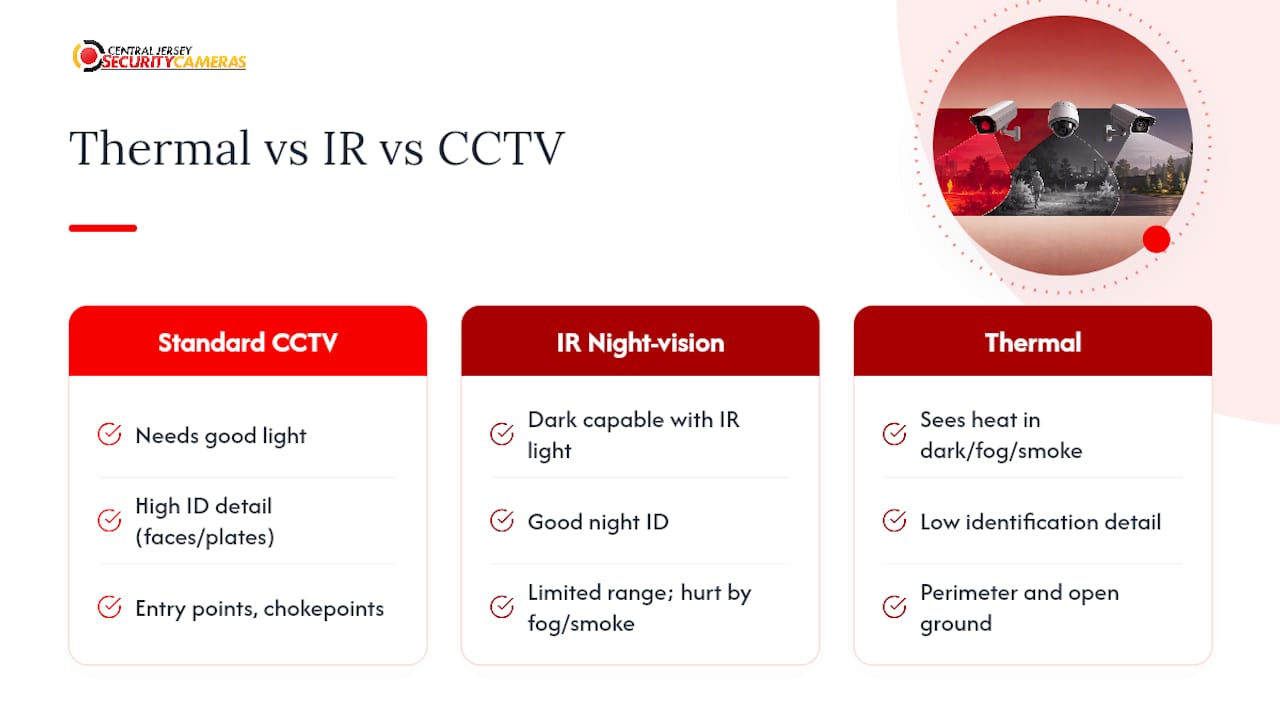
Standard CCTV, meaning ordinary visible-light cameras, delivers the most detail per dollar in good lighting. Faces, plate numbers, clothing colors, all readable, provided there’s enough ambient or supplemental light. Drop the light level to near zero, though, and standard CCTV becomes close to useless without help.
IR night-vision cameras solve part of that problem by bouncing infrared light off the scene, similar to a flash, to produce a usable image in the dark. Security testing consistently finds IR cameras deliver more identification detail than thermal when the goal is recognizing a face or reading a plate at night, because they’re still capturing a reflected image, just in a wavelength you can’t see. Their limit is range and obscurants. Fog, heavy rain, and smoke scatter infrared light and degrade the image, and IR illuminators only reach so far before the picture washes out.
Thermal closes exactly that gap. It ignores ambient light entirely and reads heat, so fog, smoke, and total darkness barely affect performance. What it sacrifices is detail.
The practical answer for most properties isn’t choosing one technology. It’s layering them: standard or IR cameras at entry points and chokepoints where identification matters, thermal along perimeters and open ground where early detection at range matters more than a clear face. Replacing a working CCTV system entirely with thermal is rarely the right move. Adding thermal where CCTV already struggles usually is.
How Do Weather and Environment Affect Thermal Camera Performance?
Thermal cameras handle darkness and fog better than any visible-light alternative, but they’re not immune to the environment, and a few conditions genuinely degrade performance.
Extreme cold or extreme heat can compress the temperature contrast a sensor sees. On a 100 degree Fahrenheit day, a sun-baked driveway and a person’s body temperature aren’t that far apart on the thermal scale, which is why afternoon detection ranges often run shorter than the same camera achieves at 2 a.m. Heavy, sustained rain scatters long-wave infrared more than a light drizzle does, gradually shortening effective range, though the degradation is nowhere near what standard cameras experience in the same conditions.
Vegetation is the other variable worth planning around. Dense foliage blocks thermal radiation just as it blocks visible light, so a camera aimed through a hedge or heavy tree cover loses most of its advantage. The fix is placement, not a better camera: mount units with a clear sightline to the detection zone, and trim or route around obstructions during the site survey rather than trying to compensate with a higher-spec sensor afterward.
Wind matters indirectly. It moves branches and debris that can look like motion to poorly tuned analytics, which is another reason classification software that distinguishes people and vehicles from background clutter earns its cost in fewer false alerts. None of these factors make thermal unreliable. They just mean detection range on a spec sheet is a best-case number, and a competent installer adjusts expectations, and camera placement, to your property’s actual conditions rather than the manufacturer’s lab results.
How Often Do Thermal Cameras Need Maintenance and Recalibration?
Thermal cameras need less day-to-day attention than most people assume, but they’re not fully maintenance-free, and skipping upkeep shows up as gradually degraded image quality rather than an obvious failure.
Flat-field correction, or FFC, is the core calibration process. The camera periodically recalibrates itself against a uniform internal reference to correct for pixel drift caused by temperature changes in the sensor itself. On most modern units this happens automatically, triggered by a brief mechanical shutter click you may notice but never need to think about. Where manual FFC matters is right after installation and after any major seasonal temperature swing, when a technician should confirm the automatic calibration is holding and image quality still matches spec.
Physical maintenance is straightforward: check housing seals and gaskets annually, especially on units rated IP66 or IP67, since a compromised seal lets moisture in and degrades both the sensor and any de-fog or heater elements built into the housing. Clear vegetation growth that’s crept into the field of view since the last inspection. Confirm mounting hardware hasn’t loosened, since a camera that’s shifted even a few degrees can drift out of its intended detection zone without anyone noticing until a review of missed activity.
Firmware updates round out the list, and they matter more for thermal units with onboard analytics than for basic motion-triggered cameras, since classification accuracy improves as manufacturers refine their detection algorithms. A camera running two-year-old firmware is leaving accuracy on the table. Most professional service contracts include an annual check that covers all of this in one visit rather than leaving it to chance.
What Can Thermal Analytics Actually Detect Beyond Motion?
Basic motion detection on a thermal camera is almost a wasted opportunity. The real value sits in the analytics layered on top of the heat signature.
Human and vehicle classification is the baseline capability worth paying for. Rather than triggering an alert on any heat source that moves, the onboard AI distinguishes a person’s shape and gait from a car, a deer, or wind-blown debris, which is the single biggest lever for cutting false alarms on a rural or wooded property. Fence line and virtual tripwire analytics build on that classification, letting you draw a specific zone or line on the camera’s field of view and trigger an alert only when a qualifying target crosses it, ignoring activity elsewhere in frame.
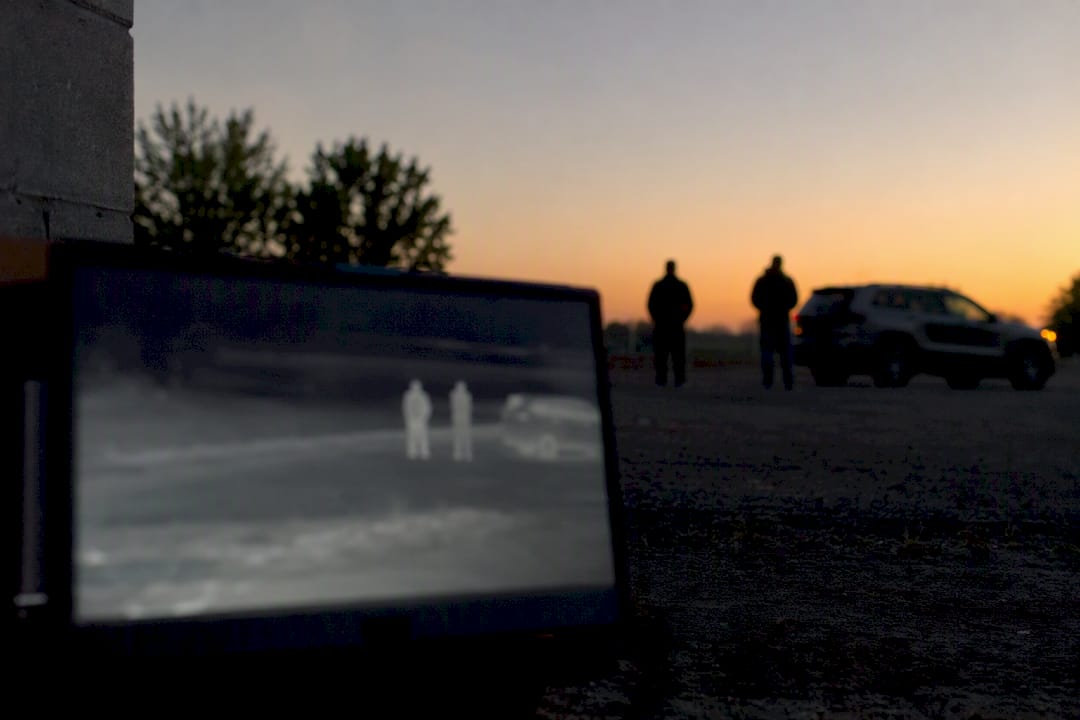
Anomaly detection goes a step further on higher-end systems, flagging behavior that deviates from an established pattern, such as a vehicle idling in a spot where none normally park, or a person lingering near a fence line rather than passing through. This is genuinely different from simple motion detection, which treats every trigger identically regardless of context.
Radiometric analytics serve an entirely different purpose: continuous temperature monitoring on equipment, panels, or structures, with automated alerts when a reading crosses a threshold that suggests a developing fault. This is less about intrusion and more about catching a mechanical or electrical problem before it becomes a fire or an outage.
The common thread across all of this software is that it only works as well as the camera’s underlying sensitivity and resolution allow. A high-NETD sensor feeding weak analytics software still produces mediocre results, and strong software paired with a low-resolution sensor runs out of usable detail at range. The two have to be evaluated together, not separately.
What Legal Rules Apply to Thermal Camera Use?
Thermal imaging occupies a genuinely favorable position on privacy compared to standard video, precisely because it can’t capture faces or license plates. That advantage doesn’t mean the technology operates outside the law.
Surveillance rules in the United States vary meaningfully by state and by what the camera actually points at. Recording your own property, including a perimeter or fence line you own, is generally permitted. Pointing any camera, thermal or otherwise, at a neighbor’s property, a public sidewalk in a way that specifically targets individuals, or areas with a legitimate expectation of privacy, such as inside another person’s home visible through a window, is where legal exposure begins. These lines don’t shift because the camera is thermal rather than visible light; the underlying surveillance and privacy laws in your state apply regardless of camera technology.
Data handling matters too, particularly for businesses. If your thermal system stores footage or feeds into an access control or HR process, retention policy and who can access that footage should be documented, the same way you’d handle standard CCTV footage. Signage disclosing video surveillance is required in some jurisdictions and a smart practice everywhere, even though thermal’s lack of identifiable detail lowers some of the risk that drives those disclosure rules for standard cameras.
None of this is a substitute for checking your specific state and municipal requirements, or for asking a licensed installer familiar with local rules before pointing any camera at areas beyond your own property line.
Where Have Thermal Cameras Made a Measurable Difference?
The clearest evidence for thermal’s value shows up in the specific conditions where other technology fails outright, rather than in a single dramatic case.
Warehouse and industrial yards with long, unlit perimeters are a common successful use case. A property with several hundred feet of fence line bordering an open field or wooded area typically can’t afford lighting or camera density to cover it with standard video, and even if it could, a person moving through brush at night wouldn’t register clearly on a visible-light sensor anyway. Thermal solves that gap directly, flagging a body-heat signature well before an intruder reaches a building, giving security staff or a monitoring center time to respond rather than reviewing footage after the fact.
Fog and coastal weather are the second recurring scenario. Properties near water or in regions with frequent low-lying fog report that standard cameras become nearly useless for stretches of the year, while thermal performance holds up because it isn’t reading reflected light at all. Campuses and large commercial sites use the same principle for perimeter analytics like virtual fence lines, catching a crossing before it becomes a break-in attempt rather than after.
Equipment monitoring is another important use case for thermal cameras. A radiometric thermal camera watching an electrical panel or a piece of rotating machinery can catch a temperature climb that signals a failing component days before it would otherwise show up as a breakdown, turning a reactive repair into a scheduled one.
Why Professional Design and Installation Matter for Thermal Systems
Thermal cameras only perform to spec when they’re placed, aimed, and calibrated correctly, and that’s where most self-installed systems fall short. Central Jersey Security Cameras designs and installs custom surveillance systems for homes, businesses, warehouses, schools, and industrial facilities across Central New Jersey, matching camera class to the actual layout of a property rather than a generic spec sheet.
That means selecting the right mix of IP cameras, 4K units, license plate recognition, PTZ, and active deterrence cameras for each detection zone, not defaulting to one camera type everywhere. A thermal unit aimed a few degrees too low, or mounted where mid-day sun bakes the field of view, underperforms regardless of how good the sensor specs looked on paper. Getting the placement, height, and calibration right the first time is what separates a system that quietly does its job from one that generates false alarms until someone gives up on it.
— Tom
Ready to See What a Thermal System Would Look Like on Your Property?
A proper thermal camera quote starts with a site survey, not a sales call. Central Jersey Security Cameras walks your property, maps out where detection range actually matters, and comes back with a detection map, recommended camera classes for each zone, and a realistic budget estimate before you commit to anything.

From there, our team handles the full scope: system design, professional installation, integration with your existing NVR or VMS, and commissioning of analytics so classification and sensitivity are tuned to your specific property rather than left on factory defaults. We also handle ongoing maintenance, so calibration drift and firmware updates don’t become your problem to track. If you’re weighing thermal against a standard camera upgrade, or trying to figure out where a perimeter system actually needs to start and stop, request a site survey for your home or business and get a straight answer before you spend a dollar on equipment.
Sources
- FLIR Triton F-Series ID — Flir
- Thermal Security Cameras & Surveillance Systems — Pelco
- AXIS Q1971-E Thermal Camera — Axis Communications