

Most businesses should retain CCTV footage for 30 to 90 days, with 90 days as the safer default for any property that handles cash, inventory, or public access. The right number isn’t a fixed rule; it’s the longest realistic window you’d need to investigate a theft, defend an insurance claim, or respond to a subpoena. Regulated sites often need longer. Whatever the number, back it up with motion-based recording, H.265 compression, and a documented legal hold process for flagging clips before they overwrite.
TL;DR:
- Most businesses should retain CCTV footage for 30 to 90 days, depending on the property type, with high-security sites often requiring at least 90 days.
- Actual retention depends on camera resolution, frame rate, bitrate, codec, and recording mode, with motion-triggered recording extending storage duration compared to continuous recording.
- To accurately determine storage needs, calculate GB per day per camera, multiply by the number of cameras, and adjust based on intended retention days and recording strategies.
- Implementing a written retention policy per camera tier, with clear documentation and regular review, ensures compliance and readiness for legal or insurance claims.
- Combining on-premises storage with cloud or hybrid solutions allows scalable retention management, but changing recording habits often reduces the need for larger hardware investments.
Table of Contents
- What Is a Reasonable CCTV Storage Days Benchmark by Industry?
- What Determines How Long Your System Actually Retains Video?
- How Do You Calculate the Storage You Actually Need?
- How Do You Set and Document a Retention Policy?
- How Do You Preserve and Export Footage Without Losing It?
- Should You Store Footage On-Premises, in the Cloud, or Both?
- Quick Checklist and Sample Retention Table
- Why Retention Belongs in the System Design, Not an Afterthought
- Get a Retention-Ready Camera System Designed for Your Property
- Sources
- FAQ
What Is a Reasonable CCTV Storage Days Benchmark by Industry?
There’s no single legal mandate for video retention for CCTV in most industries, which is exactly why so many property owners guess wrong. The right window depends on how long it realistically takes to discover a problem and act on it. A retail theft might surface in a chargeback dispute six weeks later. A workplace injury claim might not land on your desk until the statute of limitations clock is already ticking.
Insurers commonly expect a minimum of 30 days, and many operations should plan for 60 to 90 days depending on their claim history and exposure. Here’s how that plays out by property type:
- Retail and convenience stores: 60 to 90 days, since chargebacks, return fraud, and shoplifting cases often take weeks to surface.
- Offices and coworking spaces: 30 to 60 days, mostly to cover HR incidents and package theft disputes.
- Warehouses and distribution centers: 60 to 90 days, tied to inventory shrinkage audits and vendor disputes.
- Construction sites: 30 to 60 days, focused on equipment theft and liability claims during active builds.
- Healthcare facilities: 90 days or longer, given the pace of licensing board reviews and patient complaint timelines.
- Parking lots and garages: 30 to 45 days for general monitoring, longer at entry and exit lanes where vehicle disputes happen.
- High-security or regulated sites: 90 days or more, often set by contract or insurance policy rather than convenience.
Zone your cameras instead of treating every lens the same. Entrances, registers, and loading docks deserve the top end of your range. A hallway or storage closet with low foot traffic can run on the shorter end without adding real risk.
What Determines How Long Your System Actually Retains Video?
Retention isn’t just a setting you type into a menu. It’s the output of resolution, frame rate, bitrate, codec, and recording mode all working against a finite disk. Push any of those higher and your actual retention shrinks, even if the policy on paper says 90 days.
Resolution and frame rate drive file size directly. A 4K camera recording at 30 frames per second generates dramatically more data per hour than a 1080p camera at 15 fps, and that gap compounds fast across multiple cameras. Bitrate, the amount of data encoded per second of video, is the lever most installers adjust first because it’s invisible to the naked eye until you push it too low and clips start looking blocky during a zoom.
Codec choice matters more than most property owners realize. Motion-based recording paired with H.265 compression can extend retention by roughly 30 to 50 percent compared to older H.264 continuous recording at similar image quality.
By the numbers: A standard 1TB hard drive running four 1080p cameras on H.265 typically holds about a week to just over a week of continuous 24/7 recording. Switch those same cameras to motion-triggered recording and that window often stretches significantly longer on the same drive.
- Continuous recording captures everything, all the time, and eats storage fastest.
- Motion-triggered recording only writes footage when the system detects activity, cutting file volume substantially in low-traffic areas.
- Scene complexity (foliage, traffic, flickering lights) can spike bitrate even in motion mode, so test real-world footage, not spec sheets.
How Do You Calculate the Storage You Actually Need?
The math is simpler than it looks: GB per day per camera × number of cameras × retention days = total storage required. You can find your current GB/day by checking how much footage your NVR wrote in the last 24 hours and dividing by the number of active cameras.
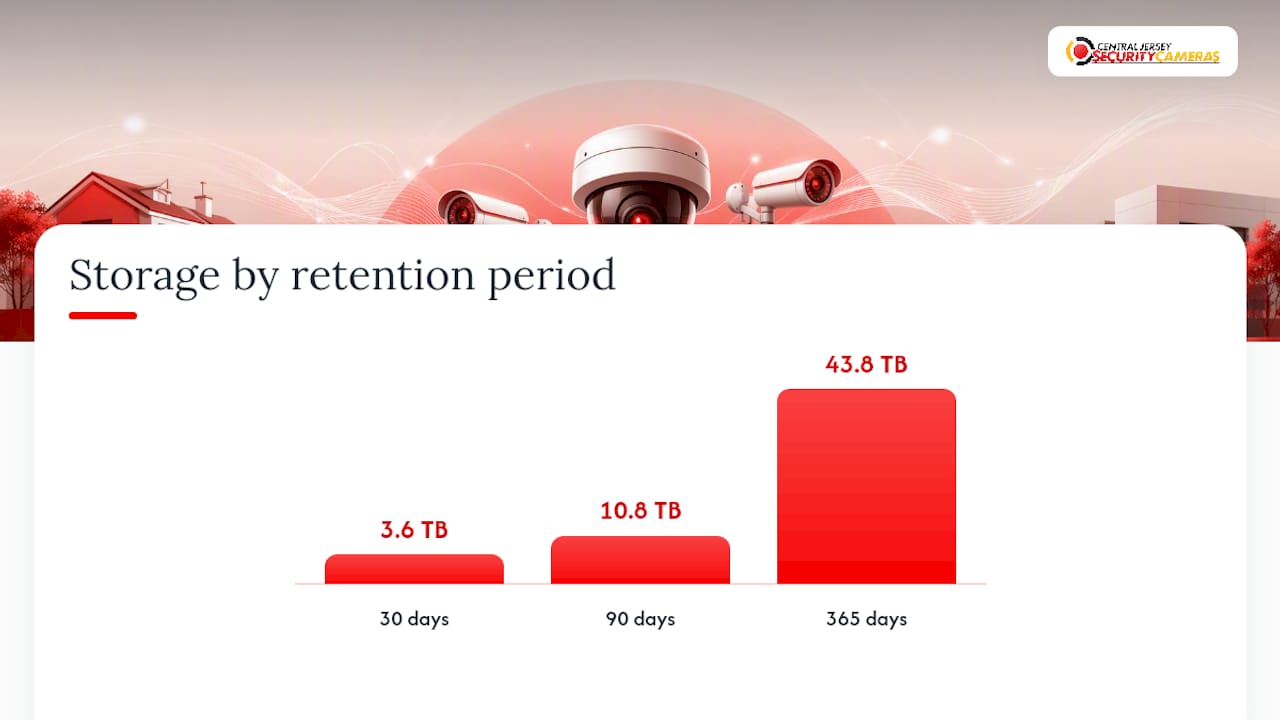
Say your system averages 15 GB per day per camera across eight cameras. At 30 days, you need roughly 3.6 TB. Push that to 90 days and you’re looking at nearly 10.8 TB, since moving from 30 to 90 days of retention typically triples storage requirements for the same camera set and settings. Stretch to a full year and you’re well past 43 TB unless you change your recording strategy along the way.
That tripling effect is why smart property owners don’t just buy bigger drives. They change how footage gets recorded in the first place. A few levers worth checking before you write a check for new hardware:
- Switch to motion-triggered recording on low-traffic cameras to cut daily file volume without losing coverage where it matters.
- Add or expand hard drive capacity in your existing NVR, which is often the cheapest fix if your recorder has open bays.
- Consider network bandwidth before adding cloud backup, since uploading 10+ TB monthly can strain a standard business connection.
- Use cloud storage tiers strategically, archiving only flagged or high-priority camera feeds instead of your entire system.
- Apply per-camera tiering, giving entrances and registers 90 days while back-of-house cameras run on a 30-day loop.
For a deeper look at sizing systems for higher-value sites, our guide to camera systems for self-storage facilities walks through NVR capacity planning in more detail.
How Do You Set and Document a Retention Policy?
A retention policy that only lives in someone’s head isn’t a policy. It’s a habit that breaks the first time an employee changes recorder settings or a hard drive fills up. Retention should be a written decision that ties camera purpose to a specific number of days, not something left to whatever the disk happens to hold.
Here’s a workable process for building one:
- Inventory every camera by location, purpose, and current recording mode.
- Classify each camera into a risk tier: high (entrances, registers, docks), medium (hallways, parking), or low (storage rooms, break areas).
- Set a retention floor per tier, using the industry benchmarks above as a starting point, and note any exceptions for regulated areas.
- Configure your NVR or VMS to match those numbers exactly, using time-based deletion rather than letting the disk overwrite on its own.
- Document and review the policy at least annually, or whenever you add cameras, change insurers, or sign a new lease with retention obligations written into it.
Your written policy should include a camera register, retention days per camera or group, the deletion method in use, an exception process for legal holds, and a review cadence. If your lease or insurance contract specifies a minimum retention period, that number becomes your floor, not a suggestion.
Pro Tip: Don’t trust the settings menu. Check the timestamp on your oldest available footage right now. If your NVR is configured for 90 days but the oldest clip you can find is 34 days old, your actual retention doesn’t match your documented policy, and that gap is exactly what an insurer or attorney will find first.
How Do You Preserve and Export Footage Without Losing It?
The moment an incident happens, that clip becomes vulnerable. Most CCTV systems record in a continuous loop, meaning today’s footage eventually overwrites last month’s unless someone actively pulls it out. A reliable approach uses a primary loop archive for routine footage alongside a documented procedure to flag and move incident clips into permanent storage before they get overwritten.
- Flag and lock incident footage immediately, moving it to a protected folder outside the normal recording loop.
- Export in universal file formats rather than proprietary NVR containers that require specific playback software.
- Preserve timestamps and metadata with the export, since a clip without a verifiable time stamp loses value in any dispute.
- Log every export with who pulled it, when, and why, creating a chain of custody an attorney or insurer can follow.
Exporting is where most retention plans quietly fail. A clip exported in a proprietary format with no playback software attached is functionally useless once it lands on someone else’s desktop.
Pro Tip: Always export a short verification clip immediately after flagging footage, and confirm it plays back correctly on a different computer before you consider the evidence secure. Waiting until a subpoena arrives to test your export process is how businesses discover, too late, that their files are corrupted or unreadable.

Should You Store Footage On-Premises, in the Cloud, or Both?
Your storage architecture decides whether your retention policy is even achievable. On-premises NVRs give you full control and predictable costs, but they cap out at whatever physical drive capacity you’ve installed, and expanding that capacity later can mean downtime.
Cloud video management systems flip that tradeoff. Enterprise cloud platforms let you configure retention per camera, per group, or per location, which means you can apply 90 day retention to your entrances and 30 days to a back office without buying separate hardware for each.
- On-premises NVR: predictable one-time cost, full local control, but limited by physical drive space and slower to scale.
- Cloud VMS: scales easily with per-camera tiering, but depends on your internet bandwidth and monthly subscription costs.
- Hybrid setup: local short-term storage for immediate access, paired with cloud archiving for flagged or long-term footage.
The right choice usually comes down to how many cameras you’re running and how fast you need to pull footage during an active incident. A property with reliable internet and a dozen cameras across multiple entrances is often better served by hybrid architecture than either extreme alone.
Quick Checklist and Sample Retention Table
Before you touch a single setting, verify what your system is actually doing versus what your policy says it should do. Then work through this short list:
- Check the oldest available timestamp on your recorder to confirm real retention matches documented retention.
- Increase retention on high-priority cameras first: entrances, registers, and loading docks.
- Enable flagging and legal hold procedures so incident clips stop being vulnerable to overwrite.
- Export any at-risk footage tied to an open claim or investigation immediately.
- Update your written policy to reflect any changes you make.
Why Retention Belongs in the System Design, Not an Afterthought
Retention requirements should be built into every system bid, not added on after installation. The mistake we see most: a property owner buys cameras based on picture quality alone, then discovers during an actual claim that their footage only goes back nine days. Planning storage capacity around your real investigation timeline, before the cameras go up, prevents that failure entirely.
— Tom
Get a Retention-Ready Camera System Designed for Your Property
If the storage math above told you your current setup won’t hold footage long enough, that’s a design problem, not just a settings problem. CCTV systems should be designed around your actual retention needs from the start, sizing NVR capacity, camera placement, and recording modes to match how long you realistically need footage on hand, not just what a default configuration provides.

That means a site survey that accounts for your industry’s realistic retention window, a recorder configuration that uses motion-based recording and modern codecs to stretch storage without sacrificing image quality, and documented export procedures your staff can actually follow when an incident happens. We also work with businesses that need a parallel evidence trail; construction operators managing jobsite documentation alongside video surveillance often pair their camera system with a tool like Ditch for photo-based site records.
Request a retention needs assessment through our security camera installation page and we’ll size a system that matches your actual investigation timeline instead of a generic default.
Sources
- How long do security cameras keep footage? | Blog Ajax
- Cloud Video Retention Explained: How Long to Keep Footage, Storage Costs, and Compliance – IFovea
- CCTV Footage Retention Period: How Long to Keep It · Fora Soft Learn
- Video Surveillance Retention Policy Guide: 30 vs 90 vs 365 Days | JB Technologies
- Princeton public safety retention policy (example of flagging/preservation practice)
FAQ
How Long Should CCTV Footage Be Retained?
Most businesses should keep footage for 30 to 90 days, with the exact number set by the longest realistic window you’d need to investigate an incident or file a claim. Insurers commonly expect at least 30 days, and higher-risk sites like retail or healthcare often plan for the longer end of that range.
Can I Get CCTV Footage From Two Years Ago?
In almost every case, no. Most systems retain footage for between 7 and 90 days before it’s automatically overwritten, so footage from two years back only survives if someone specifically flagged and exported it at the time.
How Long Can You Retain CCTV Footage?
There’s no fixed ceiling. Some regulated or high-security properties keep footage for a year or longer when contracts or insurance policies require it, though most standard commercial systems are built for the 30 to 90 day range.
How Long Is CCTV Footage Usually Kept?
Typical retention runs 30 to 90 days depending on industry, camera settings, and storage capacity. A retail store might keep 90 days on registers and entrances while a low-traffic hallway camera runs on a shorter 14 to 30 day loop within the same system.
What Does Central Jersey Security Cameras Charge for Installation?
Central Jersey Security Cameras charges a $99 one-time installation fee for new camera systems, with ongoing alarm monitoring available for $24.95 to $29.95 per month.