
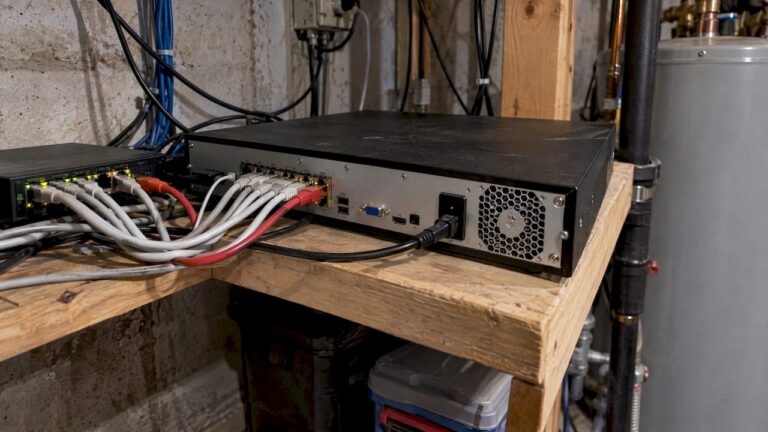
An NVR channel is one dedicated input on the recorder for one IP camera stream. A 16-channel NVR records up to 16 cameras, and it cannot register a 17th. But channel count is only one of several limits. PoE ports, incoming bandwidth, decoding power and storage decide whether those channels work well in practice.
This guide walks through each limit in plain terms, with worked examples, so you can size a recorder for a house, a shop or a warehouse without overbuying or running short.
TL;DR
- One channel equals one camera stream. An 8-channel NVR handles up to 8 cameras, a 32-channel NVR up to 32.
- Channels are not the same as PoE ports. A recorder can have 16 channels and only 8 built-in PoE ports, with a separate PoE switch covering the rest.
- Incoming bandwidth (in Mbps) and decoding capability can cap performance before channels run out.
- Pick a channel count above today’s camera count so you can add cameras later without replacing the recorder.
- A professional design checks all of these together before anything is mounted.
Table of Contents
- What a channel means on an NVR
- Channels versus PoE ports
- How many cameras fit on a 32-channel NVR
- The limit most people miss: incoming bandwidth
- Decoding capability: recording is not the same as viewing
- Storage: the quiet fourth limit
- How to choose a channel count
- What happens when you hit a limit
- Compatibility when you mix brands
- Get a recorder sized for your property
- FAQ
- Sources
What a channel means on an NVR
Think of a channel as a dedicated lane between one camera and the recorder. Each IP camera sends its video to the NVR over the network, and the NVR assigns that stream to a channel. One camera takes one channel. If the recorder has 8 channels, you can add 8 cameras, and the ninth will be refused even if the recorder has plenty of processing power left.
That is why channel counts come in fixed steps. NVRs are commonly sold in 4, 8, 16, 32 and 64-channel versions, and a few larger models exist for big sites. The number printed on the box is the maximum number of cameras, not a promise that any mix of cameras will run flawlessly.
Channels apply to IP cameras on a network recorder. Older analog systems use a DVR with its own channel count, tied to coaxial inputs. If you are comparing the two designs, our overview of security cameras installed in New Jersey homes shows what a modern IP setup looks like on a real property.
Channels versus PoE ports
This is the point that confuses most buyers. Many NVRs have built-in Power over Ethernet (PoE) ports, so you plug a camera straight into the back of the recorder and it gets both power and data through one cable. Those ports are a convenience. They are not the channel count.
Clare Controls, a manufacturer of recorders, separates physical channels from virtual channels. Physical channels are the PoE ports on the back of the recorder. Virtual channels are cameras that reach the recorder over the local network instead. In their example, the first camera added over the LAN on an 8-port unit takes channel 9, and the next takes channel 10, and so on.
In practice that means:
- A 16-channel NVR with 8 PoE ports can still record 16 cameras. Eight plug in directly, and the other eight connect through a PoE switch on the same network.
- A 32-channel NVR with 16 PoE ports works the same way: the remaining cameras need an external switch, but they still use recorder channels.
- Some recorders have no PoE ports at all. They rely entirely on a switch and are sold purely on channel count.
Cameras added through a switch do not skip the channel limit. They simply move the power source off the recorder. Cabling that runs long distances, or cameras spread across several buildings, usually calls for a switch anyway. Our power budget checklist for PoE security cameras covers how much a switch can supply, and the same logic applies to the PoE switch powering a camera system.
When cameras connect through the LAN rather than directly to the recorder, the quality of the network matters. Cloud-managed networking, such as Meraki security camera solutions, is one way larger properties keep switches and cameras organized. For a house, a simple unmanaged PoE switch is often enough, and our guide to how home networks support security cameras explains the basics.
How many cameras fit on a 32-channel NVR
Up to 32, with one stream per channel. That is the ceiling, and it holds only while the recorder’s other limits stay in range. A 32-channel unit with 16 PoE ports, for instance, needs a switch for the second sixteen. And 32 cameras at high resolution may demand more bandwidth than the unit can ingest.
The same logic applies at every size. Channel count tells you how many cameras are allowed. Bandwidth and decoding tell you how many cameras at what quality are practical.
The limit most people miss: incoming bandwidth
Every camera sends a stream with a bitrate, measured in megabits per second (Mbps). The NVR can only ingest so much total data at once. That figure is called incoming bandwidth, and it is listed on the recorder’s datasheet.
Hikvision’s published specs show how it scales with size. Its DS-7600NI-Q1 series datasheet lists 40, 80 and 160 Mbps of incoming bandwidth for the 4, 8 and 16-channel models. The DS-7616NI-Q2/16P datasheet gives 160 Mbps for a 16-channel unit.
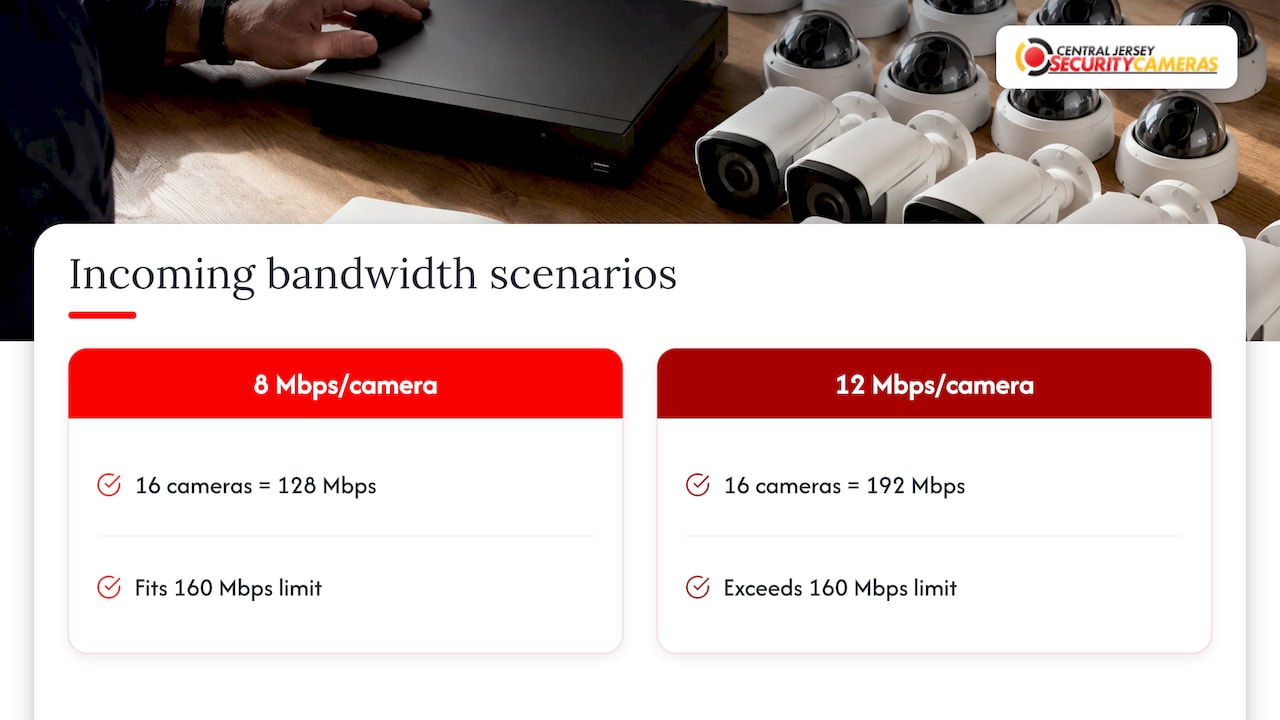
Here is a simple, hypothetical example. Say you install 16 cameras on a 16-channel recorder rated at 160 Mbps, and each camera streams at 8 Mbps. Add them up: 16 × 8 = 128 Mbps. That fits with room to spare. Now raise every camera to 12 Mbps for higher quality. The total becomes 192 Mbps, over the limit. The recorder has the channels, but it cannot take the data. The usual symptoms are dropped frames, choppy video or streams that will not register.
Clare Controls explains that incoming bandwidth limits how many cameras can record at once and can affect live view reliability if the system is not configured correctly. The same page includes an H.265 table at 15 frames per second that lists 8MP capacity of 9 cameras on a 4-channel model, 16 on an 8-channel model and 25 on a 16-channel model. Capacity depends on resolution, compression and frame rate, not on the channel number alone.
To estimate your own total, add the bitrate you set on each camera’s main stream, plus any secondary streams or audio the recorder also receives, and leave some headroom for busy scenes and future cameras. A professional installer sets these values on purpose rather than leaving every camera at its factory default.
Decoding capability: recording is not the same as viewing
The People Also Ask question “What is decoding capability in an NVR?” points at a second, separate limit. Recording writes streams to disk. Decoding is what the recorder does to show video on a monitor or play it back. A recorder can record many streams yet decode far fewer at full resolution at the same time.
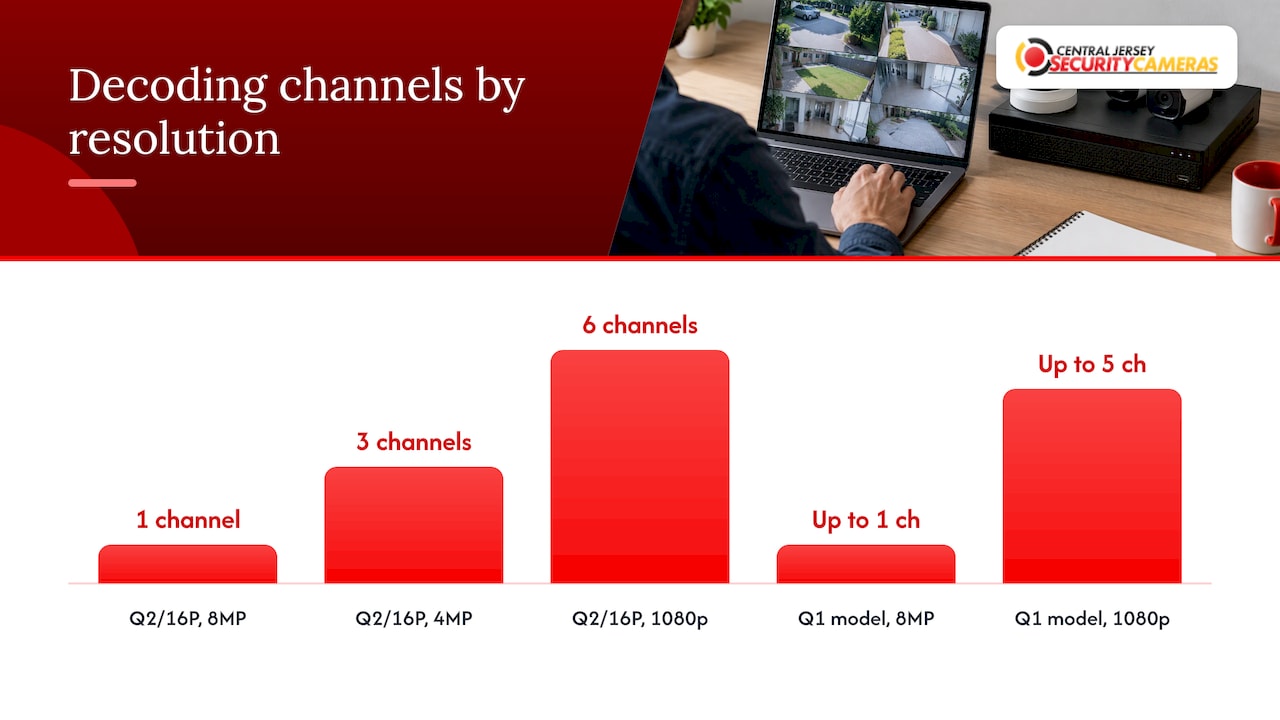
The Hikvision DS-7616NI-Q2/16P datasheet above lists decoding of 1 channel at 8MP, 3 channels at 4MP or 6 channels at 1080p, even though the unit accepts 16 camera inputs. The DS-7600NI-Q1 datasheet lists decoding of up to 1 channel at 8MP or 5 channels at 1080p, depending on the model.
What this means on your screen:
- Viewing all 16 cameras on one monitor at full resolution can exceed the decoder. Recorders usually handle this by showing sub-streams (lower resolution) in grid view and switching to the full stream when you pick one camera.
- Playback of several high-resolution cameras at once can be limited by decoding, even if recording is flawless.
- Remote viewing on a phone typically uses a lighter stream, but it still draws on the recorder.
For a home with six cameras, decoding rarely becomes an issue. For a business that wants a wall of 16 or 32 live feeds at high resolution, it should be part of the plan from day one.
Storage: the quiet fourth limit
Every channel writes to the hard drives, so more cameras and higher bitrates fill storage faster. A fixed bitrate across more channels shortens how many days of video you keep. Storage is a recording-time question, not a channel question, but they are tied together: the bitrates you set for bandwidth also set how fast the disks fill.
Our retention and storage calculation diagram shows how camera count, bitrate and retention days combine, and the NVR storage overview covers drive sizing. Recorders also vary in how many drive bays they offer. For example, Amcrest’s 32-channel NV5232 lists support for up to two 10TB hard drives and 320 Mbps throughput, which shows how bays and throughput are specified separately from channels.
How to choose a channel count
Work through these steps in order:
- Count the cameras you need now. Walk the property and mark entries, driveways, loading docks, interior choke points and blind corners.
- Add the cameras you will want within a few years. A new garage, a second storefront or an extra door is easier to plan for now.
- Round up to the next recorder size. NVR sizes jump from 4 to 8 to 16 to 32, so you usually land with spare channels automatically.
- Check bandwidth. Multiply cameras by the bitrate you plan to use and compare the total with the recorder’s incoming bandwidth.
- Check decoding. If you want many live views at high resolution on one screen, read the decoding line of the datasheet.
- Check PoE. Count the built-in PoE ports and decide where a switch is needed.
- Size storage. Pick drives that give the number of retention days you want at the bitrates you chose.
Worked examples
| Property | Cameras today | Sensible recorder | Why |
|---|---|---|---|
| Single-family home | 6 | 8-channel | Two spare channels for a garage or side yard camera |
| Small retail shop | 10 | 16-channel | Room for a stockroom, back door and a second register view |
| Office or warehouse | 20 | 32-channel | Spare channels for expansion, plus a PoE switch for the extra cameras |
The first two rows follow a common sizing approach: pick the next standard size above your camera count. If you are torn between the two smallest options, our guide to choosing between an 8-channel and 16-channel NVR goes through the trade-offs in detail. For commercial planning, see how camera zones for a growing business are laid out.
What happens when you hit a limit
Each limit fails in its own way, which helps when troubleshooting an existing system:
- Channel limit reached: the recorder will not add another camera.
- Bandwidth exceeded: frames drop, video stutters or recordings have gaps.
- Decoding exceeded: live view or playback shows black tiles or lags, while recording may still be fine.
- PoE budget exceeded: cameras on the recorder or switch reboot or fail to power up.
- Storage too small: the oldest footage is overwritten sooner than you expected.
If cameras flicker or video breaks up and you suspect something other than the recorder, two quick CCTV interference checks can rule out common causes.
Compatibility when you mix brands
Channels count cameras, but the recorder still has to understand each one. Check that it supports your camera’s resolution, video compression (such as H.265) and any smart features like line crossing or license plate recognition. If you mix brands, look for ONVIF compatibility on both sides. This is one reason a designed system, with cameras and recorder chosen together, behaves better than a pile of parts bought separately.
Our perspective
We design a recorder around the property, not around the number on the box. When we plan a system, we start by walking the site and deciding what each camera has to see. Channel count comes after that, together with bandwidth, decoding, PoE power and storage.
The mistake we help people avoid is buying the recorder first. A homeowner picks an 8-channel unit for six cameras, then adds a garage and a driveway and has no room. A business buys a 16-channel unit and later finds the cameras are set to a bitrate the recorder was never meant to ingest. Planning these limits together up front is what makes a system reliable for years.
That is the point of custom design. Our systems are built with IP cameras, NVRs and remote viewing matched to each property, and we offer free on-site evaluations so the channel count, switches and storage fit the building you actually have.
Tom
Get a recorder sized for your property
If you would rather not do the math, we will. We design, install and maintain IP camera systems for homes and businesses across Central New Jersey, including Ocean, Monmouth, Middlesex, Mercer and Burlington counties. That covers choosing the NVR, planning PoE and switches, and setting up remote viewing.
Our published one-time installation fee is $99, listed on our security camera installation page. If you also want alarm monitoring, plans are listed at $24.95 to $29.95 per month on our alarm monitoring pricing page.

Business owners can see how we approach larger sites on our commercial security installation page, and homeowners can start with home security installation.
FAQ
What does channel mean in an NVR?
A channel is one input on the recorder that handles one camera’s video stream. An 8-channel NVR can record up to 8 IP cameras at the same time. It is the maximum number of cameras the recorder allows, whatever the resolution.
How many cameras can I connect to a 32-channel NVR?
Up to 32, one per channel. Whether all 32 run well depends on the recorder’s incoming bandwidth, decoding capability, PoE ports and storage. Check the datasheet’s Mbps rating against your camera bitrates before you buy.
Is the channel count the same as the number of PoE ports?
No. PoE ports are one way to power and connect cameras directly to the recorder. A 16-channel NVR with 8 PoE ports can still take 16 cameras, with the other 8 connected through a PoE switch on the same network.
What is decoding capability in an NVR?
Decoding is the recorder’s ability to display or play back video. It can be lower than its recording capacity. For example, a 16-channel Hikvision model lists decoding of 6 channels at 1080p, so a full wall of high-resolution live views needs a recorder with stronger decoding.
How many spare channels should I leave?
Leave room for the cameras you expect to add. For six cameras, an 8-channel recorder is a sensible fit, and for ten, a 16-channel unit. Then confirm the bandwidth and storage still work with the extra cameras.
Sources
- Getting Started with ClareVision: NVR and Camera Setup
- ClareVision Display Capacity and Bandwidth Explained
- Hikvision DS-7600NI-Q1 Series NVR datasheet
- Hikvision DS-7616NI-Q2/16P datasheet
- Amcrest 32-channel NV5232 NVR