
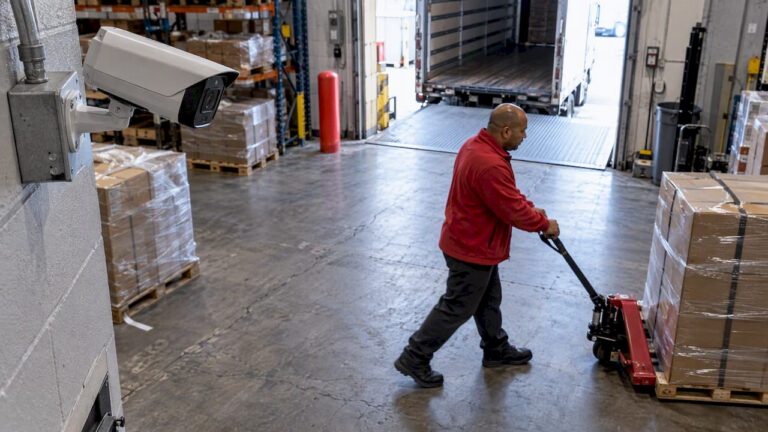
For most doors, hallways, driveways and storefronts, a security camera records well at 10 to 15 frames per second (fps). You only need 25 to 30 fps where people or vehicles move fast, such as a cash register, a gate or a vehicle entrance. Going to 60 fps on every camera usually costs you storage and night-time image quality without giving you better evidence.
That is the short answer. The rest of this guide explains why, shows you what to set for each part of a property, and covers the settings that matter more than fps when footage ends up in front of an insurer or the police.
TL;DR
- 10 to 15 fps is the working range for most security cameras. Guidance for forensic-grade systems puts the floor at one full frame per second, and most sites should sit far above that.
- Use 25 to 30 fps only at fast-action spots: registers, loading docks, vehicle entrances and gates.
- Higher fps is not higher quality. Resolution, compression and lighting decide whether you can identify a face or a plate.
- Every extra frame multiplies storage and network load, and very high rates can darken night images.
- Set fps per camera, not one number for the whole system, and test with a real walk-through before you sign off.
Table of Contents
- What frame rate means on a security camera
- How many fps do you need? Recommended settings by location
- Why more frames are not always better
- What the forensic guidelines say
- Smart recording: low baseline, high on motion
- Frame rate by camera type
- How to set and test frame rate, step by step
- Our perspective
- Get it designed for your property
- FAQ
- Sources
What frame rate means on a security camera
Frame rate is the number of still images a camera captures each second. Movies run at about 24 fps and broadcast TV at about 30 fps. A camera set to 15 fps takes 15 pictures every second, so a person walking at a normal pace appears in many consecutive frames.
What matters for security is not how smooth the video looks live. It is whether the recording contains the frame you need: the one where a face is turned toward the lens, a hand reaches for a door, or a license plate is square to the camera. A camera that records 30 fps through a blur of heavy compression can give you less usable evidence than a camera at 12 fps with a clean, sharp image.
How many fps do you need? Recommended settings by location
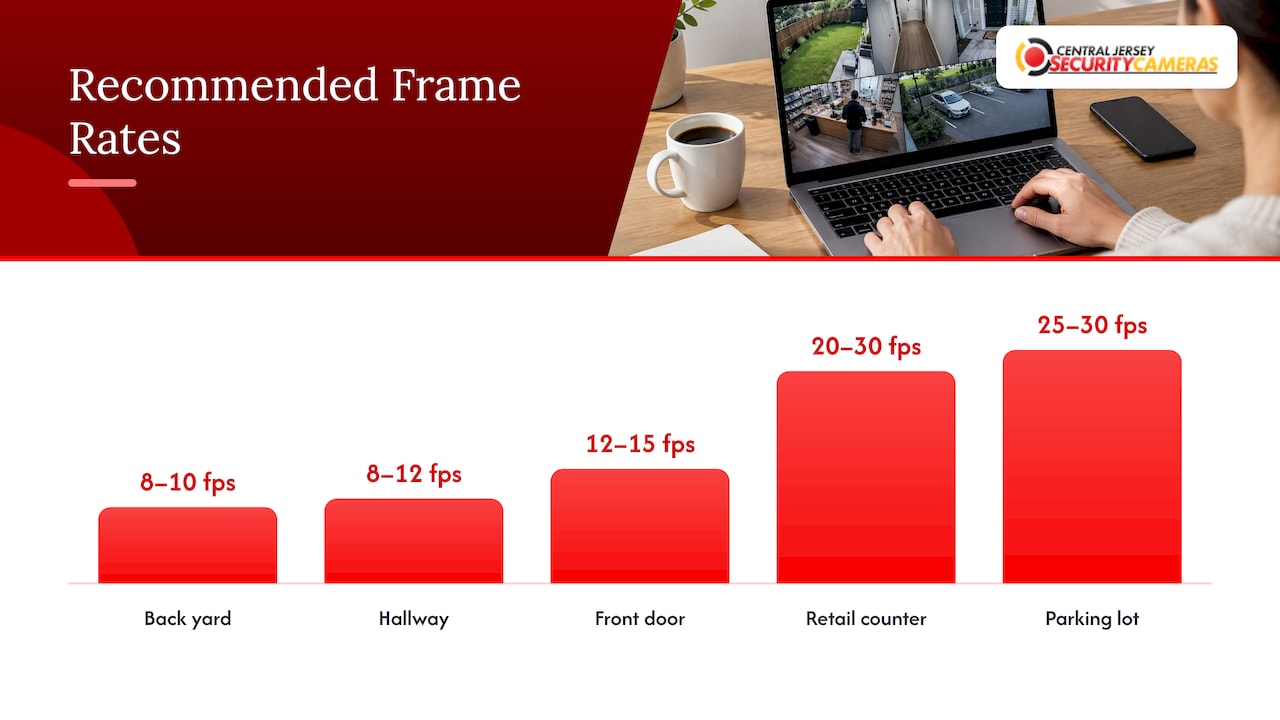
There is no single correct number. The CCTV Operational Requirements Manual, a widely used design reference, tells designers to ask how fast the target will be moving before choosing a recording rate. The manual also notes that most CCTV systems record in time-lapse mode rather than at full real-time speed. The faster the action, the more frames you need to catch it.
The same guidance suggests that around 1 to 6 fps can be enough for a quiet corridor, while 12 to 25 fps is for busy doorways and cash registers. Here is how we translate that into practical settings for a typical New Jersey home or business:
| Location | Typical activity | Suggested fps |
|---|---|---|
| Back yard, fence line | Slow, occasional movement | 8 to 10 |
| Hallway, stairwell, storage room | Walking pace, low traffic | 8 to 12 |
| Front door, porch | Walking, deliveries, close faces | 12 to 15 |
| Garage or driveway | Vehicles at low speed | 15 |
| Retail counter, cash register | Hands, fast transactions | 20 to 30 |
| Warehouse dock, vehicle gate | Forklifts, trucks, quick entries | 15 to 30 |
| Parking lot entrance, plate capture | Moving vehicles | 25 to 30, plus a dedicated plate camera |
Treat this table as a starting point. Your own site, lighting and lens angle can move the numbers up or down.
Is 30 fps good for security cameras?
Yes, 30 fps is good, and it is the maximum on many standard cameras. It is also overkill for most views. If a camera watches a side gate where someone passes twice a day, 30 fps just fills your drive faster. Save it for the places where motion is quick and the detail matters.
Do you need 60 fps?
Rarely. Professional IP cameras do offer it. The Hanwha XNZ-6320 lists up to 60 fps at all resolutions, and the Uniview IPC3232SB offers 1920 x 1080 at 60 fps in the main stream. Those rates make sense for specialized scenes with very fast movement, like industrial lines or traffic. For a home front door, 60 fps is mostly extra data.
Why more frames are not always better
Storage and bandwidth grow with every frame
More frames per second means more data to send over your network and write to your recorder. Retention is the other half of the equation. The common storage formula multiplies bitrate by cameras, hours and days, as laid out in this NVR storage calculator. Its sample run, eight 4 MP cameras at 25 fps in H.265 for 30 days, comes to roughly 9.66 TB.
That is a lot of drive for a modest system. Dropping several of those cameras from 25 to 12 fps cuts their share of the load sharply. You can then keep footage longer or spend the savings on better resolution where it counts.
Network load matters just as much, especially with many cameras on one switch or a congested Wi-Fi link. If your recordings stutter, the cause is often the network and not the camera. Our guide on how home networks support security cameras covers the home side. For offices with several locations, the same principles behind fixing choppy video on business Wi-Fi apply to camera streams too: steady, uncongested links keep frames from being dropped.
High fps can hurt night footage
This surprises many owners. A camera sensor needs time to collect light. At a high frame rate, each frame has less exposure time, so in dim conditions the camera has to brighten the image digitally, which adds grain. A lower rate gives each frame longer to gather light. If a camera covers a poorly lit driveway, dropping from 30 to 15 fps can give you a cleaner picture of the person standing there.
Frame rate is not image quality
Forensic guidance consistently makes the same point. The UK Home Office police requirements for CCTV, written for the UK but built on principles that apply anywhere, frame the key questions as what resolution, what compression and how many pictures per second. Fps is only one of the three. If storage is tight, keeping resolution high and compression light at a lower frame rate generally serves you better than keeping a high frame rate and compressing the picture hard enough to smear faces.
What the forensic guidelines say
People often ask whether a legal minimum exists. In the guidance we reviewed, no single legally mandated frame rate applies to security systems. The UK police document says the right settings depend on the camera’s purpose, such as recognizing a face versus watching general activity, and should be proven with testing at the actual site. That is a UK document, so it is not binding in New Jersey, but the logic carries over.
In the US, the Scientific Working Group on Digital Evidence (SWGDE) publishes recommendations for video security systems. They are guidelines, not law. Among other points, they set minimum resolution levels: digital cameras should output at least 640 by 480 pixels. They also recommend recording at least one complete field per camera per second as a floor, since anything less risks missing events. Almost every modern camera clears that bar easily, so the real decision is where to go above it.
If your footage might become evidence, two more details matter as much as fps. The first is accurate date and time stamping. The second is the compression method. Aggressive proprietary compression can throw away fine detail an investigator needs, whatever the frame rate. Examiners also check technical attributes such as frame rate and codec when they review a file, as described in SWGDE’s best practices for forensic video analysis. Make sure your recorder can export clean files with the player information included.
Smart recording: low baseline, high on motion
You do not have to pick one number for 24 hours a day. A common approach is a low baseline rate, in the 1 to 6 fps range, for general watching. Motion or a PIR sensor then boosts the rate to 12 to 25 fps only while something is happening, according to the same operational requirements manual. You still get sharp evidence of the event, and the quiet hours cost almost nothing to store.
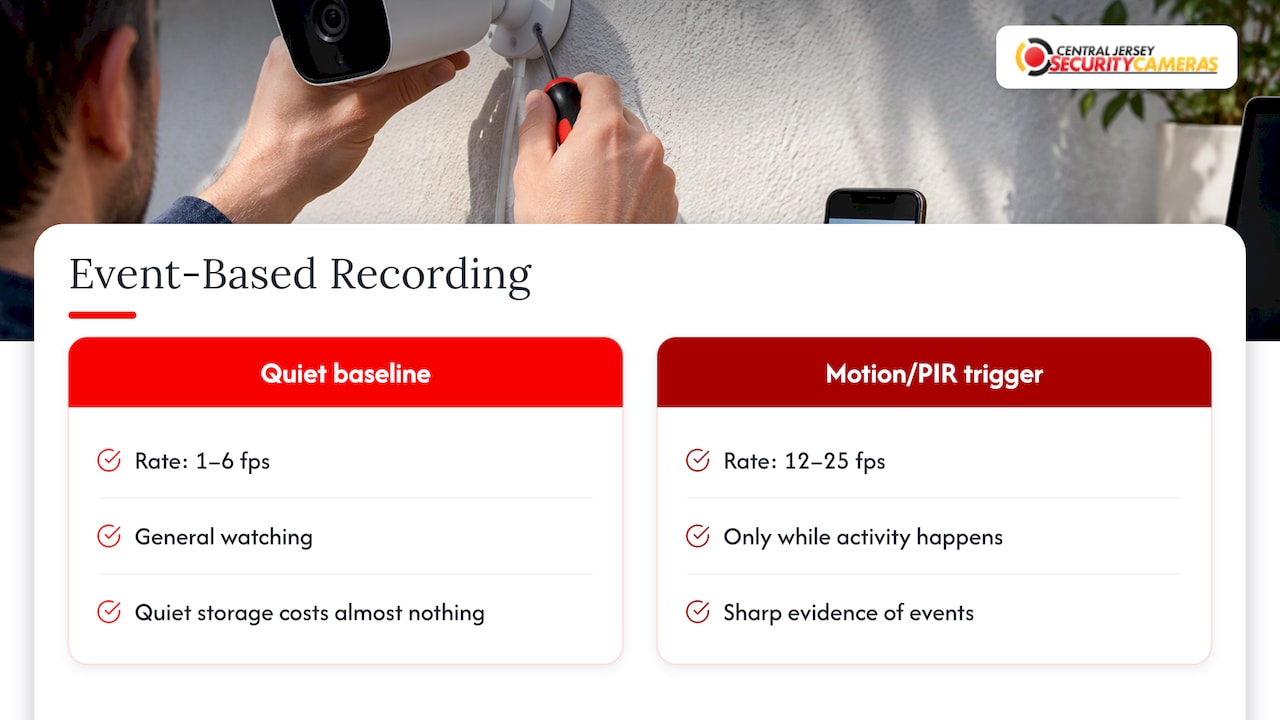
This only works if the recorder supports event-based frame rate changes per camera. Many recorders let you set a single overall recording rate, and some distribute or cap the throughput across channels. On a busy day your entrance camera might drop frames at just the wrong moment. Good system design adds up the peak throughput of every camera and checks that the recorder can handle it.
Frame rate by camera type
- Fixed bullet and dome cameras: the everyday workhorse. 12 to 15 fps covers most views. Our bullet IP camera installs are a typical example.
- PTZ cameras: these pan, tilt and zoom, so the image changes quickly while the camera moves. Higher rates, often 20 to 30 fps, keep tracking footage smooth.
- License plate recognition cameras: these are tuned for a narrow lane with a fast shutter and controlled exposure. Frame rate is one piece of the setup, alongside angle, shutter speed and lighting. See our page on license plate recognition cameras in New Jersey.
- Wireless or battery cameras: many cap frame rate to save power and bandwidth, and often record short clips on motion instead of continuous video.
How to set and test frame rate, step by step
- Write down the goal for each camera. Is it to identify a face, read a plate, or just confirm that someone was there?
- Start from the table above. Pick the lowest rate that still captures that goal at the expected speed of movement.
- Set resolution and compression first. Choose a resolution that can show the detail you need at the distance involved, with moderate compression.
- Calculate storage. Multiply bitrate by number of cameras and days of retention, then add headroom. Confirm the recorder can sustain the total.
- Enable event boosting where the recorder supports it, on entrances and cash points.
- Run a real-world test. Have someone walk, and if relevant drive, through the scene at the lighting you will actually have, including night. Play it back frame by frame. If you cannot see a clear face or plate, change the camera, angle or lighting before you raise fps.
- Recheck after seasons change. Leaves, snow and shorter days alter what a camera sees.
Our perspective
We install systems across Central New Jersey, and the most common frame rate mistake we see is a blanket setting. Someone sets every camera to the maximum “to be safe”, then wonders why the drive fills quickly and the night images look noisy.
Our approach is different. We design each system around the property: what each camera needs to prove, how fast the action is, and how long you want to keep footage. Front doors and registers get more frames. Quiet side yards get fewer. Where plates matter, we use a camera built for it instead of hoping a general camera catches one.
We also think the camera is only half the question. A well-placed 4K camera at a sensible frame rate with clean lighting beats a 60 fps camera pointed at a dark corner. If you are comparing systems, ask any installer how they will test the footage at your site before they call the job done. We do a walk-through test as part of the job, and we are happy to explain every setting we choose.
— Tom
Get it designed for your property
If you would rather not tune recorder settings yourself, we design and install systems for homes and businesses across Central New Jersey, including Ocean, Monmouth, Middlesex, Mercer and Burlington counties. We offer free on-site evaluations, and we set frame rate, resolution and storage for each camera. Camera installation carries a one-time installation fee of $99. You can also browse our home security installation and commercial security installations pages, or compare options in our guide to the best CCTV security cameras.
FAQ
What is a good frame rate for security cameras?
For most views, 10 to 15 fps is a good choice. It captures walking people and slow vehicles with clear frames and keeps storage manageable. Use 25 to 30 fps at registers, gates and loading docks, where movement is fast.
What security camera has 60 fps?
Several professional IP cameras support it, including the Hanwha XNZ-6320 and the Uniview IPC3232SB listed above. They are designed for specialized scenes, and you can set them lower per stream. For a home or small business, a lower rate with good resolution and lighting is usually the better use of your recorder.
What frame rate is better, 24/30 or 60?
For surveillance, 30 fps gives smooth motion and 60 fps gives even more frames, but at roughly double the data. Unless you are watching very fast action, 30 fps or less captures what you need. Better lighting and sharper resolution will improve your evidence more than doubling the frame rate.
Is 30 fps good for security cameras?
Yes. It is smooth and widely supported. You do not need it on every camera, though, so reserve it for fast-moving areas and run quieter views at 10 to 15 fps.
Sources
- CCTV Operational Requirements Manual
- UK Police Requirements for CCTV Systems
- SWGDE Recommendations and Guidelines for Using Video Security Systems
- SWGDE Best Practices for Digital Forensic Video Analysis
- Hanwha Vision XNZ-6320
- Uniview IPC3232SB-AHDZK-I0
- NVR Storage Calculator