
Choose an installer who holds a New Jersey license, designs the system around your property instead of selling a boxed kit, and stays reachable after the cameras go up. In New Jersey the license is not a nice-to-have. State law treats CCTV work as regulated electronic security work, so the first thing to check is the license, and the rest of your decision follows from there.
This guide is for New Jersey homeowners and business owners who have decided to hire a professional, or who are thinking about replacing do-it-yourself cameras that have not delivered. It walks through what to verify, what to ask, what a solid quote contains and what to prepare before anyone visits your property.
TL;DR
- Verify the installer’s license and the firm’s business license with the NJ Division of Consumer Affairs before you discuss price.
- Ask for a design built around your property: camera locations, coverage goals, recorder, network and remote viewing, not a generic package.
- Compare quotes line by line: hardware by model, labor, warranty terms and what happens when something fails.
- Choose a local company that offers a free on-site evaluation and ongoing service, because a camera system needs support long after install day.
- Walk your property first and write down what you want to see, such as entrances, driveway, loading dock or cash area.
Table of Contents
- Start with the license, not the price
- What the license tells you about the person on your roof
- Questions to ask before you sign
- What a good quote looks like
- What installation costs, and what to expect
- Homes and businesses need different systems
- Replacing DIY cameras with a professional system
- Prepare before the site visit
- Privacy and placement rules to know
- Our perspective
- Our offer for New Jersey homes and businesses
- FAQ
- Sources
Start with the license, not the price
New Jersey requires individuals and businesses to hold a license to install, service or maintain burglar alarms, fire alarms and electronic security systems. The state’s Division of Consumer Affairs FAQ confirms that CCTV systems, including low-voltage camera systems you can view over the internet, fall inside the regulated definition of an electronic security system. The law dates to 1998, so this is long-standing, not new.
That has a practical consequence. A handyman, an IT freelancer or a general contractor who mounts a few cameras on the side may be doing regulated work without the license that covers it. You would find out when something goes wrong: a warranty dispute, a recorder that stops saving, an insurer asking who did the work.
The Division offers an online licensing lookup. Use it to confirm two things:
- The person doing the work is licensed.
- The company is licensed as a business. A firm needs its own business license and must name a licensed business qualifier for each license category it works in.
It takes about five minutes and it filters out a large share of the field before you spend a single hour on estimates.
What the license tells you about the person on your roof
The license is not a formality. According to the same Division FAQ, alarm license applicants must be at least 18, be of good moral character, hold a high school diploma or equivalency (or a waiver), pass fingerprinting and a criminal background check, and pass a state examination. License holders also complete continuing education during each licensing period.
For you, that means the technician who enters your home, office or warehouse has been background-checked and examined, and is expected to keep learning as the technology changes. That matters when the job gives someone access to your building layout, your alarm codes and a live view of your property.
Questions to ask before you sign
Once the license checks out, the conversation should move to how the installer works. These questions separate a company that designs systems from one that sells boxes.
Experience with properties like yours
A warehouse with a loading dock, a retail store with a cash counter and a single-family home with a long driveway are different problems. Ask how many systems the company has installed in your county and whether any were similar to yours. A good installer answers with specifics: what the camera count was, what the challenge was, what they would do differently on your site.
Who designs the system
Ask who decides camera positions and lens types, and whether that person walks the property. Design is where most systems succeed or fail. Cameras that are too high see the tops of heads. Cameras facing a bright window or a low sun produce unusable footage in the afternoon. A camera that does not cover the approach to a door does not help you identify anyone.
Insurance
Ask for proof of general liability and workers’ compensation coverage. If someone drills through your roofline or falls from a ladder on your property, you want the installer’s policy to respond, not yours.
Equipment and recording
Ask what recorder the system uses, how many days of video it stores at the resolution you want, and how you will view footage from your phone. Storage is the question people forget. A system that overwrites last week’s footage before you notice an incident is not doing its job.
Ongoing support
Ask what happens when a camera fails, a recorder needs a firmware update or you add a building. Ask how quickly the company responds to a service call and whether the person who installed the system will be the person who services it. A local company that stays in your area can often be back on site faster than a national brand working through a call center.
What a good quote looks like
A quote is a preview of how the company will behave during the job. Look for these elements:
| Quote element | What to look for |
|---|---|
| Hardware | Each camera and recorder listed by model, not “4 HD cameras” |
| Scope of work | Where each camera goes and what it covers |
| Cabling and power | How the cables run, and whether new outlets or conduit are needed |
| Labor | Shown separately from equipment |
| Installation fee | Stated clearly, not folded into a vague total |
| Warranty | Separate terms for hardware and for workmanship |
| Remote viewing | Which app or platform, and any recurring fee |
| Timeline and payment schedule | Start date, duration, deposit and balance |
Two quotes only compare when they describe the same system. If one lists a recorder with storage for 30 days and the other leaves storage out, the cheaper number is not cheaper. Ask each company to quote the same camera count and the same retention period so you can see the real difference.
Also watch for wiring. New Jersey requires a licensed electrical contractor for branch circuit wiring, so a job that needs a new outdoor outlet involves more than camera work. A company that spots this at the evaluation and tells you how it will be handled is thinking ahead. One that discovers it on install day is not.
What installation costs, and what to expect
Prices vary with the number of cameras, the distance of cable runs, ceiling and wall materials, the recorder and storage you choose, and whether the property is a home or a commercial building. Because of that, any figure you read online without knowing your layout is a rough guess, and an honest installer will want to see the property before naming a total.
At Central Jersey Security Cameras, the one-time installation fee is $99, and we offer free on-site evaluations so you get a design and a quote based on your actual property. If you add alarm monitoring, our plans run $24.95 to $29.95 per month, as listed on our alarm monitoring pricing page.
When you compare, add up the first-year cost, not just install day: equipment, labor, any monitoring or service plan, and any cloud or app fee. Then divide by the coverage you are getting. A lower quote that leaves your side door uncovered is a cost, not a saving.
Homes and businesses need different systems
For homeowners
Most homes need coverage of entry points: the front door, the back door, the garage and any ground-floor windows facing a fence or side yard. Add the driveway if you park outside. Good home design balances coverage with privacy, so interior cameras, if any, go where you are comfortable with them. Our home security camera installation work covers cameras, alarm systems and the recorder behind them, and we also handle Ring security installation if you already use that product line.
For business owners
A business has more to protect and more to document: cash handling, inventory, employee areas, parking and deliveries. It may also need license plate recognition cameras for vehicle entrances, PTZ cameras that pan, tilt and zoom to cover a large yard, or active deterrence cameras that discourage trespassers before they reach the building. Access control, such as card or keypad entry, often belongs in the same design so that door events line up with video. If you operate a warehouse, office, school or industrial site, ask the installer whether they have handled similar sites and who will maintain the system afterward. Our commercial security installation team designs, installs and services these systems.
Replacing DIY cameras with a professional system
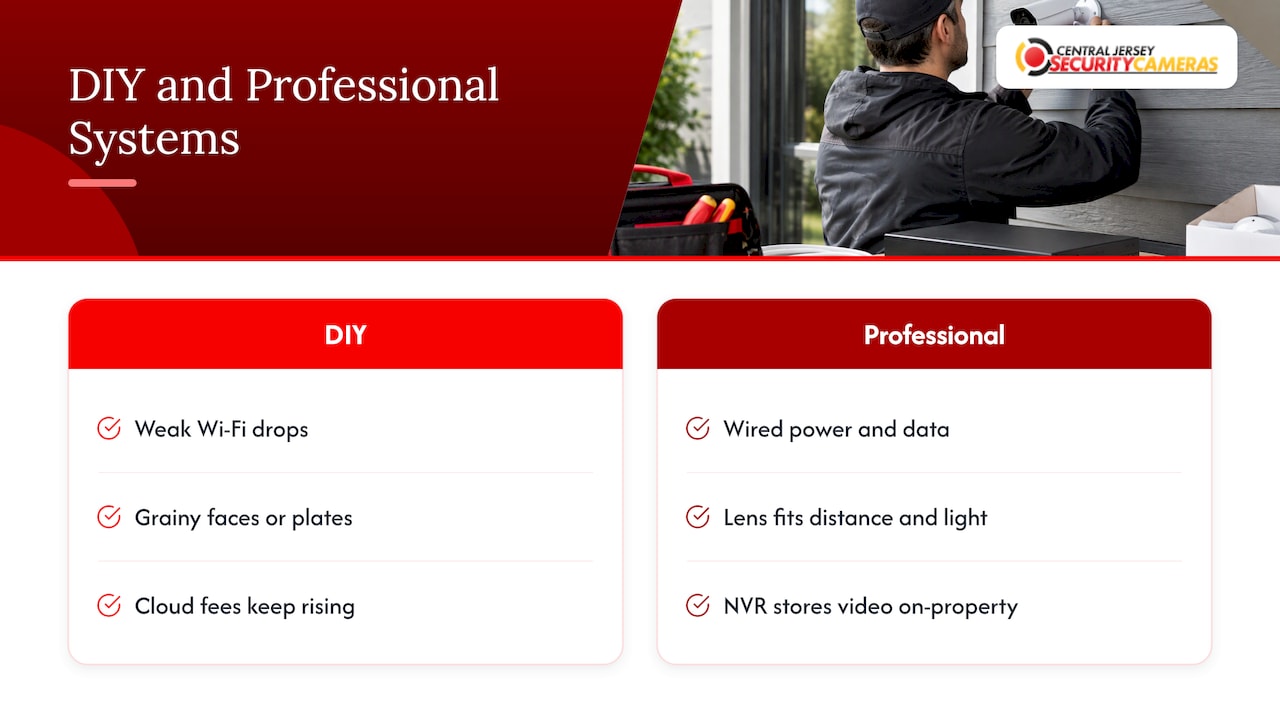
People usually replace do-it-yourself cameras for the same few reasons: the Wi-Fi connection drops, the footage is too grainy to identify a face or a plate, batteries die at the worst moment, the camera count has outgrown what the app handles, or a subscription fee keeps climbing for storage they do not control.
A professionally designed system answers these directly. Cameras are wired for power and data rather than relying on a weak signal at the edge of your yard. Lenses are chosen for the distance and lighting at each location. Footage is recorded to a network video recorder (NVR), a dedicated box that stores video from the cameras on your own property, so your history is not tied to a monthly cloud plan.
What can you keep? That depends on the cameras you have. Network cameras that use standard protocols can sometimes be reused, while older analog cameras and battery-powered units usually cannot. Ask the installer to look at what you own during the free evaluation and tell you plainly which pieces are worth keeping and which will hold the system back. Do not remove your old cameras until the new system is recording, so you are never uncovered during the switch.
Prepare before the site visit
The evaluation goes faster, and the quote is more accurate, if you do some homework. Spend thirty minutes on the following:
- Walk the property at dusk and at midday. Note where light is poor and where the sun glares.
- List what you want to see. Doors, a driveway, a side gate, a loading dock, a cash register, a stockroom. Rank them.
- Write down past incidents. Package theft, a break-in attempt, vehicles in your lot after hours. Real events drive better placement than general worry.
- Locate your internet router and electrical panel. Cable runs start here, and distance affects labor.
- Decide how long you want to keep footage. Thirty days is a common starting point to discuss, and the installer can size storage from there.
- Decide who needs access. Family members, a manager, an owner who travels. Remote viewing should match the people who will actually use it.
- Gather what you already own. Model numbers of current cameras, recorder and router.
- Check with your landlord, HOA or property manager if you rent or live in a community with rules about exterior mounts.
Bring these notes to the evaluation. A good installer will turn them into a camera map, a recorder recommendation and a written quote.
Privacy and placement rules to know
A licensed installer will steer you away from placements that cause legal trouble, but it helps to know the basics yourself. In general, cameras should cover your own property. Aiming into a neighbor’s bedroom or bathroom, or recording private conversations you are not part of, creates real legal risk. Our guide to New Jersey security camera laws explains the wiretapping and voyeurism rules in plain terms.
The rules are also moving. New Jersey bill S4133 would require makers of private outdoor cameras with enhanced surveillance features, when sold or installed in the state, to ship them with those features off by default and obtain a clear opt-in from the user. Ask your installer how the features on your cameras are configured and how they keep up with changes like this.
Businesses that record audio or monitor employees should also discuss signage and policy with the installer and, where needed, with their attorney.
Our perspective
After years of working on properties across Ocean, Monmouth, Middlesex, Mercer and Burlington counties, we believe the best predictor of a good camera system is the design conversation, not the camera brand.
That is why we start with a free on-site evaluation. We look at how your property is laid out, where people approach, where light fails and what you need to be able to see, then build a system around it. The cameras, the recorder, the remote viewing and the service plan should all be chosen for your property, not pulled from a shelf.
Boxed DIY products and subscription-based services are built for the average home. Your property is not average. A custom, professionally installed system gives you reliable video, clear footage and a local team you can call when something needs attention.
Pick a licensed installer, ask for a system designed for your property, and make sure someone local stands behind it after install day.
Tom
Our offer for New Jersey homes and businesses
Central Jersey Security Cameras designs, installs and maintains custom CCTV and IP camera systems for homes and commercial properties across Central New Jersey. That includes 4K cameras, license plate recognition, PTZ and active deterrence cameras, NVR recorders, remote viewing, alarm systems and access control, with ongoing service and support. We begin with a free on-site evaluation and a one-time installation fee of $99.
To see what a system could look like for your property, start with our security camera installation page or contact us to schedule your evaluation.
FAQ
How do I know a security camera installer is licensed in New Jersey?
Use the online licensing lookup from the NJ Division of Consumer Affairs to check both the individual and the business. The business should hold its own license and have a named qualifier. Ask the installer for license numbers before the evaluation so you can check them in advance.
Do I need a licensed professional for a few simple cameras?
New Jersey regulates installation, service and maintenance of electronic security systems, and the Division confirms that CCTV is included. For a system you want to rely on, such as a home with several cameras or a business, a licensed installer also gives you a design, a warranty and someone to call.
How much does professional security camera installation cost?
It depends on camera count, cable runs, the recorder and storage, and the type of building. Our installation fee is $99 one-time, and we provide a free on-site evaluation so your quote reflects your property. Ask any installer for an itemized quote so you can compare like for like.
Can I keep my old DIY cameras when I upgrade?
Sometimes. Network cameras that follow common standards may be reusable, while older analog or battery-powered units often are not. Have the installer review what you own during the evaluation and keep the old setup running until the new one is recording.
What should I have ready before the installer visits?
A list of the areas you want covered, past incidents, the location of your router and electrical panel, the models of any existing equipment and the number of days of footage you want to keep. Having this ready makes the quote faster and more accurate.
Sources
- NJ Division of Consumer Affairs: Fire Alarm, Burglar Alarm and Locksmith Advisory Committee FAQ
- New Jersey Senate Bill S4133 (2026)