
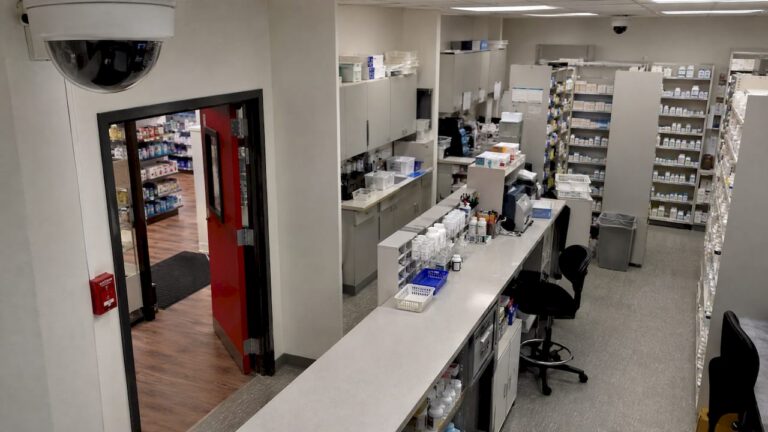
Place pharmacy cameras to answer the questions you will ask after an incident: who came in, who stood at the counter, who reached the dispensing area or the controlled substance safe, and how they left. That means cameras on every entrance and exit, the checkout, the dispensing bench, the safe or cabinet, the receiving door and the parking lot or drive-thru lane. It also means keeping them off patient screens, prescription labels and private consultation conversations. Here is how to do it zone by zone, with the New Jersey guidance a pharmacy owner should know.
TL;DR
- Cover every entrance and exit, the register, the dispensing bench, the safe or cabinet, receiving, and the exterior, including drive-thru and parking.
- Match each camera to a job. An overview camera and a face-identification camera are different placements, and one ceiling camera cannot do both.
- Aim to capture faces and hands at counters, and keep screens, labels and consultation audio out of the frame.
- New Jersey’s pharmacy security guidance points to cameras wherever controlled dangerous substances are stored, counted, dispensed or returned to stock, with footage kept for at least three months.
- A professional site walk-through before you drill catches blind spots, glare and lighting problems that a floor plan hides.
Table of Contents
- Start with the questions footage has to answer
- The zones every pharmacy should cover
- Mounting height and angle
- Image quality that supports identification
- How long to keep footage
- Privacy: what cameras should not see
- Alarms, tampering and daily checks
- Get the layout right from the start
- FAQ
- Sources
Start with the questions footage has to answer
Most pharmacy camera mistakes come from placing cameras by room instead of by event. A camera in the middle of the ceiling shows that the store exists. It does not show a face at the counter or a hand in a drawer.
Think about what an investigator, an insurer or the New Jersey Board of Pharmacy would ask. Who approached the counter? Who crossed toward the dispensary? Who lingered near higher-risk stock? How did they get in and out? An Australian installer guide makes the same point: those answers come from deliberate zone placement, not from one camera looking generally at the shop.
So before choosing hardware, walk the store and list the moments you would need to see:
- A person entering and leaving, face on.
- A customer at the register, with hands and the cash drawer visible.
- A staff member or visitor at the dispensing bench and the safe.
- A delivery arriving at the back door and where the boxes go next.
- A vehicle or person in the lot, at the drive-thru or at the night depository.
Each item becomes at least one camera with a defined purpose.
The zones every pharmacy should cover
AccountableHQ’s pharmacy monitoring guide lists the core placements: all entrances and exits, pickup and drop-off and drive-thru lanes, point of sale, dispensing benches, the safe or cabinet, receiving, and parking areas. Here is what each one needs in practice.
Entrances and exits
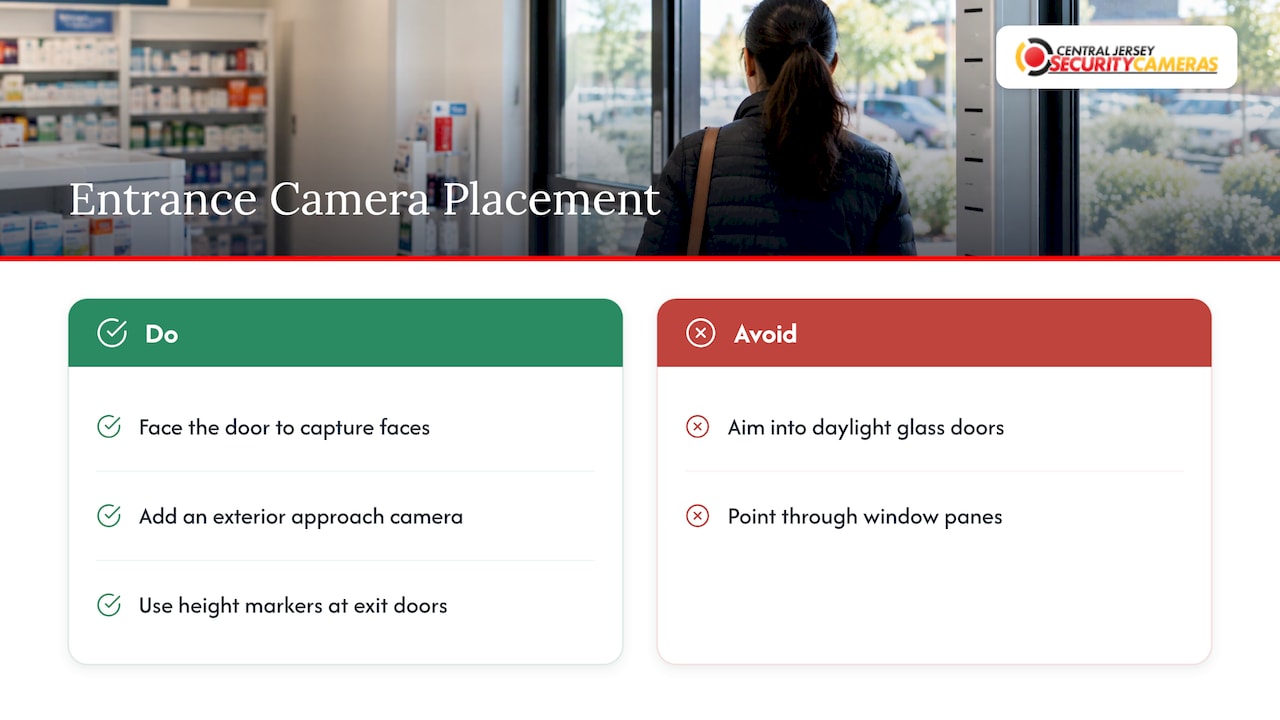
Mount a camera facing the door so it sees faces as people walk in, not the tops of heads. A camera pointed from the sales floor toward the entrance gives you the face view. A second camera outside, looking at the approach, shows who arrived and what they came in. The New Jersey Division of Consumer Affairs lists exits from the pharmacy or the front end of a retail store among the places cameras should capture. The same document mentions height markers at exit doors, which turn a clear exit camera into a reliable way to judge a suspect’s height.
Backlight is the usual failure here. A camera facing glass doors in daylight records a dark silhouette. Wide dynamic range cameras, a changed angle or a mounting position that keeps the sun out of the lens fix it. Do not aim a camera through a window pane either, because reflections ruin the image.
Checkout and registers
The goal at the register is a clear view of the customer’s face, the employee’s hands and the transaction area. A camera behind and above the counter looks at the customer, while one in front looks at the employee. The cash handling side has its own rules of thumb, which we cover in our guide to security cameras for cash handling areas.
Registers are also where privacy needs the most care. HPSO’s guidance on video surveillance in pharmacies calls for particular attention at registers and consulting areas, because a camera can pick up prescription details on a screen or a bag label. Choose a lens and mounting height that frame the transaction without reading the monitor.
Dispensing bench and filling area
This is the zone where placement matters most. The New Jersey Division of Consumer Affairs recommends quality cameras placed to capture activity anywhere controlled dangerous substances are stored, counted, held, dispensed or returned to stock. That covers the counting tray, the label and verification station, the will-call shelves and the return-to-stock bin.
Use more than one angle. Overlapping views mean that if one worker’s body blocks a camera, another still sees the hands. An IHS Portland Area pharmacy security specification calls for overlapping coverage to eliminate blind spots, and for higher resolution at medication filling locations, automated dispensing units and controlled substance safes than at entries and exits. That is a federal facility spec, not a New Jersey rule, but it shows how a careful buyer thinks about image detail by zone.

Safe, cabinet and bulk storage
Put a camera directly on the controlled substance safe or cabinet, aimed so it sees who opens it and what happens at the door. A second, wider camera shows who walked there. Many diversion schemes are found late. HPSO notes that diversion is often discovered through monthly statistical reports that are not reviewed right away, so the footage needs to be there weeks later, sharp enough to use.
Receiving and back doors
Deliveries, staff corridors and rear service doors are common blind spots. Cover the door itself, the staging area where cartons sit and the path from there to the dispensary. If a tote of product goes missing between delivery and shelf, this view settles it.
Parking, drive-thru and exterior
Cover the lot, the drive-thru lane, the pickup window and any night drop. Plate capture is a separate job from a general lot view. A license plate recognition camera aimed at the lane entry reads plates at a distance and angle where a standard camera only shows a bright blur. For a wide lot, a PTZ camera lets staff follow activity and zoom in, while fixed cameras keep recording the whole scene.
Self-serve and secondary areas
Pharmacies often add other self-serve retail corners, such as a snack or convenience counter. The same placement logic applies: one overview, one view where the transaction or pickup happens. Operators of unattended retail wrestle with the same issues, and micro market security coverage shows how risk-based camera placement applies to those spaces.
Mounting height and angle
The common rule among installers is to mount general surveillance cameras high enough to keep them out of easy reach and to keep people from blocking the view. Published guidance varies by use. One vendor guide puts the practical range at 8 to 20 feet with a downward tilt of 15 to 45 degrees and keeps the camera body upright. Treat those as starting points, not rules, because the right height depends on the lens and the scene.
The trade-off to understand: higher mounting gives a wider overview but less facial detail, and a steep angle shows hair and hats instead of faces. So:
| Camera job | Placement idea | What to avoid |
|---|---|---|
| Face identification at doors | Facing the entrance at a moderate height, level with approaching faces | Pointing into glass or sun |
| Overview of the sales floor | Higher, in corners or along aisles | Using it as the only camera |
| Register and counter | Behind or above the counter for the customer, in front for the employee | Framing screens or labels |
| Dispensing bench | Overlapping angles on hands and the work surface | Single camera that a body can block |
| Safe or cabinet | Close, aimed at the door and the person opening it | Distance that loses detail |
| Lot and drive-thru | Pole or eave mounting, plus dedicated plate camera | Relying on a wide shot for plates |
Cameras in public view also deter. The National Community Pharmacists Association has advised that cameras should be visible so potential criminals know they are watched, and that the recorder belongs in a secure area where intruders cannot destroy the recording.
Image quality that supports identification
Placement fixes where the camera looks. Resolution, frame rate and lighting decide what you can read.
- Resolution. The IHS specification asks for 3 megapixels or higher at pharmacy entries and exits, and 5 megapixels or higher at dispensing units, controlled substance safes, prescriptions awaiting pickup and medication filling locations. AccountableHQ suggests 1080p or higher with wide dynamic range and 12 to 20 frames per second as typically enough for identification and motion clarity.
- Low light. The same IHS document requires low-light recording with night mode. Pharmacies sit empty overnight, which is when break-ins happen, so infrared or low-light capability is not optional for the exterior and the dispensary.
- Lighting. Plan even light where people appear. The New Jersey guidance lists sufficient lighting levels inside and outside the pharmacy among routine security features, and a dim lot undermines a good camera.
- Time stamps. Accurate clocks matter when you match video to a point of sale or dispensing record. AccountableHQ recommends time sync through NTP.
Our camera system design guide covers bandwidth, power over Ethernet and cybersecurity, which all affect whether those high-resolution streams record reliably.
How long to keep footage
New Jersey’s Division of Consumer Affairs recommends keeping recordings for a minimum of three months to help investigate potential theft found during random controlled substance counts. HPSO warns that keeping video for less than 30 to 45 days or poor image quality can hamper an investigation. Federal IHS specs ask for storage that holds up to 60 days per camera and can be expanded.
The practical consequence: size the recorder for the longest period you need, at the resolution you chose, across every camera. Higher-resolution cameras on the dispensing zones eat storage faster. Keep incident clips until the case is closed, and log who views, exports or deletes footage. Check with your insurer and your pharmacy’s counsel for the retention they require.
Privacy: what cameras should not see
A pharmacy camera can accidentally record protected health information, so placement has a privacy side.
- Screens and labels. Avoid angles that capture computer monitors, printers and patient identity boards. Privacy masking can block sensitive zones in the frame, and lens and height choices can avoid close-ups of screens.
- Consultation areas. Take particular care at consulting areas. Do not record in rooms where patients expect privacy, such as exam rooms or bathrooms, without a documented need and strong controls.
- Audio. HPSO says recording sound can be problematic because patients expect privacy when speaking with pharmacists, and that most states have wiretapping laws that prohibit recording audio without informed consent. If the purpose is tracking medications, video does the job. Turn audio off.
- Access. Limit who can watch and export video, audit it, and secure transmission. If footage goes through the cloud or a third party, HPSO’s source notes you need secure transmission and a HIPAA Business Associate Agreement.
- Notice. A New Jersey law firm’s alert says no state law specifically governs employer workplace video recording, but individuals keep a common-law right against offensive intrusion. It recommends handbook notice, signage and camera locations with a legitimate business reason. That alert addresses surgery centers, so ask your attorney how it applies to your pharmacy.
Alarms, tampering and daily checks
Cameras are one layer. The New Jersey Attorney General’s pharmacy security best practices note that pharmacies must comply with the requirement for a monitored security system that signals intrusion and has a backup mechanism if it is tampered with or disabled, citing N.J.A.C. 13:39-4.15(b)1. Cameras and a monitored alarm work together: the alarm tells you something is happening, and the video shows what.
To keep the system working:
- Mount cameras out of easy reach and use tamper-resistant housings.
- Put the recorder in a locked, secure area.
- Check daily that every camera is live and unobstructed. AccountableHQ recommends daily checks and health alerts for camera and recorder failures.
- Watch for new obstructions: seasonal displays, promotional signage and stacked cartons change sight lines.
What we see on pharmacy walk-throughs
The most common problem we see in any store is a system that was laid out by room count. Cameras are evenly spaced, nobody decided what each one is for, and the one view the owner needs most, the hands at the bench or the face at the door, is the weakest.
We design the other way around. We start from the incidents you would have to investigate, assign each camera a job, check lighting and glare on site, and then pick the camera type: fixed for identification, PTZ for the lot, plate recognition for the lane. A free on-site evaluation is how we start, because a floor plan cannot show you a reflection or a blocked sight line.
A professionally installed IP system with a recorder sized for your retention period is also easier to maintain than a patchwork of consumer cameras. We stay available for service afterward, so a camera that fails or gets blocked does not stay unnoticed.
Tom
Get the layout right from the start
Central Jersey Security Cameras designs, installs and maintains custom camera systems for businesses across Ocean, Monmouth, Middlesex, Mercer and Burlington counties. For a pharmacy, we start with a free on-site evaluation, map coverage zone by zone, and install IP cameras, PTZ units, plate recognition and a recorder to match.
Our one-time installation fee is $99, listed on our security camera installation page. If you also want a monitored alarm on the doors and dispensary, our alarm monitoring plans run $24.95 to $29.95 per month. To discuss your pharmacy, see our commercial security installation page. Another regulated business with controlled product, a cannabis dispensary, has defined camera zones under New Jersey rules, and our dispensary camera zone guide shows how zone-based planning works there.
FAQ
How many cameras does a pharmacy need?
There is no single number. Count the zones instead: entrances and exits, registers, dispensing bench, safe or cabinet, receiving, and the exterior including parking or drive-thru. Large or busy dispensing areas need overlapping angles, so they take more cameras than their size suggests. A site walk-through gives you the real count.
Where should the recorder go?
Put it in a locked, secure area away from public view. The National Community Pharmacists Association advises keeping the recording device somewhere intruders cannot reach and destroy it. Restrict who can view or export footage and log access.
Can pharmacy cameras record audio?
In most cases you should turn audio off. Patients expect privacy when talking with pharmacists, and many states have wiretapping laws that restrict recording sound without consent. Video alone covers tracking medications and cash. Ask your attorney before enabling audio anywhere.
How long should a New Jersey pharmacy keep camera footage?
The New Jersey Division of Consumer Affairs recommends keeping recordings for at least three months. Keep any incident-related clips until the case is closed. Check your insurer’s requirements too, since some ask for longer.
Sources
- New Jersey Division of Consumer Affairs, Best Practices for Pharmacy Security
- New Jersey Office of the Attorney General, Pharmacy Security Best Practices
- IHS Portland Area, Pharmacy Security Camera Requirements
- HPSO, The Role of Video Surveillance in Pharmacies
- AccountableHQ, Security Monitoring Best Practices for Pharmacies
- AccountableHQ, HIPAA and Security Cameras
- Brach Eichler, Use of Cameras in NJ-Based Ambulatory Surgery Centers
- NCPA, America’s Pharmacist, April 2011
- CheckVideo Camera Placement Guide