
Dewarping transforms fisheye frames into rectilinear or panorama outputs so you can view, record, and run analytics reliably. You will find both camera-side (hardware) and server-side (software) dewarping in the field, and the right choice depends on how many channels you can spare and how much projection flexibility your analytics pipeline needs.
TL;DR:
- Hardware dewarping uses a separate NVR channel for each output, while software remaps one raw stream for viewing or analysis, usually reducing storage needs.
- A calibration set should include 20 to 40 chessboard or Charuco images at varied angles and distances, with pattern corners reaching frame edges.
- Use the correct fisheye coefficient format and check the principal point; mismatched lens parameters can warp edges and undermine object detection.
- Keep a full resolution raw recording during calibration tests, then validate straight lines and detector accuracy; recalibrate after camera repositioning, lens replacement, or servicing.
Table of Contents
- Dewarping Outputs and Common Surveillance Use Cases
- Hardware vs Software Dewarping: Operational Differences
- Projection Types and the Parameters You Will Tune
- Calibration and an OpenCV Workflow You Can Run
- Practical Tuning Tips and Common Pitfalls
- Tools and Real-World Implementation Examples
- How We Approach Dewarping Projects in the Field
- Professional Dewarping and Calibration Installation Support
- FAQ
- Sources
Dewarping Outputs and Common Surveillance Use Cases
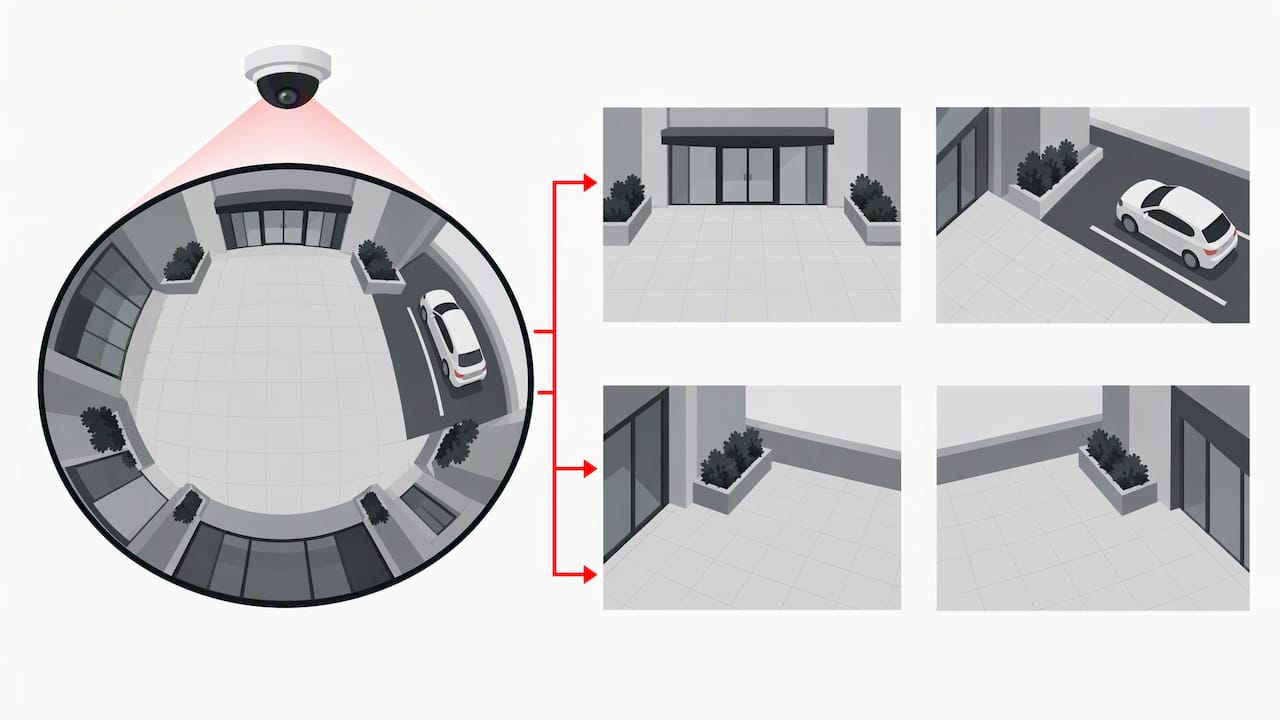
A single fisheye sensor can feed several different output types, and each one solves a different monitoring problem.
- Panorama: a stitched wide view that lets one operator scan an entire room or parking area without panning.
- ePTZ (virtual PTZ): an on-demand digital window that zooms into a specific zone, like a doorway or register, without moving any motor.
- Rectilinear tiles: flattened quadrants fed into recording or an analytics pipeline that expects straight lines and normal perspective.
Each output trades coverage for distortion and resources. A full panorama shows everything but stretches edges, while rectilinear tiles look clean but may need four or more channels to cover the same area a single fisheye lens captures. Frame rate and channel usage climb with every extra dewarped surface, so plan NVR capacity around the outputs you actually need rather than generating all of them by default.
Hardware vs Software Dewarping: Operational Differences
The split between hardware and software dewarping comes down to where the remap math happens and how it affects your channel budget.
- Hardware (on-camera) dewarping: the camera itself generates multiple dewarped streams, each consuming a separate NVR channel, which is simple to wire up but limits flexibility once installed.
- Software (VMS or GPU) dewarping: a server or client application remaps the single raw fisheye stream into one or more dewarped surfaces without using extra camera channels.
- Hardware fits: small sites, low-latency live display, and installers who want a plug-and-play result.
- Software fits: larger analytics pipelines, custom projections, and setups where storage and bandwidth matter more than setup speed.
Bandwidth and storage behave differently in each case. Hardware dewarping multiplies the number of streams the NVR has to record, while software dewarping keeps one raw stream on disk and applies the remap only when someone views or analyzes it, which usually keeps storage costs lower.
Projection Types and the Parameters You Will Tune
Every dewarper works from a projection model, and the common ones each suit a different viewing task: perspective for flat rectilinear tiles, equirectangular for 360 degree review, cylindrical for wide horizontal coverage, Panini for a compromise between the two, and PushBroom for linear scan-style views along a corridor or shelf.
- Projection mode decides the geometry of the output, from a flat rectilinear tile to a full panorama.
- Distortion coefficients describe the lens itself: fisheye lenses typically use a 4-element coefficient set, while standard lenses use a radial and tangential set, and mixing the two formats produces warped or shifted output, as detailed in OpenCV’s fisheye camera model documentation.
- Focal length and principal point control framing: increasing focal length narrows the field of view and reduces outer stretching, while shifting the principal point reframes the center of the output without changing the lens.
Getting these three settings wrong is the most common reason a dewarped image looks fine in the center but smears or doubles objects near the edges.
Calibration and an OpenCV Workflow You Can Run
A clean calibration is the foundation every dewarped output depends on, and OpenCV’s fisheye module gives you a repeatable path to get there.
- Capture a chessboard or Charuco pattern at 20 to 40 images, varying angle and distance so corners appear across the whole frame, including edges.
- Run
cv::fisheye::calibrateto solve for the camera matrix (K) and distortion coefficients (D), as documented in OpenCV’s fisheye calibration API, noting flags likeCALIB_USE_INTRINSIC_GUESSorCALIB_FIX_PRINCIPAL_POINTwhen you already know rough lens values. - Compute remap tables with
initUndistortRectifyMaporestimateNewCameraMatrixForUndistortRectify, then applyremapto generate the corrected frame. - Validate by checking that known straight lines, like door frames or floor tiles, render straight in the output, and run an object detector before and after dewarping to confirm accuracy holds.
Pro Tip: Keep recording the original raw fisheye stream while you test new calibration settings, so a bad remap table never costs you footage you cannot get back.
Practical Tuning Tips and Common Pitfalls
Object detectors are generally trained on rectilinear imagery, and research on fisheye distortion shows that leaving frames uncorrected can meaningfully degrade detection accuracy in computer vision models. That makes dewarping a functional requirement for analytics, not just a viewing convenience.
Performance comes down to where the remap runs. GPU-accelerated plugins handle the pixel remap far faster than CPU-based processing, which matters once you are running several dewarped surfaces alongside live detection.
- Confirm calibration accuracy with a straight-line test before trusting any analytics running on top of it.
- Match the dewarped output resolution and aspect ratio to what your detection model expects.
- Record the full-resolution raw stream rather than only a low-resolution dewarped copy, so you keep evidentiary quality.
- Watch for a mismatched principal point or incomplete calibration coverage: both produce a dewarped image that looks almost right but throws off detection near the frame edges.
Pro Tip: If detection accuracy drops after switching to a dewarped feed, recheck the principal point first. It is the most commonly misconfigured parameter in field installs.
Tools and Real-World Implementation Examples
Three categories of tools cover most dewarping projects, from one-off prototypes to full installations.
- OpenCV gives you full control over calibration and undistortion for custom pipelines or one-off research work, using the fisheye module referenced above.
- NVIDIA’s Gst-nvdewarper plugin, part of DeepStream, produces GPU-accelerated, multi-projection surfaces from a single fisheye stream with per-surface parameters like focal length and yaw, ideal for high-throughput analytics across many cameras.
- VMS and cloud-client dewarping, such as the UI-driven controls in Synology’s Surveillance Station, lets operators enable and adjust dewarped viewports without writing code, which suits mobile viewing and simpler deployments.
Choose a custom OpenCV pipeline when you need exact control over the math, a GPU plugin when throughput across many channels matters, and a VMS client dewarp feature when ease of setup matters more than deep customization.
How We Approach Dewarping Projects in the Field
On a site visit, we walk the property to confirm mounting height and angle before capturing calibration images, then validate the dewarped output against straight lines and a quick analytics check before handing the system over. We weigh dewarping accuracy against processing load so the system stays responsive, and we recommend re-calibration whenever a lens is replaced, a camera is repositioned, or a unit comes in for servicing.
— Tom
Professional Dewarping and Calibration Installation Support
Getting fisheye dewarping right takes correct mounting, a clean calibration capture, and an NVR or VMS configuration that matches your analytics needs, and that is exactly what we handle on every installation. Our team designs and installs New Jersey Security Camera Installations, sets up NVR and VMS configurations, and calibrates dewarped views so panorama, ePTZ, and rectilinear outputs all read correctly from day one.

When you are also weighing fixed versus varifocal lenses for a project, resources like this installer breakdown of varifocal and fixed lens choices are a useful reference alongside our own site survey. For PTZ coverage that complements a dewarped fisheye view, our PTZ camera lineup fills in blind spots a single fisheye sensor cannot reach. Schedule a site evaluation through our security camera installation page to get your system calibrated and running correctly.
FAQ
What does fisheye mean in slang?
Outside of photography and surveillance, “fisheye” is sometimes used casually to describe a wide, suspicious, or exaggerated stare, borrowed from the bulging look of a fisheye lens image. In camera and security contexts, though, it always refers to the ultra-wide lens type and its characteristic round distortion.
Can you correct fisheye distortion?
Yes, through dewarping, which remaps the curved fisheye image into a panorama, rectilinear tile, or virtual PTZ view using calibration data about the lens. Tools like OpenCV’s fisheye module and GPU plugins such as Gst-nvdewarper both perform this correction, one through custom code and one through configurable surveillance pipelines.
How much does a fisheye camera cost?
Fisheye camera pricing is not published as a standalone figure on our site, since cost depends on the specific model and installation scope. For a New Jersey property, a site evaluation gives you an accurate quote based on your coverage needs, and our one-time installation fee applies separately from equipment cost.
How can I turn photos into fisheye photos?
That process runs in the opposite direction from dewarping and applies a fisheye distortion effect to an already rectilinear photo, typically through photo editing software or a dedicated fisheye lens filter. It is a creative photography technique rather than a surveillance or dewarping function, so it uses different tools than the calibration workflow described above.
What is the difference between hardware and software dewarping?
Hardware dewarping happens on the camera itself and produces multiple streams that each use a separate NVR channel, while software dewarping remaps a single raw stream on a server or VMS client without consuming extra channels. Hardware suits simple, low-latency setups, and software suits larger analytics pipelines that need custom projections.
Sources
- OpenCV docs — fisheye camera model (calib3d)
- Gst-nvdewarper — NVIDIA DeepStream documentation
- arXiv: Impact of fisheye distortion on computer vision models
- How do I operate fisheye dewarping in Surveillance Station? — Synology KB