
This guide is for the monitor and mouse connected directly to your LTS recorder. If you are sitting at a Windows computer instead, use our NVMS V3 guide.
Start here: Have your recorder login available. LTS uses several interface generations, so follow the section that resembles your system. Your camera names and available controls depend on the installation.
Get familiar with Live View
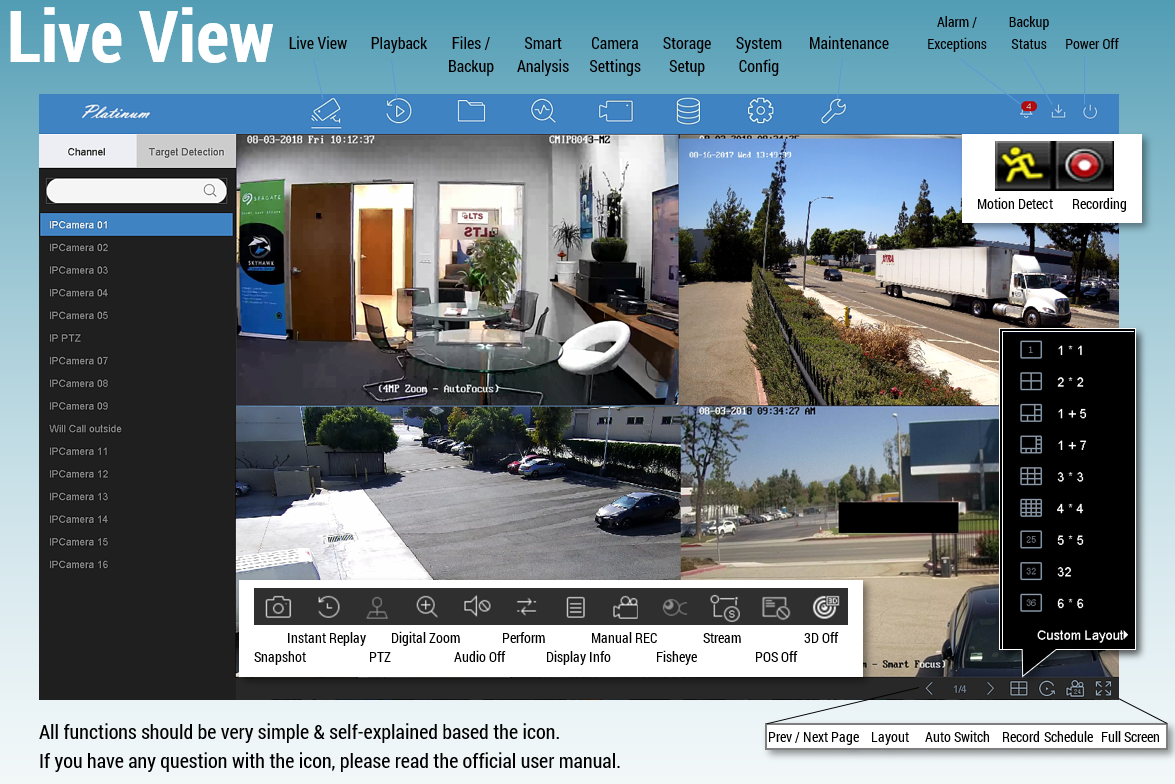
Live View shows what your cameras see now. Check the camera name before selecting a view, especially when several cameras cover similar areas.
- Move the mouse over a camera to reveal its available shortcuts.
- Double-click a picture to enlarge it. Double-click again to return to the divided view.
- Use the layout or window-division control to choose how many cameras appear together.
- If there are more cameras than visible windows, use the next/previous screen controls.
Find your way around the menus
Newer EUI-style interface
Look for Live View, Playback, Search, and Configuration. Right-clicking Live View can open a shortcut menu or a login prompt. Configuration contains settings; it is not needed just to watch a recording.
NVR 4.0 interface
The main navigation separates viewing and playback from Camera, Storage, and System settings. Start with Live View for current pictures or Playback for earlier footage. Layout settings may be under System → Live View.
Older interfaces
Right-click a camera and look for Menu or Playback. Older recorders often group more functions behind the main menu. A different menu appearance does not mean you have the wrong recorder.
Watch something that happened earlier
Open Playback or Search, then choose the camera, date, and time. Follow Viewing Recorded Video on Your LTS NVR/DVR for the full walkthrough.
Keep everyday viewing separate from setup. There is no need to change network, recording, or storage settings to review video. If a menu is unfamiliar, return to Live View and contact CJSC with the recorder model and a description of the screen.
Reference manuals
Menu terminology was checked against the LTS 87 Series manual, LTS NVR 4.0 manual, and older LTN86/LTN89 manual. Procedures are written here in CJSC’s own wording.