
These steps describe the older Platinum web interface. Your browser and recorder must already be configured for supported viewing.
Watch live cameras
Use Start All Live View to open the available camera pictures. Start with fewer cameras if the connection is slow.
Review recorded video
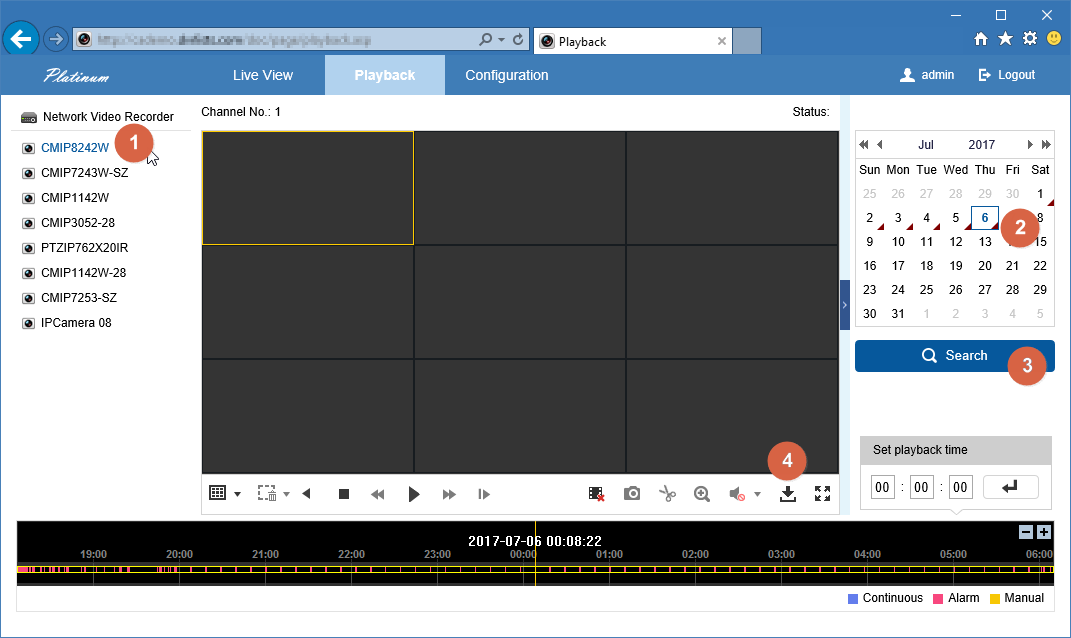
- Open Playback and select a camera.
- Choose the date and time you need, then start playback.
- Move through the recording with the timeline.
- For another angle, choose a multi-window layout, select a window, then choose its camera and time.
- Stop the current playback before replacing a window’s camera.
If a control is missing, identify the recorder model and browser for CJSC. Avoid installing unknown plug-ins from third-party download sites.
Sources and applicability
Written in CJSC’s own wording using official LTS guide. Follow the version noted above.